Environment Details:
Atlassian Cloud ecosystem — using Jira Software, Confluence, Product Discovery, and Atlassian Home (Teams / Goals / Projects).
Issue:
I’m trying to link a Jira Epic from a Jira Software Project to an Atlassian Home Project. Within Atlassian Home, each time I attempt to create a project using an epic, I get the following error:
“There was an error syncing your Atlassian project to Jira: ASPE-19 because of an unknown error, please try again.”
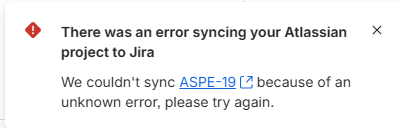
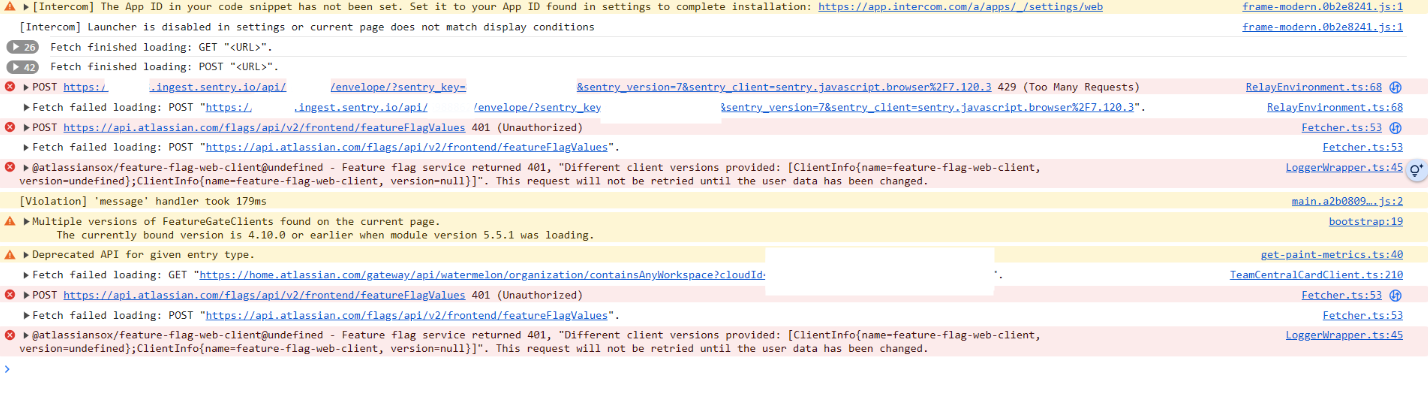
Considering that the UI error message provided no context for me to troubleshoot the issue, I performed the request and reviewed the console log within the Chrome Dev Console to see if I could identify the exact error. These errors appeared in the console each time I tried to perform the action - I assume they may be related, but am not certain:
Console / Network Logs (sanitized)
- POST …/flags/api/v2/frontend/featureFlagValues → 401 Unauthorized
- @atlassiansox/feature-flag-web-client@undefined – Feature flag service returned 401, "Different client versions provided: [ClientInfo{name=feature-flag-web-client, version=undefined}; ClientInfo{name=feature-flag-web-client, version=null}]". This request will not be retried until the user data has been changed.
- GET …/gateway/api/watermelon/organization/containsAnyWorkspace?cloudId=<redacted> → 401 Unauthorized
- Warning: "Multiple versions of FeatureGateClients found on the current page. The currently bound version is 4.10.0 or earlier when module version 5.5.1 was loading."
What I’ve Tried So Far (all unsuccessful):
Cleared browser cache and cookies, fully signed out and back in
Disabled all extensions, tried different browsers (Chrome, Firefox), incognito mode
Verified cross-site cookies for Atlassian domains (*.atlassian.com, *.api.atlassian.com) are allowed
Attempted the same on different devices and networks
Questions:
- Could this be caused by missing permissions or admin restrictions (e.g., a global "Atlas for Jira Cloud" permission)?
- Is this a known issue involving the feature-flag or “watermelon” gateway failing due to auth/session issues?
- Any pointers on additional diagnostic steps (like capturing x-trace-ID or headers) before escalating to official support?
- If this is a known bug, is there a workaround (e.g. reauthenticating, feature toggle, etc.)?
Goal:
Clarify whether this behavior is expected (e.g., due to account/session/auth issues) or a platform bug. I’d appreciate any guidance.
Thanks in advance for any insight!


