Jira tracks changes and offers both a built-in Audit Log and a History tab. The Audit Log records system-level changes, while the History tab in the Activity section of each Jira work item shows field-level changes. For detailed filtering, bulk-update tracking, export options, or compliance reporting, it's best to look at third-party apps such as Advanced Audit Log for Jira or Issue History for Jira to fill in the gaps left by the built-in tools.
When working in teams, it is useful to be aware of what and when something has been changed. Auditing in Jira allows you to make everything transparent and under control, whether you are troubleshooting the problems, ensuring accountability, or preparing for an audit.
Jira has some built-in tracking functionality. And unless you like playing the role of a full-time Jira detective (pipe and magnifying glass not included 🕵️), you will probably need some better tools to do the job.

In this article, we'll explore native auditing in Jira and the apps that can help you audit everything without the mystery.
Who Needs Jira Auditing
Let’s explore what Jira users need auditing the most:
Monitor configuration modifications, assignment of permissions, and editing of workflow. Vital in handling big or increasing Jira environments.
- Project Managers and Team Leads
Track the progress, make sure that transitions are made correctly, and be the first to reveal some unintentional shifts in tasks or assignments.
- Compliance and Security Officers
Keep audit trails to comply with internal policies or external standards (ISO, SOC2, GDPR, etc.).
When working on bug reports or quick fixes, check the entire history of the work item activity.
View a clear log of user and system activity during periodic reviews.
Native Jira Auditing and Tracking Features
Audit Log
One of the key built-in tools used for auditing in Jira is the Audit Log.
To access it, choose the next: Settings → System → Audit Log.
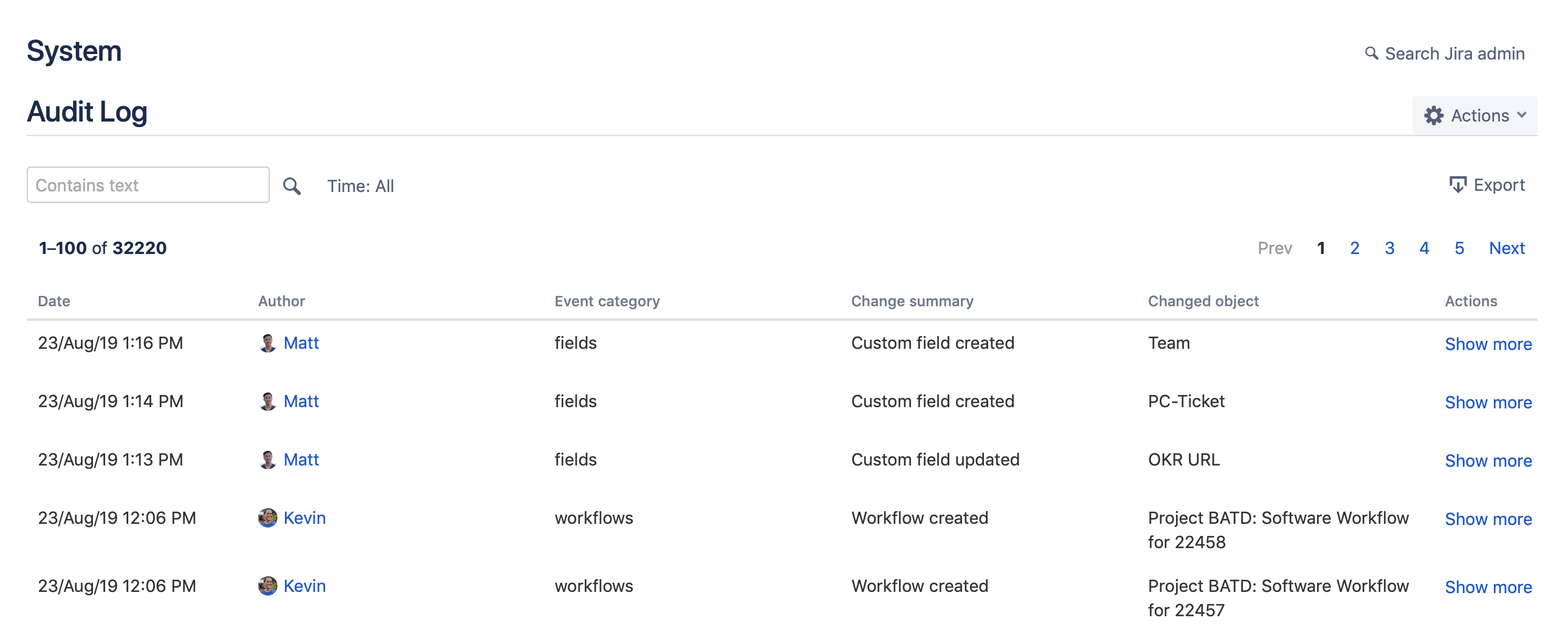
Image source: Atlassian Support
It monitors changes at the admin level within your Jira instance, so it is a required feature to use in case you manage users, workflows, or project settings.
🔍 What it records:
- Updates to permissions
- Changes in workflow
- User or group management operations
- Changes in global settings
- Installation and uninstallation of apps
✅ Why it’s useful:
Audit Log ensures that the Jira Admins are aware of any critical changes made to the system and are able to detect any unanticipated modifications that may result in changes in the system's behavior, performance, or security. It is also useful in incident resolution and compliance tracking, which provides a list of actions in chronological order at the system level.
⚠️ Limitations:
- There is no insight into field changes at the work item-level (e.g., status, assignee).
- No project or user filtering.
- Export is limited.
History Tab
Each Jira work item has a History Tab that records the changes made to that work item over time. It is one of the most easily available native auditing functions, yet one of the most limited.
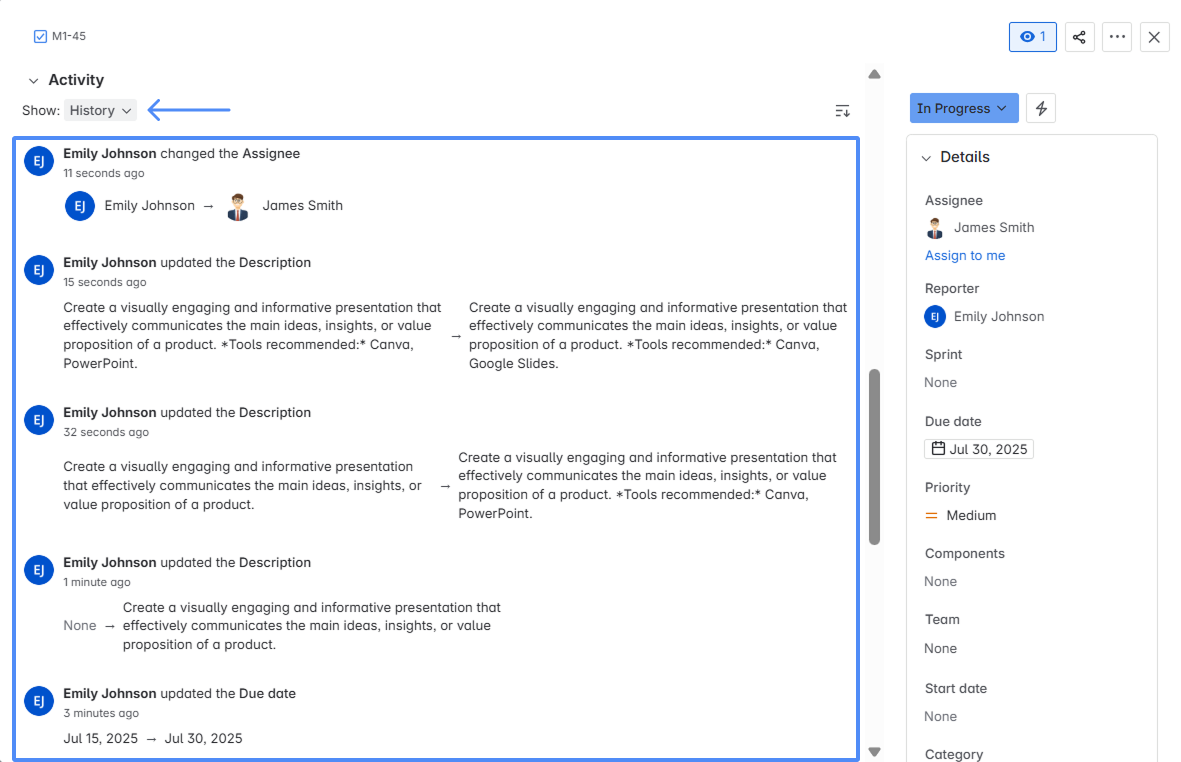
🔍 What it shows:
- Field updates (e.g., status, priority, summary, assignee).
- Who did the change and when.
- Workflow transitions.
✅ Why it’s useful:
It is useful whenever you need to look back at the history of a particular work item, such as during a retrospective or when investigating an incident.
⚠️ Limitations:
- We can only track one work item at a time; no cross-project or bulk tracking.
- No user, date, or field filtering.
- When it comes to export, there are no available options.
Third-Party Apps for Auditing in Jira
Advanced Audit Log for Jira App
Advanced Audit Log for Jira app is explicitly designed for Jira admins and security teams who need to track every structural or system update in the instance easily.
🔍 What it records:
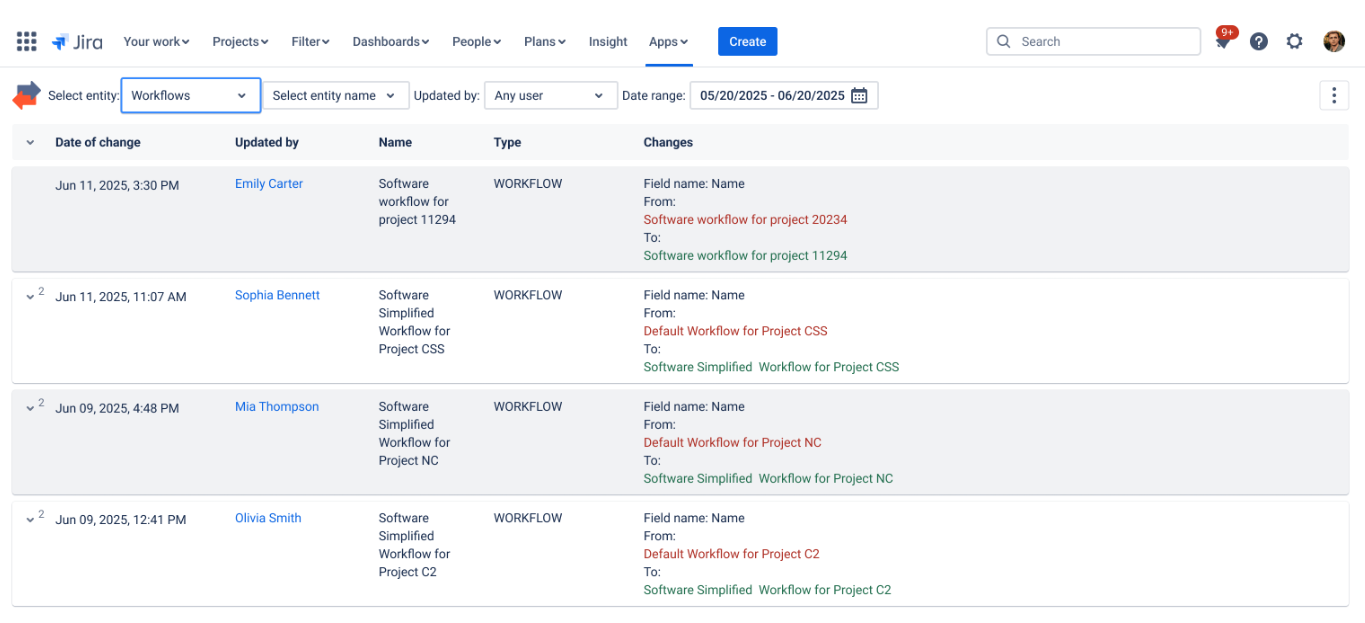
- Screen configuration changes.
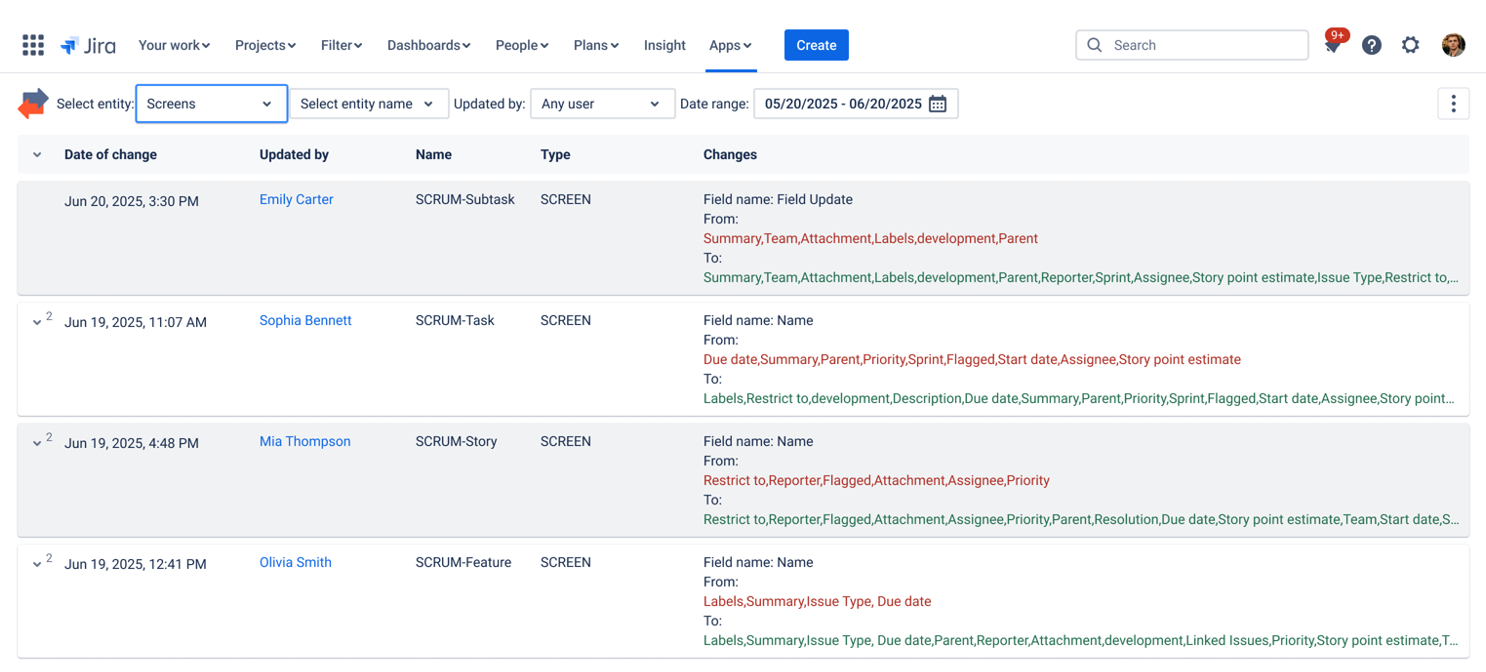
- Custom field modifications.
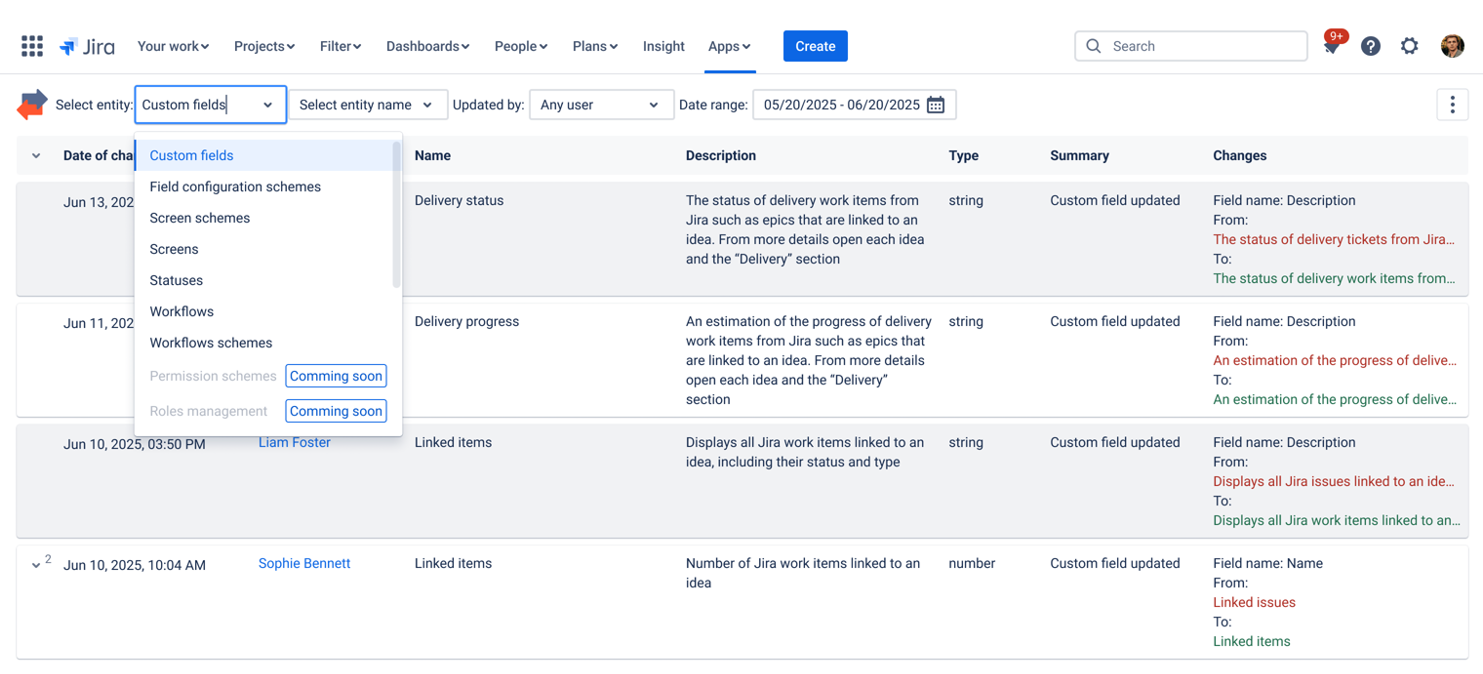
Each log entry includes:
- Who made the change.
- What was changed (before/after).
- When it happened.
✅ Why it’s useful:
- Assists in identifying the misconfigurations in advance.
- Helps to support compliance and audit processes (ISO, SOC2, internal policies).
- Makes complex admin processes easier to handle.
👤 Best for:
- Jira admins who have multiple projects or workflows to manage.
- Compliance and security officers who require quality audit logs.
- Large teams where admin activity needs to be tracked clearly.
Issue History for Jira (Work Item History) App
Issue History for Jira app is an app that expands Jira capabilities with a centralized and searchable history of all work item-level changes to your entire workspace.
🔍 What you can track:
- All the field changes of various work items (e.g., status changes, assignee changes, priority changes).
- By whom, and when, was the change made.
- Bulk updates.
- Deleted work items.
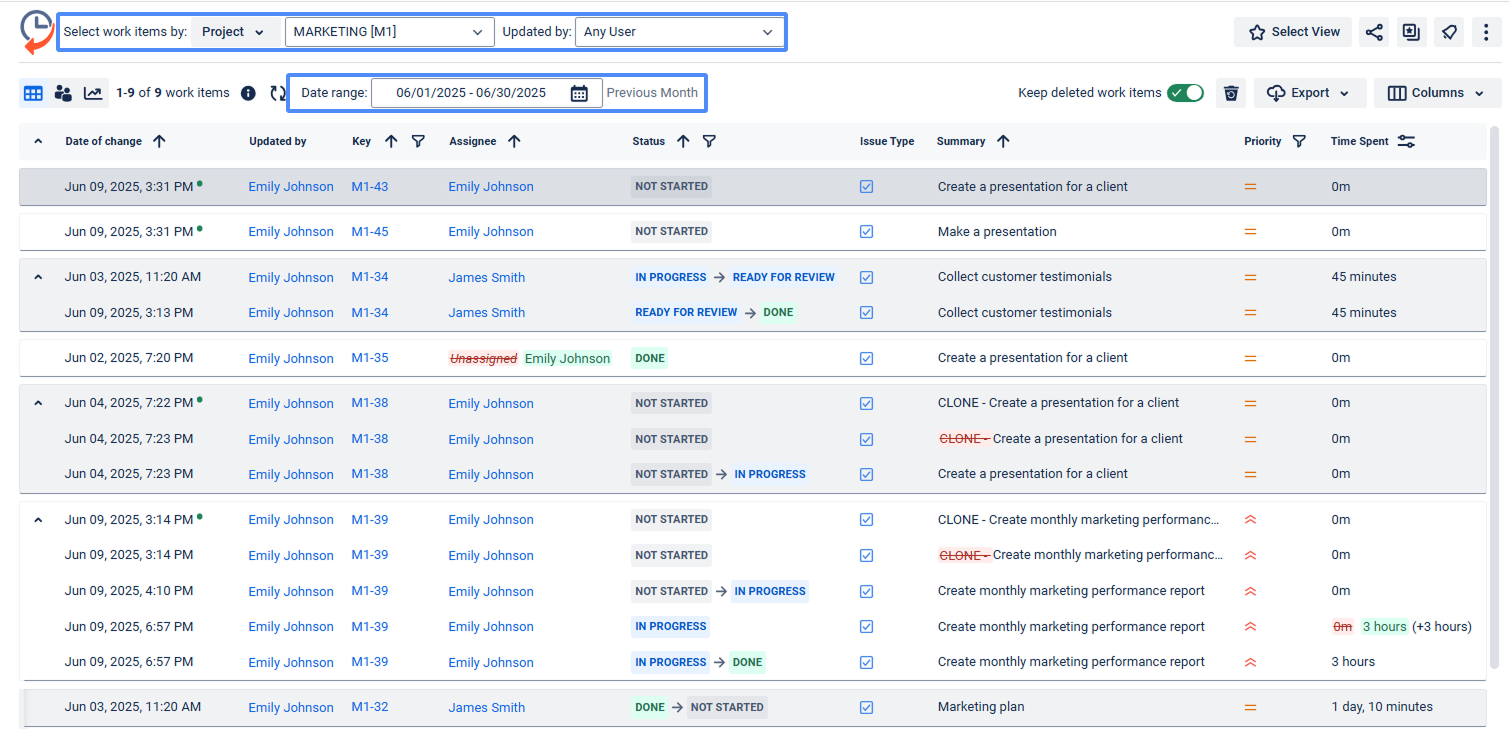
To view specific reports of changes, you can use the app's filter for project, user, field, date, and more. You can also export the data in Excel or CSV formats.
✅ Why it’s useful:
Rather than flipping through hundreds of work items, you will have one screen with complete visibility of what changed and who made the change.
👤 Best for:
- Team leads and project managers who need to monitor sprint changes and accountability.
- Support and QA teams to trace how work items have been handled over time.
- Jira admins to get insights into bulk edits.
- Project auditors need to access a user-friendly history of changes without having to delve into each work item.
👉 Try Issue History for Jira app now
✅ Quick Checklist: How to Audit in Jira Effectively
| Step |
What to Check |
Tool or Feature |
| 1. Review system changes |
See configuration, workflow, and permission updates |
Audit Log (Jira System Settings) |
| 2. Track work item edits |
View who changed fields like status, assignee, or priority |
Jira History Tab or Issue History for Jira app |
| 3. Filter by user or date |
Focus only on relevant activities |
Issue History for Jira app |
| 4. Export data |
Save or share reports for compliance |
CSV/Excel export in Issue History for Jira app |
| 5. Monitor admin activity |
Detect misconfigurations early |
Advanced Audit Log for Jira app |
Auditing in Jira: Top 5 Frequently Asked Questions
Q1: What exactly does the process of auditing in Jira mean?
Auditing in Jira means tracking which user made changes, what those changes were, and when they occurred. This includes permissions, workflows, custom fields, and individual work items. It helps admins find unauthorized changes, fix problems, and meet compliance requirements like ISO or SOC 2.
Q2: What changes are possible to track using the native Audit Log in Jira?
The native Audit Log in Jira lets you monitor permission updates, workflow changes, user or group actions, changes to global settings, and app installations or removals. You can find it under Settings> System> Audit Log. It works at the system level, not for individual work items.
Q3: What's the difference between the Audit Log and the History tab?
The Audit Log tracks administrative changes across the system, including permissions, workflows, and settings. The History tab is on each work item and shows field-level changes over time, such as updates to status, assignee, or priority. Use the Audit Log for a broad view of the system, and the History tab to check a specific ticket.
Q4: Is it possible to export complete Jira history reports to Excel or CSV for external and internal audits? Unfortunately, built-in features in Jira have quite limited export options. Third-party apps available on the Atlassian Marketplace, like Issue History for Jira by SaaSJet, allow you to export filtered reports, such as by project, user, or date, directly to Excel or CSV. This feature is helpful for compliance reporting or sharing audit results with stakeholders.
Q5: Does Jira track deleted work items or bulk updates?
Native auditing tools in Jira have gaps when it comes to tracking deleted work items and bulk updates. Apps like Issue History for Jira aim to capture bulk updates and deleted work items throughout the workspace. The standard History tab and Audit Log do not fully address this issue.
Summing Up
Auditing in Jira is what keeps things visible, accountable, and under control, whether it's about tasks or system settings. Although Jira provides such basic tools as History Tab and Audit Log, they are not always sufficient to go deeper.
You can enable complete transparency of both work item-level change and configuration-level change by adding tools, such as Issue History for Jira and Advanced Audit Log for Jira, which provide confidence, visibility, and a full audit trail to your team.


