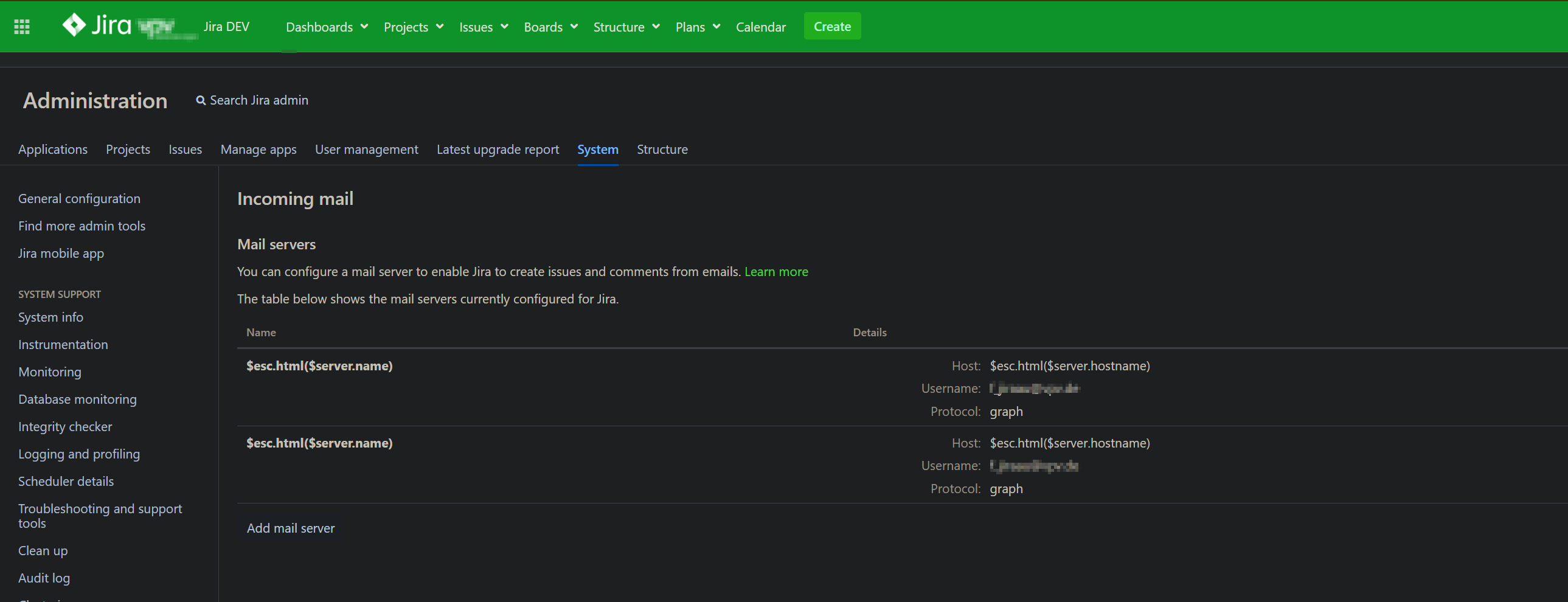
Since upgrading to Jira Data Center version 10, the mail server names and hostnames are no longer displayed under:
Administration → System → Incoming Mail
Instead of the actual values, the UI renders the following placeholders:
$esc.html($server.name)
$esc.html($server.hostname)
This issue did not occur before the upgrade and appears to be related to how the UI processes and renders the mail server configuration.
Important note: We have not made any changes to the Velocity templates or any other frontend-related files.
Steps Taken So Far
To troubleshoot the issue, we performed the following actions:
Cleared plugin and temp caches:
<jira-home>/plugins/.bundled-plugins<jira-home>/plugins/.osgi-plugins<jira-install>/tmp
Activated Safe Mode to rule out plugin conflicts.
Performed a full re-index of the instance.
After these steps, the issue was temporarily resolved for approximately one day.
Current Behavior
The problem reappeared today during configuration changes to the mail server. The placeholders are now shown again instead of the actual mail server names and hostnames.
Impact
This issue prevents us from properly verifying and managing mail server configurations via the UI. Since we rely on email for issue creation and commenting, this is a critical functionality for our operations.
Request for Support
We would appreciate your assistance with the following:
- Are there any workarounds or patches available?
- Could this be related to Velocity template rendering, plugin conflicts, or permission issues?
Additional info:
- Jira Data Center version: 10.7.1
- Issue persists across different sessions
Please advise on how to resolve this issue or if a patch is available
A screenshot is attached for reference.