Hey admins! We’ve been looking forward to giving you an update on user management in the cloud. This update is most relevant for customers on the original user management experience, but everyone will benefit from improvements we’ve been making behind the scenes. 🎉
We’re bringing the benefits of centralized user management to all customers, without the need to consolidate multiple directories into one. Read on for more details.
Recap
In 2021, we announced a new, centralized user management model for customers in Atlassian cloud. This gives new customers one directory for their entire organization, no matter how many sites they create. Last year, we moved existing customers with only one site to this model.
While the centralized model is appropriate for many customers, it’s not suitable for others. In November, we decided not to migrate our remaining customers. We know for these customers, a multiple-directory setup is necessary and intentional.
What's next?
From July 2026, customers on the original user management model will see users across all their directories (sites) in one place. These users still exist in separate directories, but admins will save time otherwise spent switching between sites to manage their respective users and groups.
Admins will also manage any user who is in more than one directory in one profile. Instead of updating profiles for the same user in multiple sites, you’ll be able to manage a user’s details and app access in different sites from a single profile.
Before we can make these changes, we’re improving the centralized experience. We’re making it easier to find users and manage their access, especially in organizations with thousands of users. In fact, we’ve already released some of these changes! Check them out below.
New APIs
In March, we released new APIs for user management. These APIs support user management operations at scale and can be used by all customers. Try them out! See API documentation
In the coming months, we’ll release more APIs for write operations.
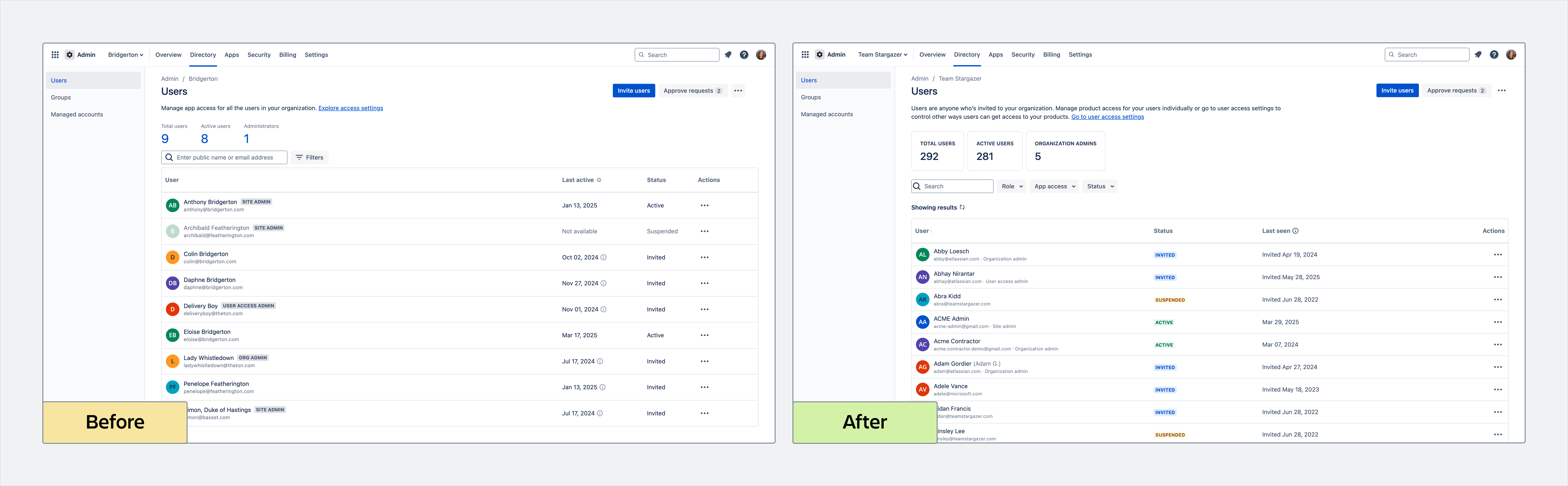
Updated users list
The new users list separates Role, App access, and Status into separate filters, each with a search field to help you quickly find your criteria. You can also choose to show up to 100 results on a page, reducing the number of pages you need to navigate. With this update, you can also sort users by their public names.
Updated user profiles
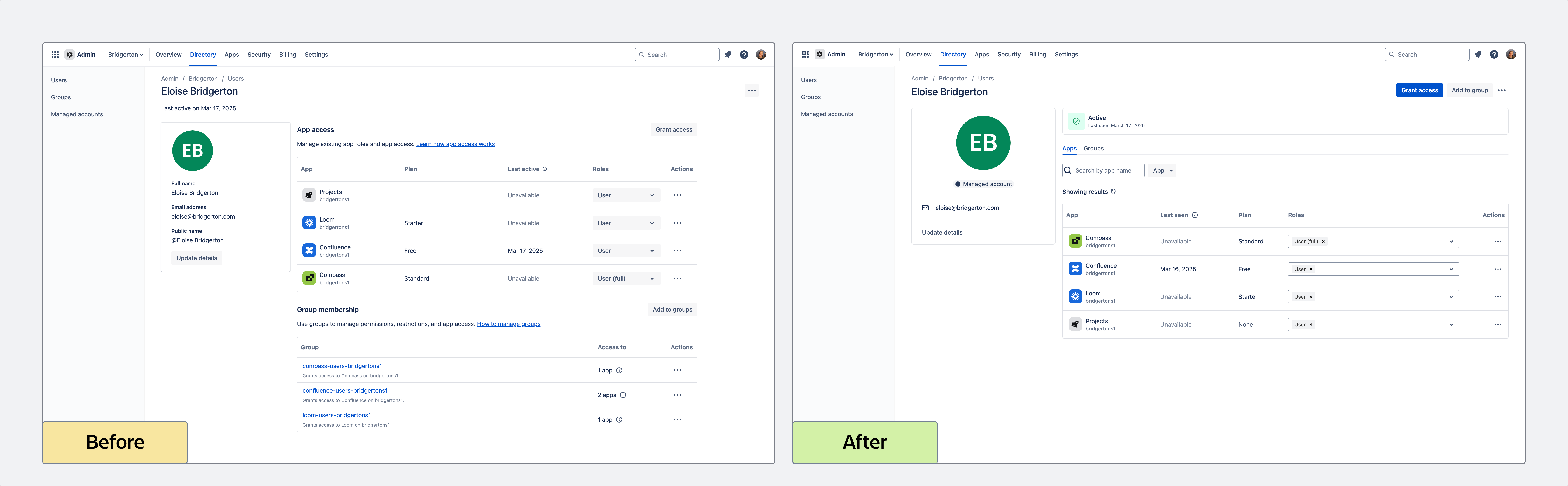
We’re starting to roll out an update to user profiles. This update moves the Apps and Groups tables into separate tabs, where you can choose how many apps or groups to show in each table. We also added search and filters to these tables, so you can look for specific apps or groups. You’ll also notice an active user’s status is now more prominent. The new profile also indicates to organization admins whether a user is a managed account or an external user.
Updated groups list
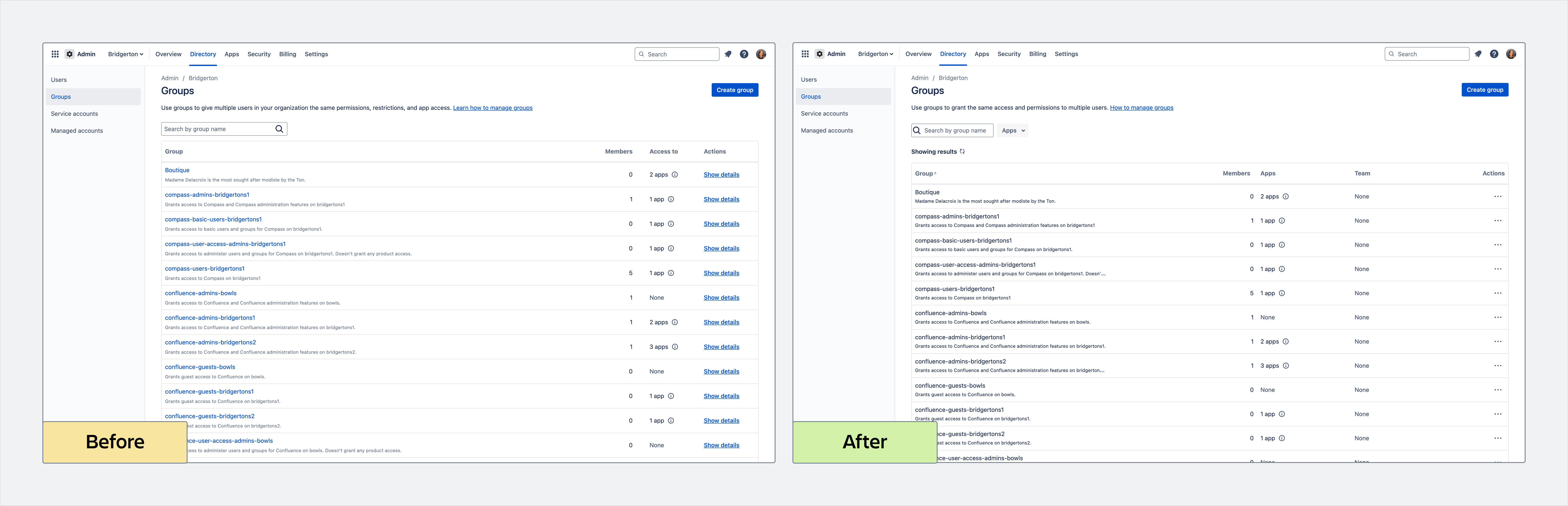
We’re starting to roll out an update to the groups list. Use the new Apps filter to find groups that grant roles to a specific app. New action menus let you add users or grant access to a group without navigating to the group profile.
You can also choose how many groups to show on a page, up to 100 at once, reducing the number of pages you need to navigate. You can also sort groups by their name with this update.
Updated group profiles
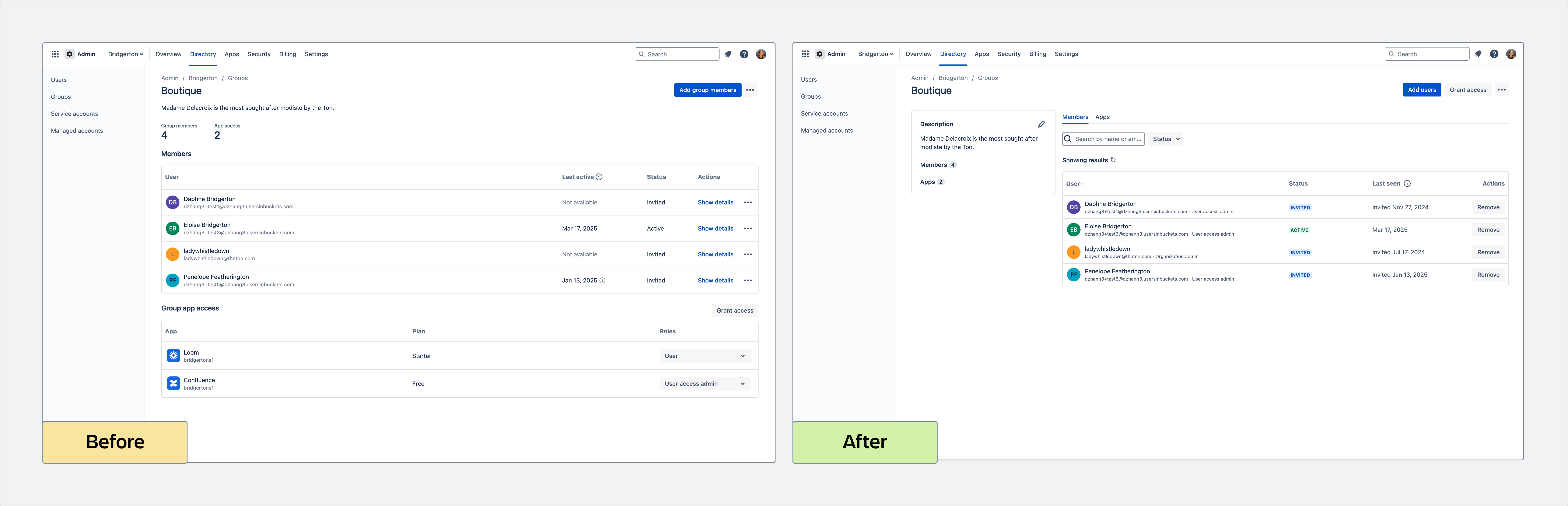
We’re starting to roll out an update to group profiles. You’ll find the group description and summary of members and apps in a card, similar to a user profile. Like the new user profiles, you’ll find the Members and Apps tables moved into tabs, where you can choose how many members or apps to show in each table. We also added search and filters to these tables, so it’s easier to find specific members or apps.
Improvements to original user management pages
Relevant to the original experience only.
We’re starting to roll out improvements to users and groups pages in the original user management experience. You’ll notice a new look and feel generally, including a new profile layout, on top of other usability and performance improvements. It’s also easier to navigate pages with many results and use filters to find specific users or groups.
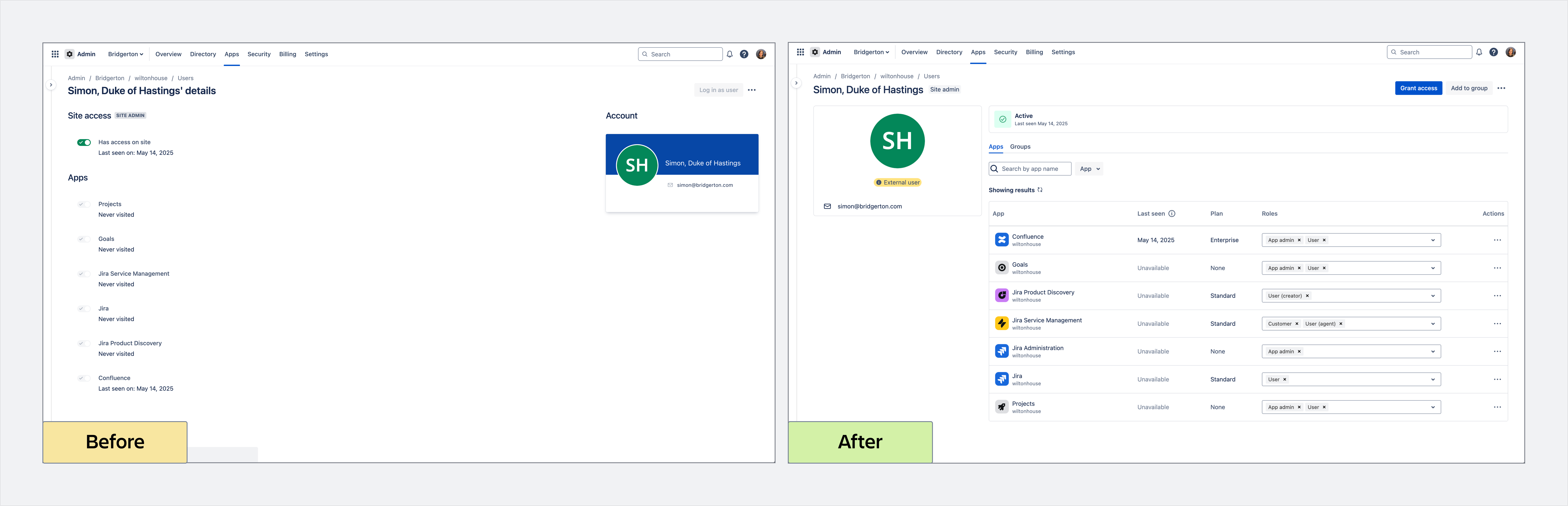
Roles: You can now assign some app roles that weren’t previously supported in the original experience. These roles are Jira Service Management stakeholder and customer and Compass basic user.
Statuses: Active, Suspended, and Deactivated replace Has site access, No site access, and Account disabled statuses, respectively. You can filter your users list by these statuses, which come with colored indicators for quick recognition. Status is also now more prominent in a user’s profile.
Users: All actions in your users list are now in the more actions menu, including a new shortcut to remove a user from the site. To see or change a user’s roles, go to their profile, which now shows you specific app roles they hold.
Groups: Your groups list now shows you how many members are in a group and how many apps a group has a role for. You can also filter for groups that have a role for a specific app. In a group profile, you can search for a member and also see when they were last seen in the current site.
New APIs available for all customers
We’re excited to share 10 new APIs that are available to all customers. These APIs will replace the current APIs that are available to customers with the centralized user management experience in June 2026.
The new APIs are:
- Get directories
-
Create group
-
Delete group
-
Grant access to group
-
Remove access from group
-
Add user to group
-
Remove user from group
-
Suspend user access in directory
-
Restore user access in directory
-
Remove user from directory
More in this separate announcement.
New organizational view for original user management customers
Relevant to the original experience only.
We’re starting to roll out the final piece of improvements to the original user management experience. This update lets organization admins find users and groups across all sites in an organizational view. More details in this announcement
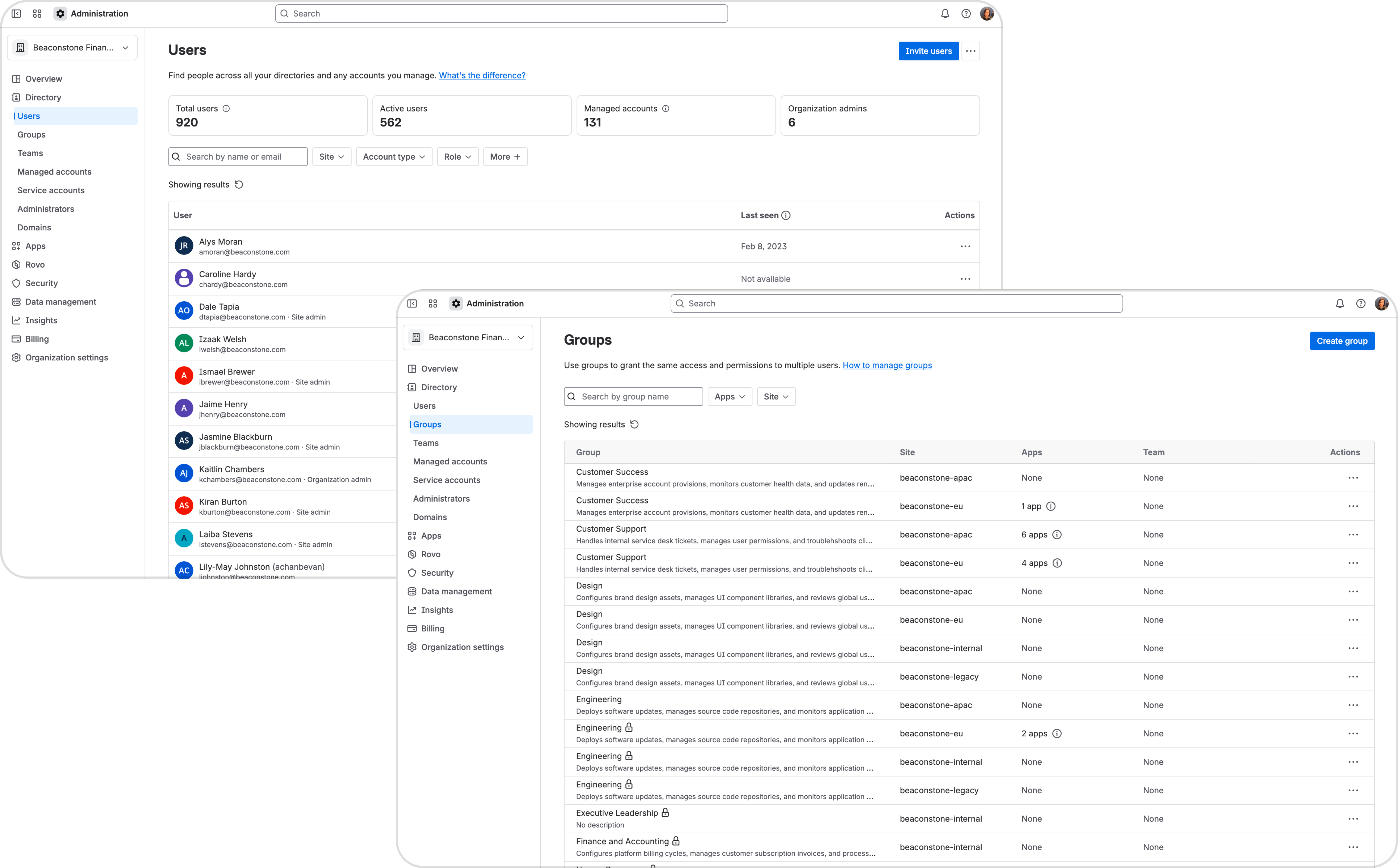
We’re not migrating customers from the original experience to the centralized experience with these changes. Your users and groups in different sites still exist in separate directories. Use the “Site” filter in the new pages when you need to find users or groups in a specific directory. Site admins will only see users and groups in the sites they manage.
As always, we’re interested in your feedback! If you have questions, leave a comment below.
Thank you,
Daphne


