Hi,
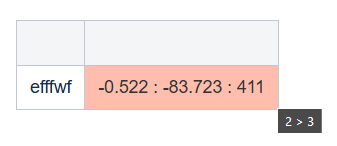
I want a cell in the table to be highlighted light red and when I hover over it I want see the title (2 > 3). Hence I have added the title attribute (title="2 > 3")
Below is my Confluence Source Editor code:
<p class="auto-cursor-target">
<br/>
</p>
<table class="wrapped">
<colgroup> <col/> <col/> <col/> </colgroup>
<tbody>
<tr>
<th>
<br/>
</th>
<th>
<br/>
</th>
</tr>
<tr>
<td>efffwf</td>
<td class="highlight" style="background-color: rgb(255,189,173);" title="2 > 3">-0.522 : -83.723 : 411</td>
</tr>
</tbody>
</table>
<p class="auto-cursor-target">
<br/>
</p>
Once I click Apply in the Source Editor, I in the Edit/Preview mode of the page where I can see the expected title (Refer the below image)
Once I click Update, the confluence page gets saved and reloads. But the title is not visible when I hover over the cell. I found that the title attribute is getting stripped when I checked the html code in the Storage Format or Source Editor.

