Keeping a daily work log isn’t just about tracking hours in Jira—it’s essential for productivity, accountability, and smart decision-making. A well-maintained log helps you stay organized, track progress, and understand where your time actually goes. Let’s explore best practices for logging time daily in Jira and how ActivityTimeline simplifies the process.
Why Daily Work Logging Matters
A detailed Jira work log serves as a record of completed tasks, helping teams evaluate performance, optimize resources, and make informed decisions. Businesses relying on billable hours need precise logging for accurate invoicing and payroll. Consistently tracking hours also ensures better productivity monitoring and project management.
Common Challenges in Work Logging
Many users forget to log their work daily, leading to vague recollections and inaccurate time entries. Manual logging is prone to errors, making it difficult to maintain a reliable record. Even when work is logged properly, extracting useful insights from raw data can be overwhelming. Without structured tracking, prioritizing tasks and ensuring consistency in reporting becomes challenging.
10 Best Daily Work Log Tips for Productivity
- Use a Work Log Template: Maintain consistency in tracking tasks.
- Log Activities in Real Time: Avoid missing key details.
- Prioritize Tasks: Plan work based on urgency.
- Leverage Automated Tracking: Reduce errors and improve efficiency.
- Track Billable vs. Non-Billable Hours: Ensure accurate invoicing.
- Review Work Logs Daily: Identify inefficiencies and adjust workflows.
- Customize Your Work Log: Tailor templates for better usability.
- Set Worklog Approvals: Ensure consistency and timely submissions.
- Integrate With Other Tools: Connect Jira with other time tracking solutions.
- Analyze Trends & Optimize Workflows: Use reports to improve team efficiency.
How ActivityTimeline Simplifies Daily Work Logging in Jira
ActivityTimeline makes daily work logging seamless with features designed to improve tracking, efficiency, and insights. It provides a clear view of work-related activities, ensuring time entries align with projects and deadlines.
Logging Hours Directly from the Timeline
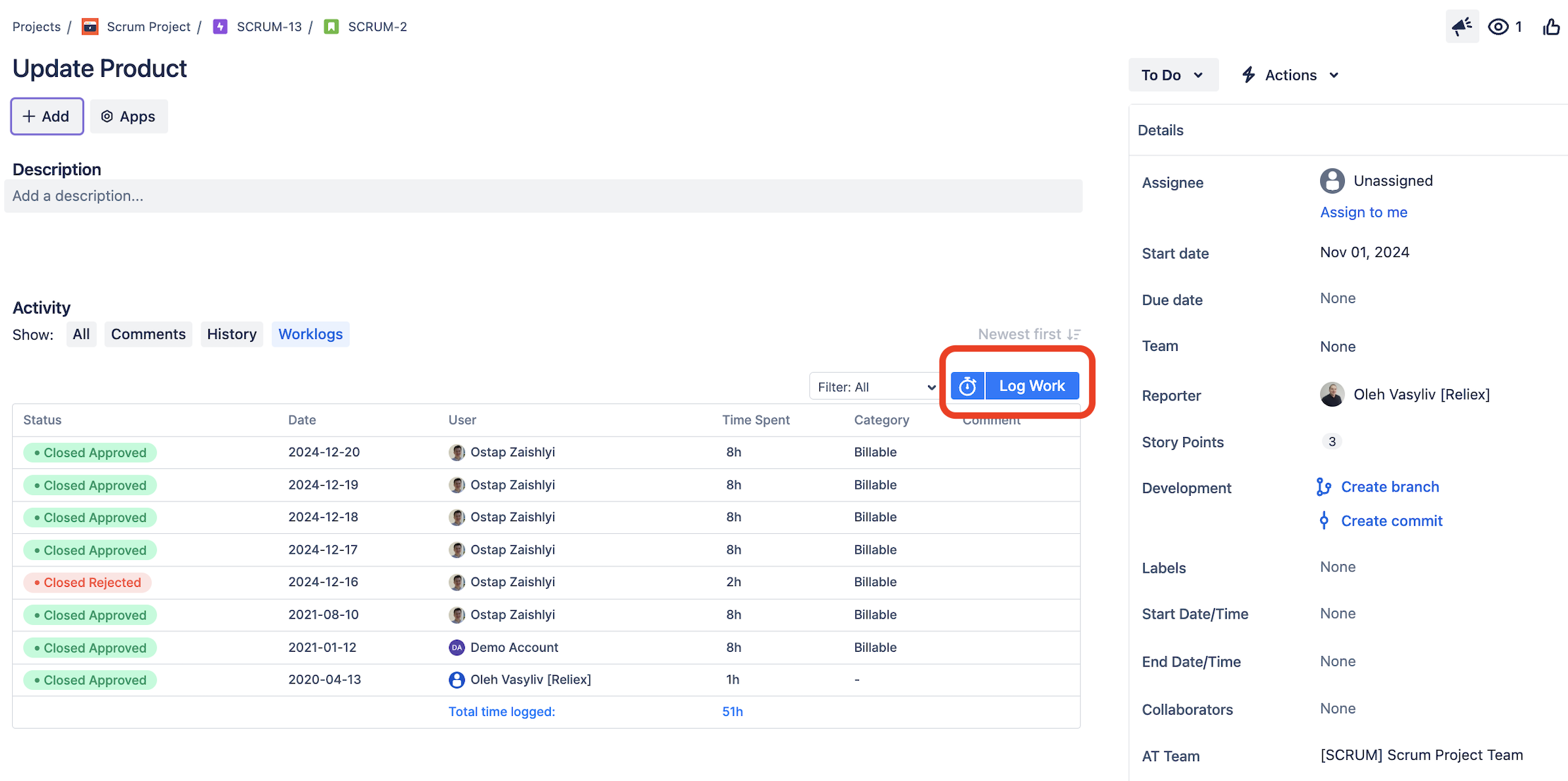
With an intuitive interface, logging hours is effortless. Users can simply click on a task to log time, and ActivityTimeline suggests entries based on previous work patterns. The personal workspace feature enables users to start a time tracker when beginning a task and stop it upon completion, ensuring accurate time tracking. Adjustments, notes, and comments can be added directly to work logs for better documentation.
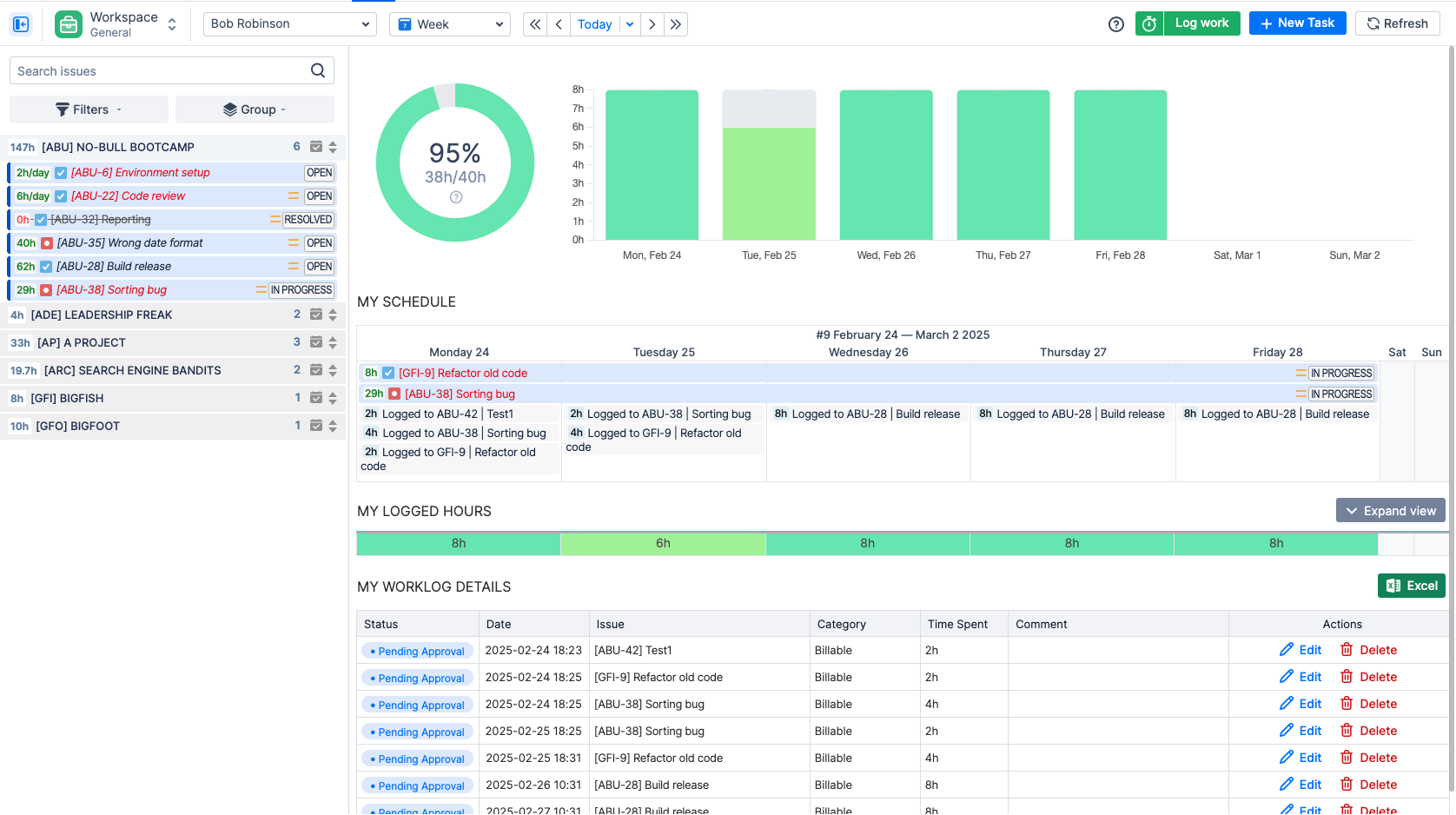
Personal Workspaces and Logged Hours Overview
For managers, ActivityTimeline offers timesheet reports, providing insights into team workloads and performance. These reports help identify patterns, track challenges, and ensure all activities align with project goals. Approval and adjustment capabilities allow managers to maintain accurate records for overtime and project billing.
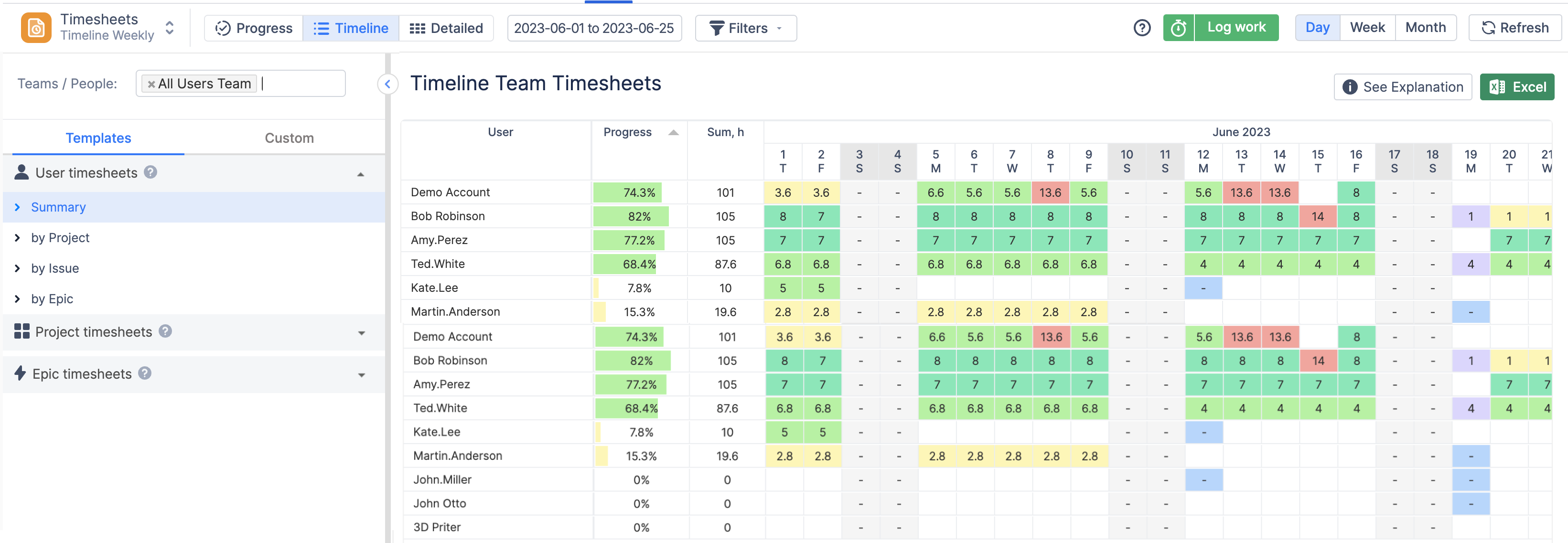
Team Timesheets for Improved Transparency
Teams managing multiple projects benefit from structured work log templates that simplify tracking. Timesheets can be exported to Word or Excel for further analysis and documentation. By using ActivityTimeline, businesses keep a detailed task record, enhance self-reflection, and foster better team collaboration.
Using Timesheets and Reports for Better Insights
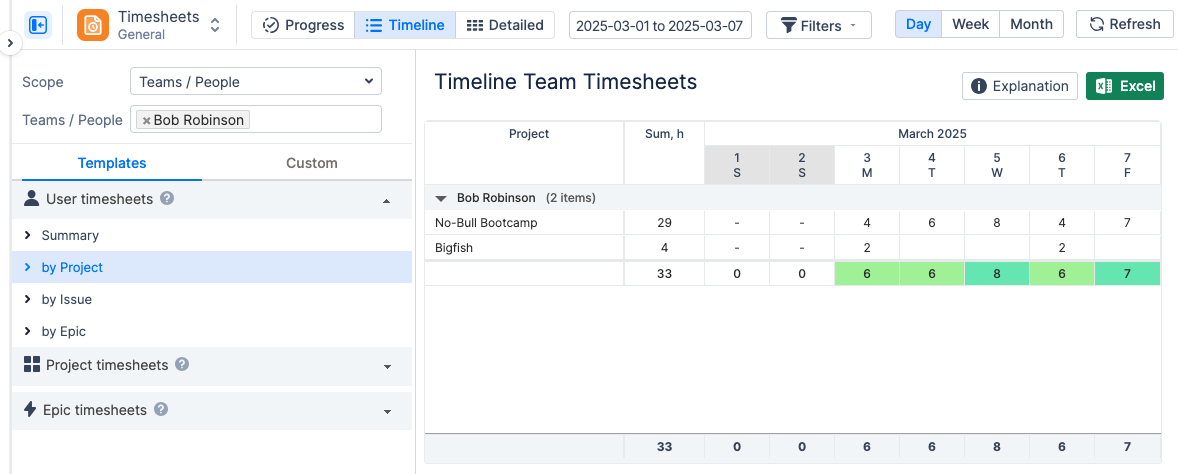
ActivityTimeline’s timesheet view offers structured work hour overviews, helping teams track productivity and manage workloads effectively. The Track module enhances time tracking, resource allocation, and compliance by automating manual admin work.
Approval and Review of Worklogs
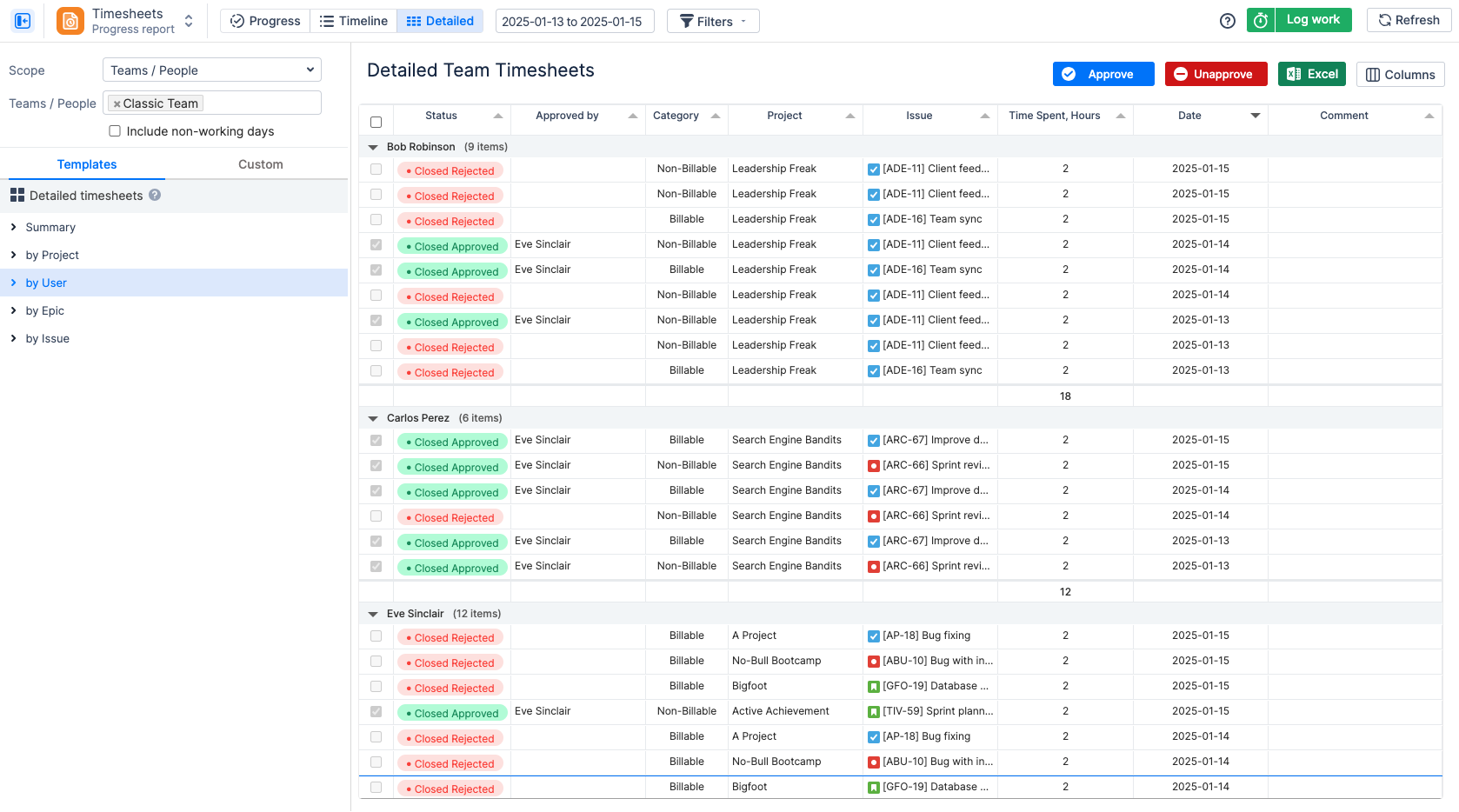
Managers, admins, and team leads can approve timesheets, tracking hours worked across projects. Employees log daily activities, including unexpected tasks, status updates, and notes, creating a comprehensive task record. The system allows filtering by project, epic, or Jira issue for detailed productivity insights.
Advanced Reports for Smarter Work Management
- Planned vs. Actual Reports: Compare scheduled tasks with real-time execution to identify discrepancies and bottlenecks.
- Project Progress Reports: Track overall progress and assess how actual work aligns with planned efforts.
- Team Utilization Forecasts: Evaluate workload distribution to prevent resource overload.
- Leave & Event Reports: Monitor non-working days, vacations, and scheduled events to prevent scheduling conflicts.
ActivityTimeline’s data visualization tools, such as charts and analytics, help teams track trends and adjust project plans for better efficiency.
Automating Worklog Approvals and Compliance
ActivityTimeline streamlines the approval process, ensuring work logs are accurate and compliant. Once approved, timesheets are locked to maintain data integrity for payroll, billing, and audits. Managers can approve logs in bulk, track pending approvals, and modify entries when necessary.
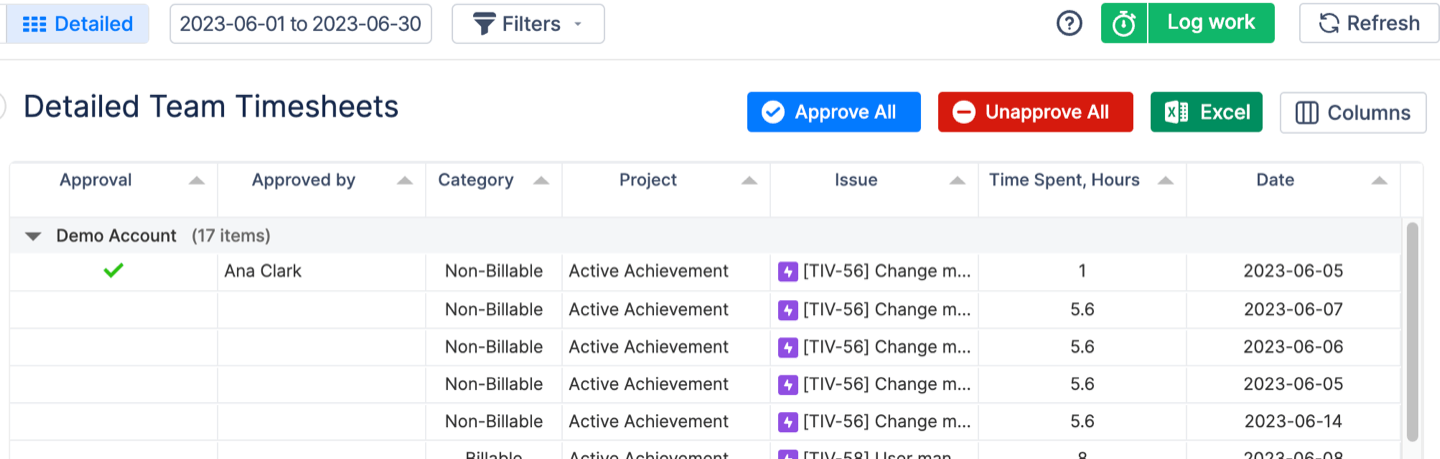
To enhance efficiency, approved worklogs can be saved as dashboards, allowing teams to generate Excel reports for long-term tracking and workflow optimization.
Conclusion
A structured daily work log can revolutionize time tracking, project management, and team productivity. ActivityTimeline simplifies logging with intuitive tools for tracking, reporting, and automation. If you’re looking to improve work logging and streamline your workflow, try ActivityTimeline today.
