Hello Jira Admins !
Managing users in Jira can be time-consuming especially when you need to see detailed user data like the exact last login time, filter large user lists, or perform bulk operations quickly. While Jira’s native UI offers some functionality, My User Manager is purpose-built to give you a more powerful and streamlined experience.
Quick Comparison: My User Manager vs. Jira UI
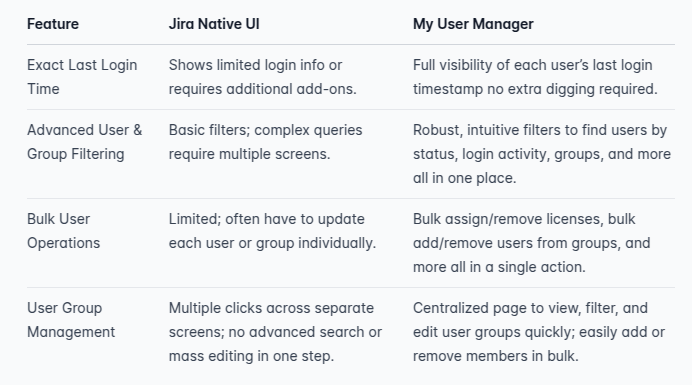
Highlights of My User Manager
-
Last Exact Login Timestamp
-
Advanced Filters & Bulk Operations
-
Filter by group, role, login activity, and more to find the exact set of users you need.
-
Perform bulk updates like deactivating users or removing licenses directly from a single dashboard.
-
Intuitive User Group Management
-
Automated Cleanup & Cost Savings
Why It Matters
-
Time Savings: Skip the manual clicks and let My User Manager handle complex operations in a fraction of the time.
-
Better Insights: Detailed analytics and last login data help you make data-driven decisions about user management.
-
Cost Optimization: With clearer user activity data, you can eliminate unused or unnecessary licenses.
Compared to the native Jira UI, where these tasks are often scattered across different pages or require add-ons, My User Manager centralizes the entire user management workflow making it faster, simpler, and more efficient.
Ready to Enhance Your User Management?
Take advantage of our extended trial to experience first hand how My User Manager can revolutionize your Jira administration. Feel free to reach out for a personalized demo or to ask any questions in the comments!
