Displaying SLA metrics and related issues directly on the Jira Service Management portal not only keeps customers informed but also helps your team maintain accountability and alignment.
In this article, we’ll explore actionable best practices for enhancing your customer portal with SLA visibility and related issue tracking.
3 reasons why display SLAs on the customer portal
Best practices for displaying SLAs and related issues
1. Choose the right metrics to display
Focus on metrics that matter most to customers, such as:
-
Time to Resolution: How long until their request is resolved.
-
Time to First Response: When they can expect an initial update.
-
Time Waiting for User Feedback: Helps users understand actions like reminders or ticket closures.
Avoid overwhelming customers with too much data—less is more.
2. Integrate related issues
Showing related issues—such as blockers, duplicates, or dependent tickets—helps customers see the bigger picture. Ensure related issues are:
3. Leverage Marketplace Apps
Out-of-the-box Jira may not support detailed SLA or related issue visibility. Apps like Elements Overview can bridge this gap by displaying SLA metrics and linked related issues in a customizable and user-friendly way on the portal.
Here's a screenshot showing you how it can look like in an used for an onboarding process:
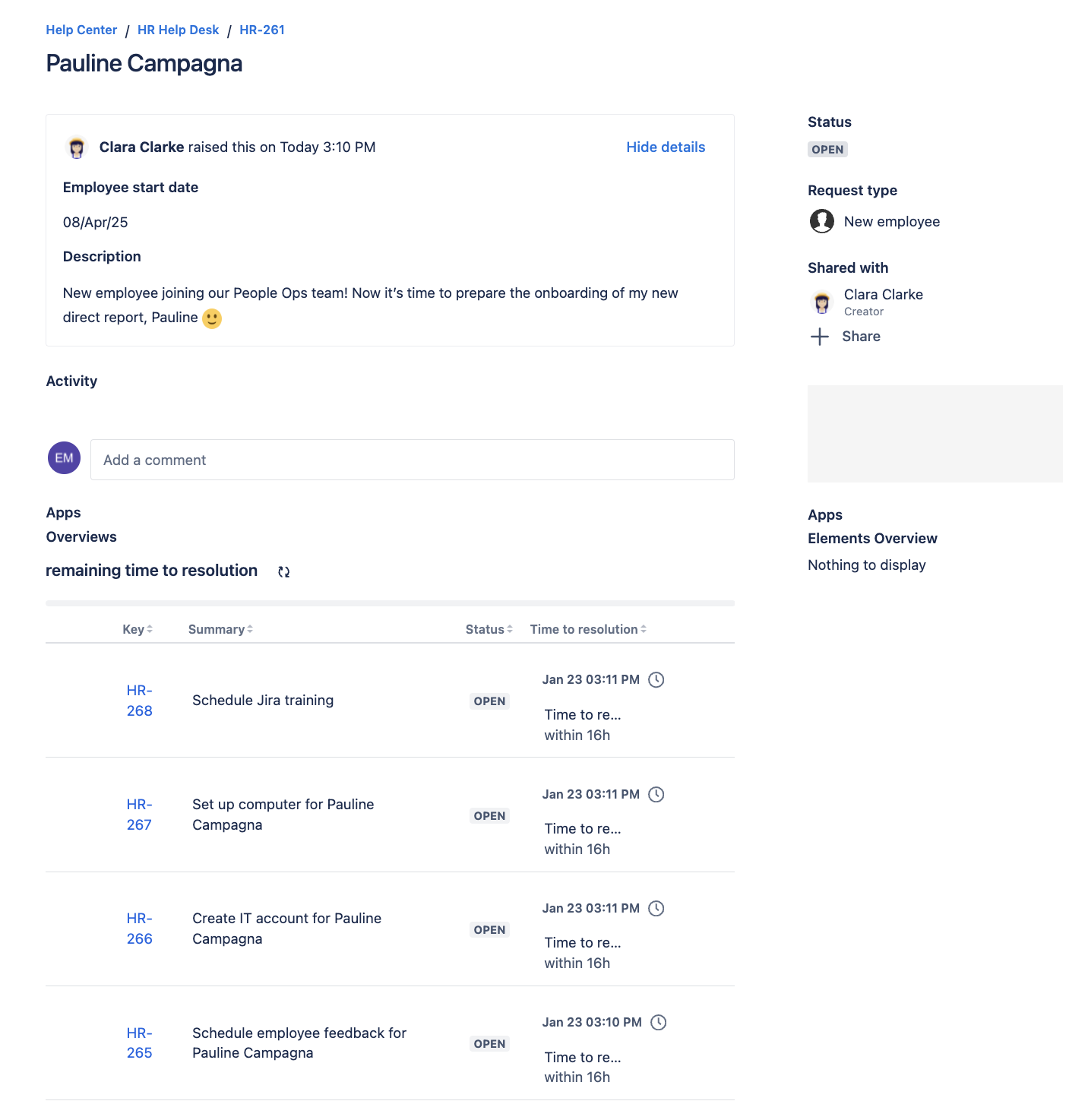
Display time to resolution of sub-tasks for the current onboarding service request
4. Make it mobile-friendly
Many customers access the portal on mobile devices. Ensure the layout, metrics, and related issue details are optimized for smaller screens.
5. Gather feedback and iterate
After implementing SLA and related issue visibility, ask customers for feedback:
Use this input to refine the display and address any gaps.
Align support teams and customers on expectations with SLAs on the portal
Displaying SLA metrics and related issues on the JSM portal isn’t just about providing data—it’s about creating a seamless, transparent, and trust-building experience for your customers while freeing your support team to focus on resolving issues efficiently.
If you’re ready to take your portal to the next level, explore solutions like Elements Overview to customize and enhance your SLA and issue visibility.
