The concept of conditional content (content variants) is as misunderstood and as criminally underused by content managers and tech writers. And often absent from CMS tools. Spoiler alert, you can get in on Confluence 
So let’s take a closer look at conditional content - what it is, how you can benefit, and why you should pay attention if you’re a
- marketplace app vendor and
- solution partner
You can greatly simplify your client’s content workflows AND lower the cost for the documentation life-cycle management
- Atlassian customer who wants to streamline their documentation processes - like me.
I created a proof-of-concept documentation site for two fictitious products. One product has 2 variants, the other has 3. Each originates in a single Confluence space. Read on to learn more and find out how you can make conditional content work for you.
Grab you tea or coffee and don't forget to share your thoughts / ask questions in the comments.
Note: Conditional content is an advanced content management technique. But if you master it, it becomes a must-have tool that saves you both the time and the resources.
What is conditional content
The basic premise is simple - you author your content in a single environment, such as Confluence space, and define conditions for specific content sections regarding where, how, and to whom they might appear.
In other words, conditional content, also known as content variants, is defined by a set of attributes that change a variant’s relationship to the rest of the content in terms of when and how the content is accessed by the end user.
Crucially, your readers can choose which variant of the content they want to see.
Content variants are not really about John being able to see specific content based on access permissions that he cannot control. That’s conditional access. Conditional content means that John can choose what he wants to see - based on what he needs, what he has, and what he’s chosen.
By the way, many CMS vendors claim, misleadingly, they support conditional content by tying to users permissions.
Benefits of conditional content
For you as a business owner
- single source of truth and single authoring environment
- no content duplication or complex transclusions (inclusions)
- simplified content management
- lower cost (time and resources)
Your users
- can choose to see only the relevant content (or whatever they want)
- are not distracted by notes and disclaimers (e.g. Cloud only)
When you should deploy conditional content
There are many scenarios (and I deployed most of them over time):
- One product - multiple operating systems
Same features but OS-specific differences
- One product - feature-based pricing tiers
Free, Standard, Premium pricing points based on feature segmentation.
- Multiple products sharing a single operating system
Same core OS functionality but product-specific features (cameras, routers...)
- Multiple sites from a single source
Internal & Public sites, client specific sites (customized for specific-clients)
Without conditional content, you have to resort to the following, less than ideal, options.
- one-size-fits-all documentation
For example, you only cover your Premium product but users frequently encounter docs for features they cannot access.
- one-size-fits-all documentation with disclaimers
You cover Premium but insert modals and disclaimers such as
- This page/section is for Premium only
- Not available in Standard
- If you have a Mac….
The above methods interrupt the reading flow and distract users of any variant of your product.
Or can try to solve this differently:
- One authoring environment per one variant
- Core universal content is shared via transclusions (inclusions) into product/tier specific doc sets. But inclusions on this scale can grow exponentially and will become hard to manage.
- You resort to a good-old-fashioned and copy-paste of content from one place to another to propagate the change. And you have to remember to do it for every single change.
Let's add localization
Now, let’s add another complication - localized content. Your two or three doc-sets suddenly multiply by the number of languages. A good CMS is capable of exporting an XLIFF localization file with all the conditional attributes that guarantee, when the XLIFF translation is imported back to CMS, localized variants are created automatically.
Example. At one of my previous gigs, I managed three product variants each localized into 5 languages… from a single Confluence space. On a two-week release cycle. Localization process was exactly the same as the process for one space translated into one language. After the company abandoned Confluence for their docs for a solution that did not support conditional content, they had to manage 3+15 doc-sets...
Proof of concept
As I said, I created a dedicated documentation site for my 100% fake company Universal Imports.
- DataSink Pro illustrates a product that installs on various platforms.
- Easy Rockets comes in a Professional and Starter version.
I used Scroll Documents, Variants for Scroll Documents, and Scroll Viewport made by K15t to create the site. For a couple of reasons: I know these tools rather well and it took me just a couple of minutes to build the site
Note: I’d love to link to my Confluence directly but… my public doc site is created from two private (no anonymous access) spaces - https://d-art-s.atlassian.net/wiki/spaces/CDN.
My software tool comes in a version for Mac, Windows and Linux. Functionality, GUI etc. are identical but there are differences in installation, troubleshooting, etc.
Mac and Windows users do not care about the Linux installation guide... and vice versa.
With conditional content, you can simply author the content in a single space and decide, which specific pages, or a section of a page, appear in all variants and which are Mac, Windows, or Linux only, respectively.
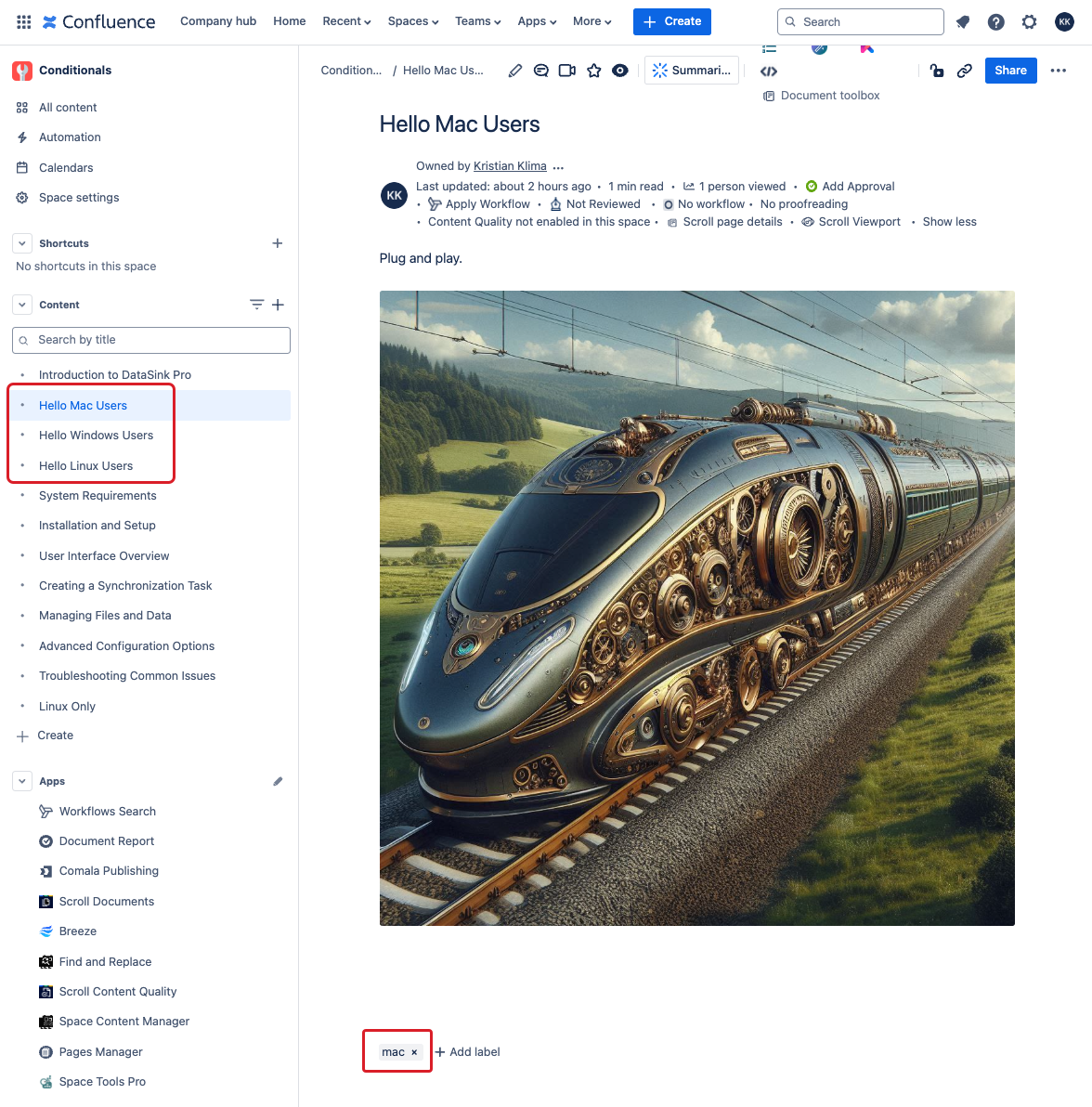
- Hello N Users - each OS has its own page in Confluence
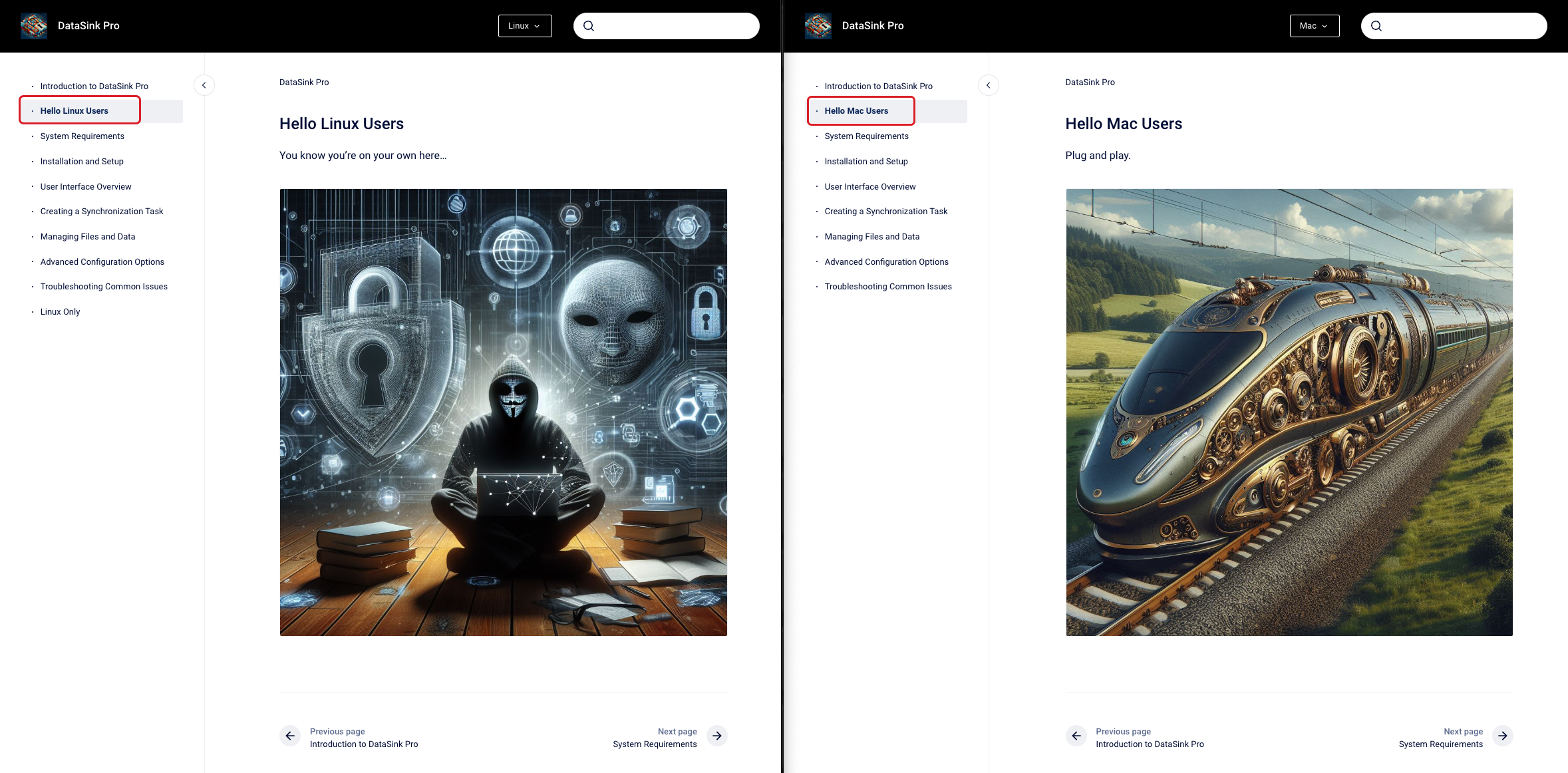
- Only the OS-specific page appears in the specific OS doc - click the link and toggle OS variants
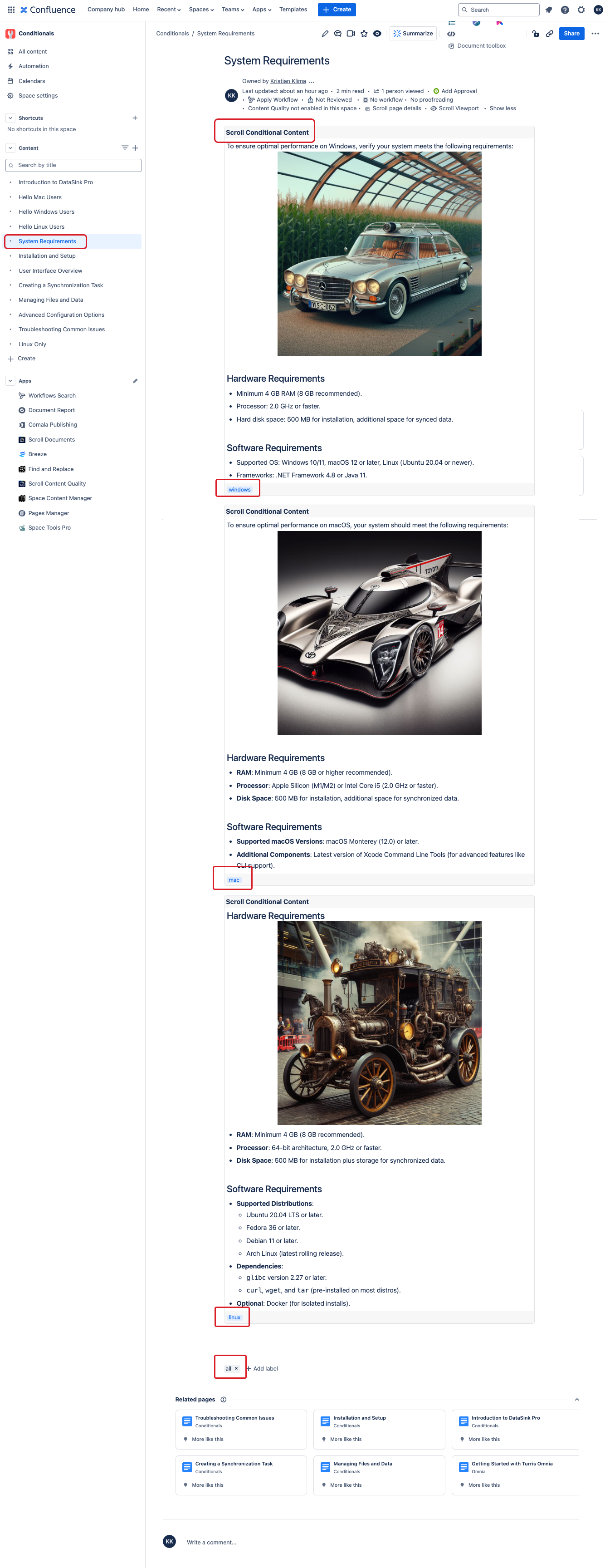
- System Requirements, Installation and Setup, Troubleshooting Common Issues - exists in all variants but in each they display only OS-specific content
Installation and Setup - click the link and toggle OS variants. In this case, it's a single Confluence page.
- Linux only page only exists in the Linux variant.
Toggle another variant 
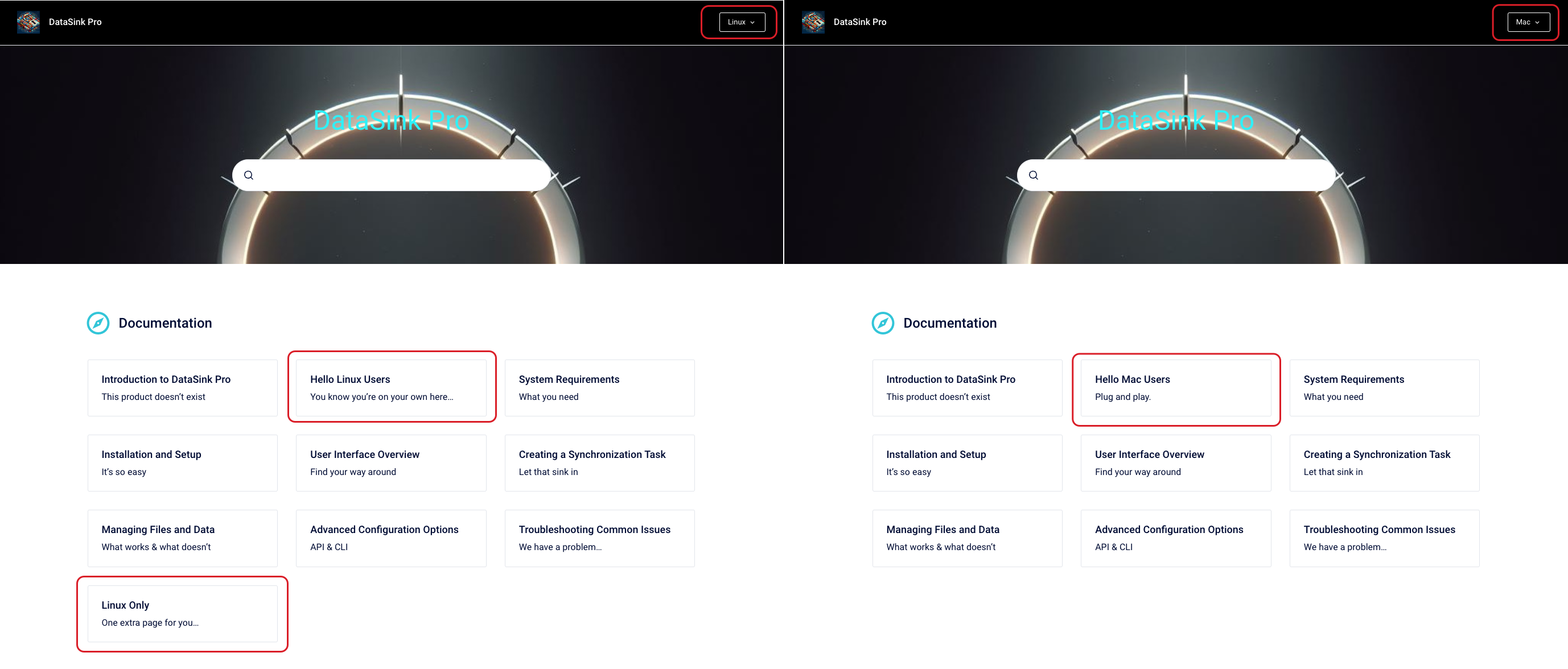
You can easily toggle between the variants. I effectively created three sites and I’m still managing just a single Confluence space with 10 pages.
Still not intrigued? Replace Mac and Windows with Cloud and DataCenter
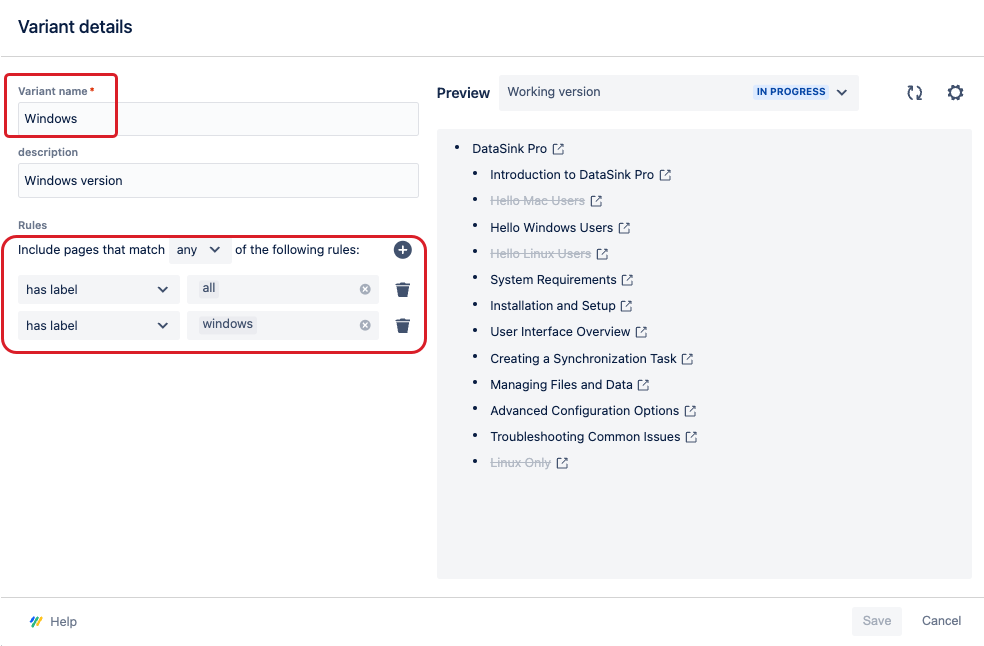
Here's my conditions setup for the Windows variant:
I’m selling rockets. I have two product tiers.
- The Professional tier comes with a Low Earth Orbit kit and a Moon Rocket kit.
- The Starer kit only comes with a Low Earth Orbit kit.
Again, content is authored in a single Confluence space on 3 pages.
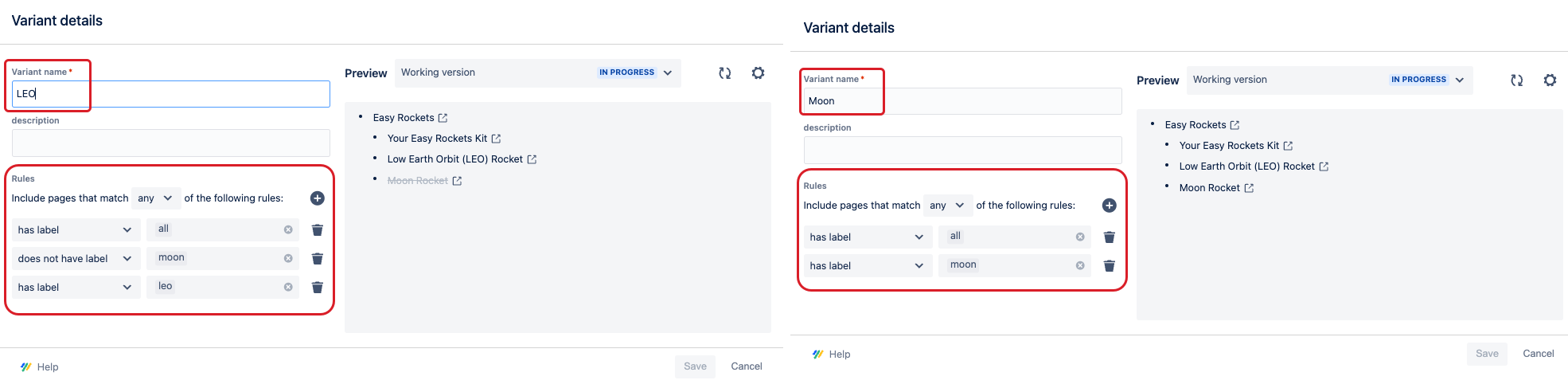
Conditional setup here a bit more complex:
Scenario 3
Last but not least, at Emplifi, we’re using conditional content to create a Public documentation site and an Internal product documentation site.
In a single Confluence space, we have pages that appear in both sites, there are pages that only go to the internal site. There are differences on the page level too. For example, our internal versions of Release Notes pages contain links to Jira tickets, internal only updates etc… which we don't want to share publicly. But it's all on a single confluence page.
Using conditional content, you can create a documentation variant for a specific client, or a region (for example, a US version and a Canadian version - both would be English and sharing most content, but feature details specific to the respective countries).
Scenario 4
A combination of conditions... Yes, you can create the following variants:
- Data Center variant
- Cloud Starter edition
- Cloud Full edition


