I'm having issues connecting to my server in my pipelines.
I have tried in my pipelines custom ssh, atlassian/ssh-run, atlassian/scp-deploy, and atalssian/rsync-deploy. All of them failes at connecting to the server
- step:
script:
- ssh -p 9999 -o StrictHostKeyChecking=no -i ~/.ssh/bitbucket_work $USER@$SERVER
- cd /home/xxxxx/domains/xxxxx.dev/public_html/folder_path/
- touch test-ssh-2024-09-27.txt
- step:
name: SSH INTO SERVER
script:
- pipe: atlassian/ssh-run:0.8.1
variables:
SSH_USER: $USER
SERVER: $SERVER
COMMAND: "echo $USER && echo $SERVER && cd /home/xxxxx/domains/xxxxx.dev/public_html/folder_path/; touch test-ssh-2024-09-27.txt;"
PORT: 9999
# EXTRA_ARGS: "-i ~/.ssh/bitbucket_work"
- step:
name: Transfer the dist forlder to the server
script:
- pipe: atlassian/scp-deploy:1.5.1
variables:
USER: $USER
SERVER: $SERVER
REMOTE_PATH: "/home/xxxxx/domains/xxxxx.dev/public_html/folder_path/folder_name"
LOCAL_PATH: "dist/*"
DEBUG: "true"
EXTRA_ARGS: ["-P", "9999", "-i", "~/.ssh/bitbucket_work"]
- step:
name: Transfer the dist with rsync
script:
- pipe: atlassian/rsync-deploy:0.13.0
variables:
USER: $USER
SERVER: $SERVER
REMOTE_PATH: "/home/xxxxx/domains/xxxxx.dev/public_html/folder_path/folder_name"
LOCAL_PATH: "dist/*"
DEBUG: "true"
SSH_PORT: 9999
# EXTRA_ARGS: ["-e", "ssh -p 9999", "-i", "~/.ssh/bitbucket_work"]
EXTRA_ARGS:
- "~/.ssh/bitbucket_work"
```
Here is one of the error :
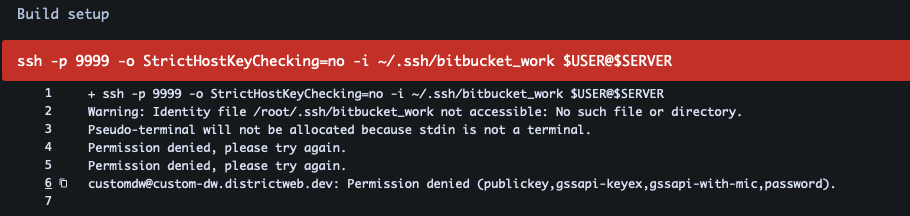
The main problem i see is that I tell the pipeline to go to ~/.ssh/ but in the pipeline command you see that it goes to /root/.ssh/.
On the server where I connect, I do not have access to the /root/ but ~ I have.
I know that the credentials works because in my terminal, if I run the same command, I'm able to connect but i'm never in root.
Is it possible to make the pipeline not ask for root but ~ ?

