We’re excited to share important updates that will help you navigate Atlassian’s upcoming 10K worklog limit while using Tempo Timesheets.
As Atlassian moves to improve performance and reliability of Jira Cloud, a cap on the number of worklogs per issue was introduced. This limit was initially set at 5,000 and has now been increased to 10,000. Atlassian has released Bulk Worklog Move and Delete APIs to help customers adapt to this new limit. However, if you are using Tempo Timesheets, Atlassian's Bulk APIs may not work as specific Tempo solutions are needed, particularly when dealing with:
- Keeping Tempo and Jira worklogs consistent – If you’re using Tempo Timesheets to log your time and then use Jira’s Bulk Worklog APIs to delete or move Jira worklogs, it may result in discrepancies between worklogs in Tempo and Jira.
- Moving worklogs from closed periods and approved timesheets - Tempo Timesheets has historically not provided the ability to do so within the UI or Tempo API, until now.
Tempo has developed solutions that will allow you to bulk move and delete worklogs ahead of the limit rollout. We’re also introducing an alternative syncing method for Internal Issues that may allow your organization to reduce the change management associated with the 10K limit.
Preparing for the limit rollout
Find out which issues are near or at the limit
To help you prepare, it starts with determining which Jira issues are near or at the 10K limit.
- For Cloud users with API querying capability: Use Atlassian’s Get Issue Limit Report API to identify issues approaching the limit.
- For those without API querying capability: Use the Worklog Count column in Tempo Reports. Simply run a Logged Time Report, include the Worklog Count column, and sort it in descending order to spot potential “problem issues.”
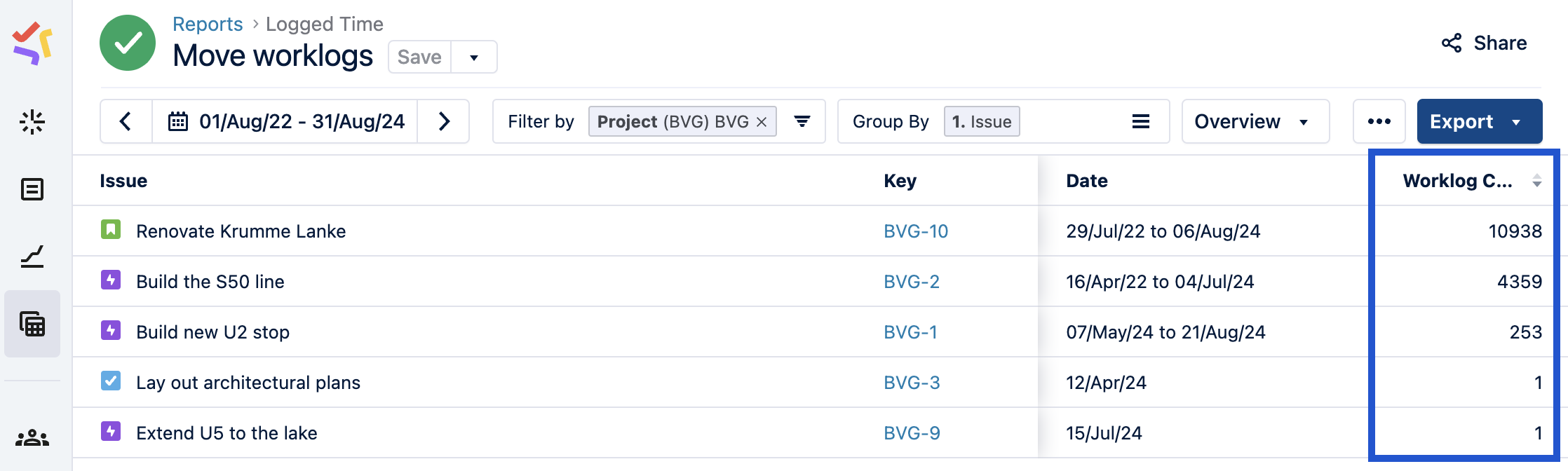
Once identified, you can decide whether to proactively move or delete worklogs before the limit is enforced, or create new issues as needed after it is enforced.
Bulk move and delete worklogs from closed periods and approved timesheets in Timesheets
Released to all customers [documentation]
For those who choose to move or delete worklogs to keep using existing issues, we’ve introduced a new Override Mode that will allow Tempo Admins to bulk move or delete worklogs from closed periods and approved timesheets, either via the UI or Tempo Public API. These actions will help ensure your key issues remain well below the 10K limit.
Limitations:
Options once the limit is enforced
Create new Jira issues
Regularly monitor your issues using Atlassian’s Get Issue Limit Report API or the Worklog Count column in Tempo Reports. If an issue reaches the limit, you’ll need to create a new Jira issue, as Timesheets will no longer allow time to be logged against it.
Periodically move or clean up worklogs
If you prefer to keep the same Jira issues active, use Tempo’s bulk move and delete features to periodically archive or clean up worklogs.
Enable daily summary worklogs to extend Tempo Internal Issues’ usability to 10,000 days
Status: Released to all customers [documentation]
By default, creating a Tempo worklog automatically generates a corresponding Jira worklog. However, many of you have raised concerns about quickly reaching the new worklog limit especially when using Tempo's Internal Issues. We want to help our customers avoid the potential confusion and change management challenges that could result from frequently having to create new Jira issues.
To help you manage the worklog limit, we’re introducing an alternative method that aggregates worklogs in Internal Issues into a single Jira worklog per issue per day. This option significantly reduces the number of worklogs created, effectively extending the usability of an Internal Issue to 10,000 days before reaching Atlassian's limit.
Please note, however, that this method is not ideal for all organizations. We do not recommend this approach for organizations that:
- Use Plans (formerly Advanced Roadmaps), Capacity Planner, and/or other third-party apps to track the Original Estimate, Remaining Estimate, Time Spent, and other worklog-influenced fields related to Internal Issues in real-time
- Need minute-by-minute worklog reporting on said fields while using Jira’s API, reports, and/or gadgets for any worklog-related reporting
Try the solutions in Timesheets
Both solutions have now been released to all customers, so you can directly try them out in Timesheets. We look forward to your questions and feedback, and hope that these solutions help you navigate Atlassian’s 10K worklog limit.


