Hello, i was looking to see if i could get a walkthrough/advice on setting up a scheduled automation..
I have an inventory board that contains a few lists showing a category of item (STAINLESS STEEL)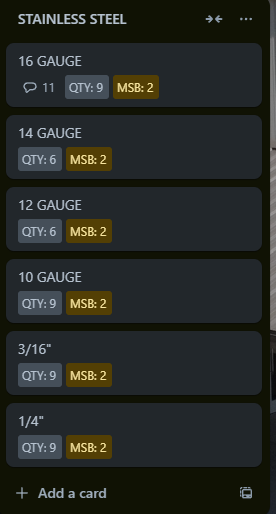
in this list are the variations of said category..
i am currently using Smart Fields in order to track the QTY of each variation.
Currently, i have smart fields mirroring the value of QTY to a custom field..
I am hoping i could get some advice in creating an automation that will let me email current stock levels..
I am looking for a pattern format like this
Category(Stainless Steel)
Variation(16 GAUGE)
QTY(9)
Variation(14 GUAGE)
QTY(6)
Variation(12 GUAGE)
QTY(6)
Category
Variation
QTY
Variation
QTY
Variation
QTY
i will have a total of about 3-4 categories that will be shown..
I have figured out most of this, as far as the automation side, i just cant get the information to show like i have listed above..
currently, i am using this scheduled automation
"every day at 2:19 pm, create a report in variable "STAINLESS_STOCK_LEVEL" with all cards in list "STAINLESS STEEL" using pattern "[{cardname}] {{%QTY}}"
**side question- is there a way to instantly test a scheduled automation, i have just been changing the trigger time to a few minuets ahead, to get it to run a test.


