Hello,
My team uses the Jira Kanban board in our workshop to keep track of ongoing projects.
We were struggling with the "comments" section inside of issues, as being unable to reply directly to comments made keeping track of conversations difficult.
I recently installed an app, Smart Comments, that allows me to reply to comments and create comment threads, similar to Reddit's comment thread system.
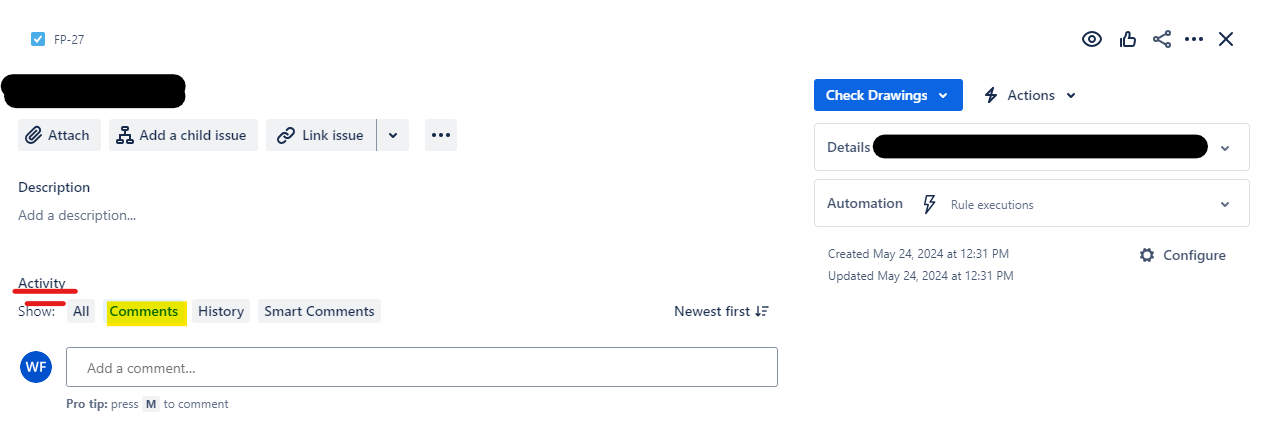
With this new app installed, when looking at an issue, under the "Activity" section, I now have four sections. "All" "Comments" "History" "Smart Comments"
Due to the benefits that Smart Comments provides, I would like to disable the viewing of default comments to all users, and preferably remove the default "Comments" button entirely for all users.
I've tried modifying the activity system app, but that seems to be no longer editable. I also tried creating a permission that would not allow users to view comments, but that is not an available option.
I've included a screenshot that highlights the area and section I am referring to.
Thanks.

