It's a familiar story when you try to fit many tasks into a small 8-hour workday. Every morning, you promise yourself to be super productive. But this productivity and your enthusiasm burn out around the second hour of the day. The reason is not a lack of time. The reason is how you manage it. Everyone has the same amount of time, but what separates the best from the rest is their ability to make the most of it.
You are the master of your time and need to learn how to manage it. I propose to delve a little deeper into this topic. So, let's start our journey into quality time management practices.

Time Management Techniques for Enhancing Productivity at Work
The techniques below are not magic wand. The key to success is to use them thoughtfully and efficiently. Please choose the one that works best for you, and don't try to implement all of them in your schedule at once.
Time blocking
Time blocking (or batching) is a time scheduling method that increases productivity by targeting work performed in specific periods or time blocks.
- Make a list of tasks you need to complete.
- Estimate how long it will take. Consider that unexpected tasks may appear, such as "I have to solve this right now because Armageddon is coming." 🫣
- Set priorities and allocate the necessary time in your schedule to complete them.
- Implement time blocking using your favorite calendar app and adjust it as needed (if you have problems sticking to the allotted time slots). And you will have them until you get used to the new technique.
- Remember to consider work meetings that will take place throughout the day.
This method gives you clarity, which in turn allows you to use your time and attention (two extremely scarce resources) efficiently and effectively.
With it, you no longer see the day as an 8-hour cloud. You'll see a structured entity.
Most employees can only stay productive for about 20 minutes per interval, so time blocking is a great way to maximize this limited resource.
And please, avoid multitasking, and don't become an octopus that tries to do everything in one-time slot.

Eat That Frog
Most of us have tasks on our to-do list that must be done. You don't want to do them, but you have to. And when you do, you'll feel overwhelmingly happy and feel the sword of Damocles move away from your throat.
This is a typical problem of a procrastinator. You save the important and challenging things for last, and then you try to get everything done in a frenzy.
This task is our "frog". And no matter how much we don't want to, we have to eat it.
Don't eat a lot of frogs in one day - it's terrible for your health. 😁
Instead, identify one most important task for the day and complete it first.
Of course, you will work on other things, but you will prioritize the most important (and often the most difficult task that requires the most energy and focus) first.
"Eat the Frog" is excellent for those who feel overwhelmed and need help setting up their work schedule to work on important tasks.

Eisenhower’s Matrix
The Eisenhower Matrix helps prioritize tasks by filtering out what is urgent and essential from what is not.
This technique divides tasks into four different quadrants, each of which has its work strategy:
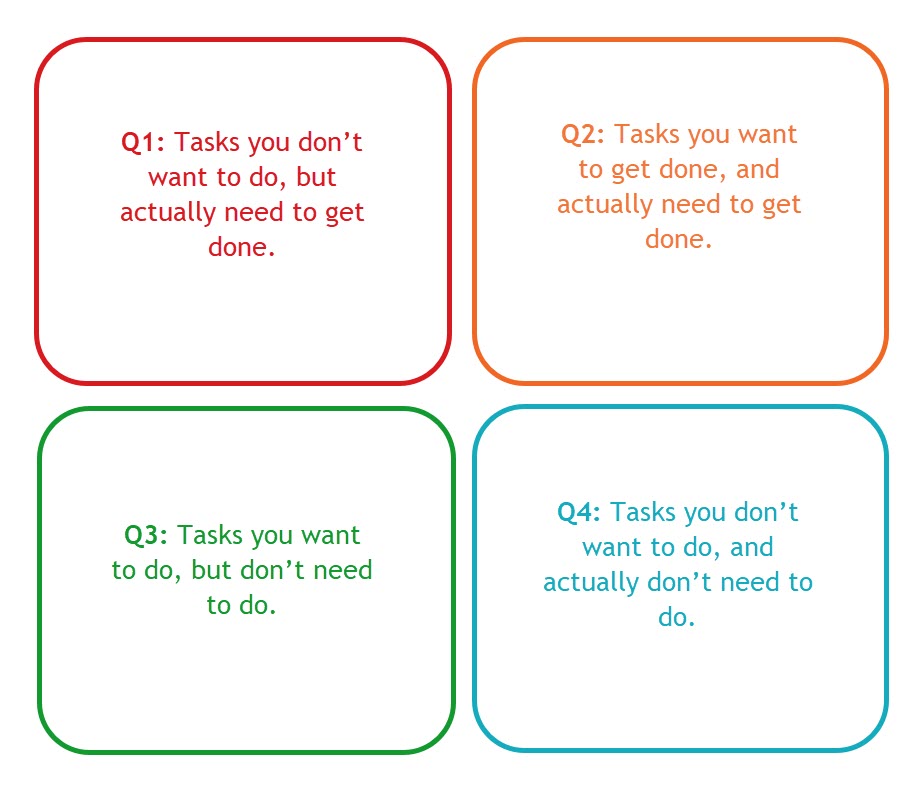
The ultimate goal is to filter out the less urgent and vital tasks you should delegate or not do, focusing on or scheduling more critical tasks.
The Eisenhower Matrix is excellent for those who need more direction and spend much time on routine work that doesn't move things forward.
Moreover, this technique is great for people working on several projects, ensuring a more efficient workflow.
And one more tip
Our team uses many apps to help us manage time. Logically, one of these apps is the Time Between Statutes app developed by my team.
After all, even if you use different time management techniques, you need to be able to measure their effectiveness and whether the method implemented in the workflow is effective.
Here's how we do it.
- We evaluate the workflow of an individual project and how transitions between statuses occur.
- We form a group status based on workflow and measure specific time metrics. They are different for different departments. Below is an example of a grid and metrics for the Support department.
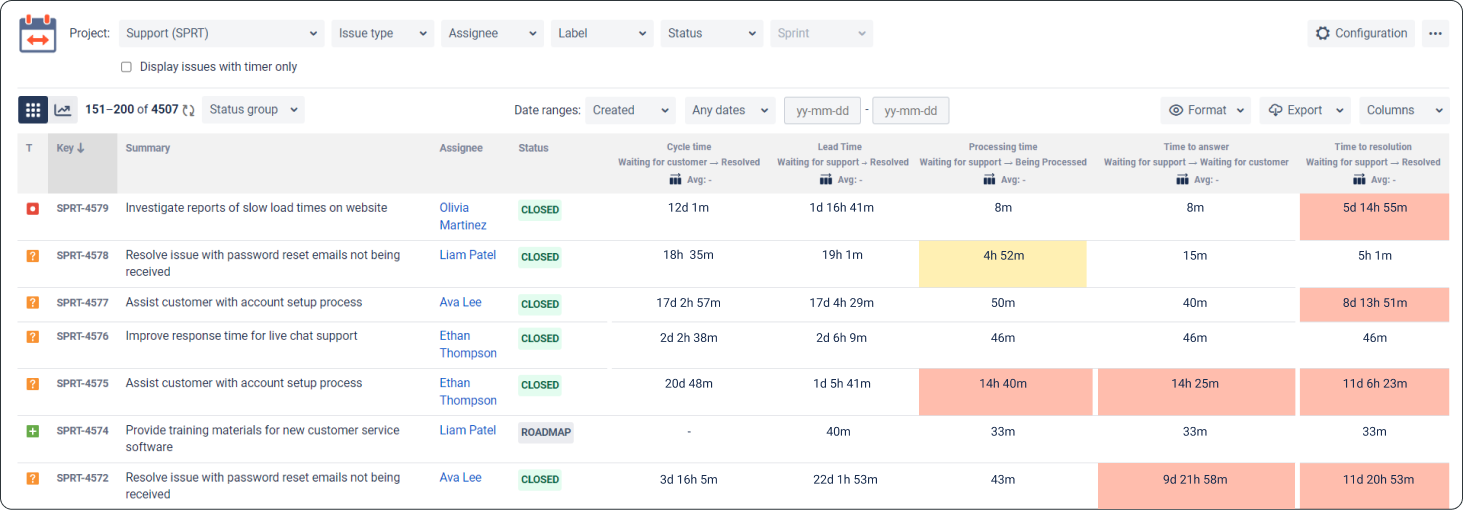
- Based on the data, we conduct analytics. The insights we get give us an understanding of whether everything is normal or whether the chosen time management technique was not chosen correctly and does not bring any benefit.
- On the convenient side, we can set time limits in the configuration, and data that exceeds them will be highlighted, immediately drawing our attention to problem areas. Also, when users exceed them, they will receive a notification in the task and by email, immediately signaling us about a potential problem.
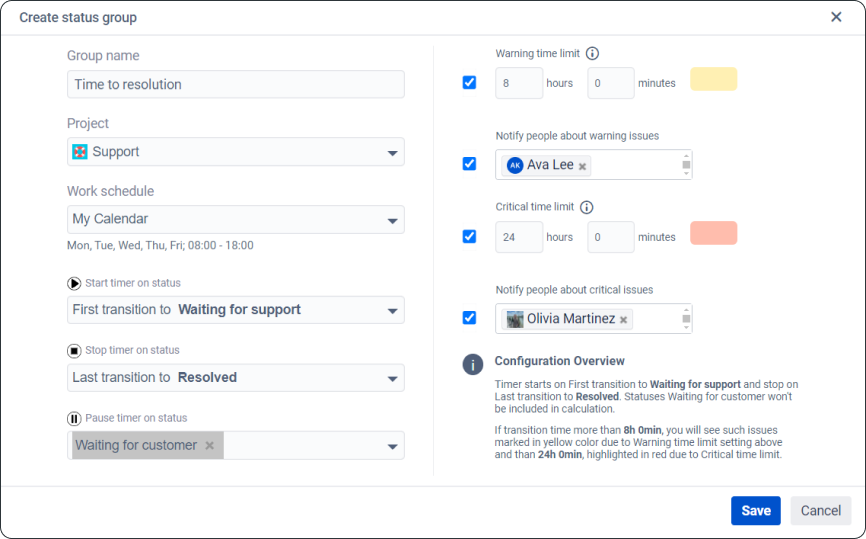
You should also try Time Between Statuses—it has a 30-day free trial. It will come in handy 🙂.
So, thank you for taking the time to read this article. Have a great time managing, and remember - you can eat no more than one frog a day 😉


