Whenever I’m starting a new program or inheriting an existing one, one of the first artefacts I look for is a program hub. A program hub is a central place that houses key artefacts that stakeholders (the direct working teams, partner teams, program sponsor, etc.) can find key info about the program to dive deep on areas of interest (program strategy, roadmap, metrics, delivery plan, etc.).
I use Confluence to create the hub where the spokes of the hub are links to other Confluence pages, JSW projects, Atlas goals and projects, and more.
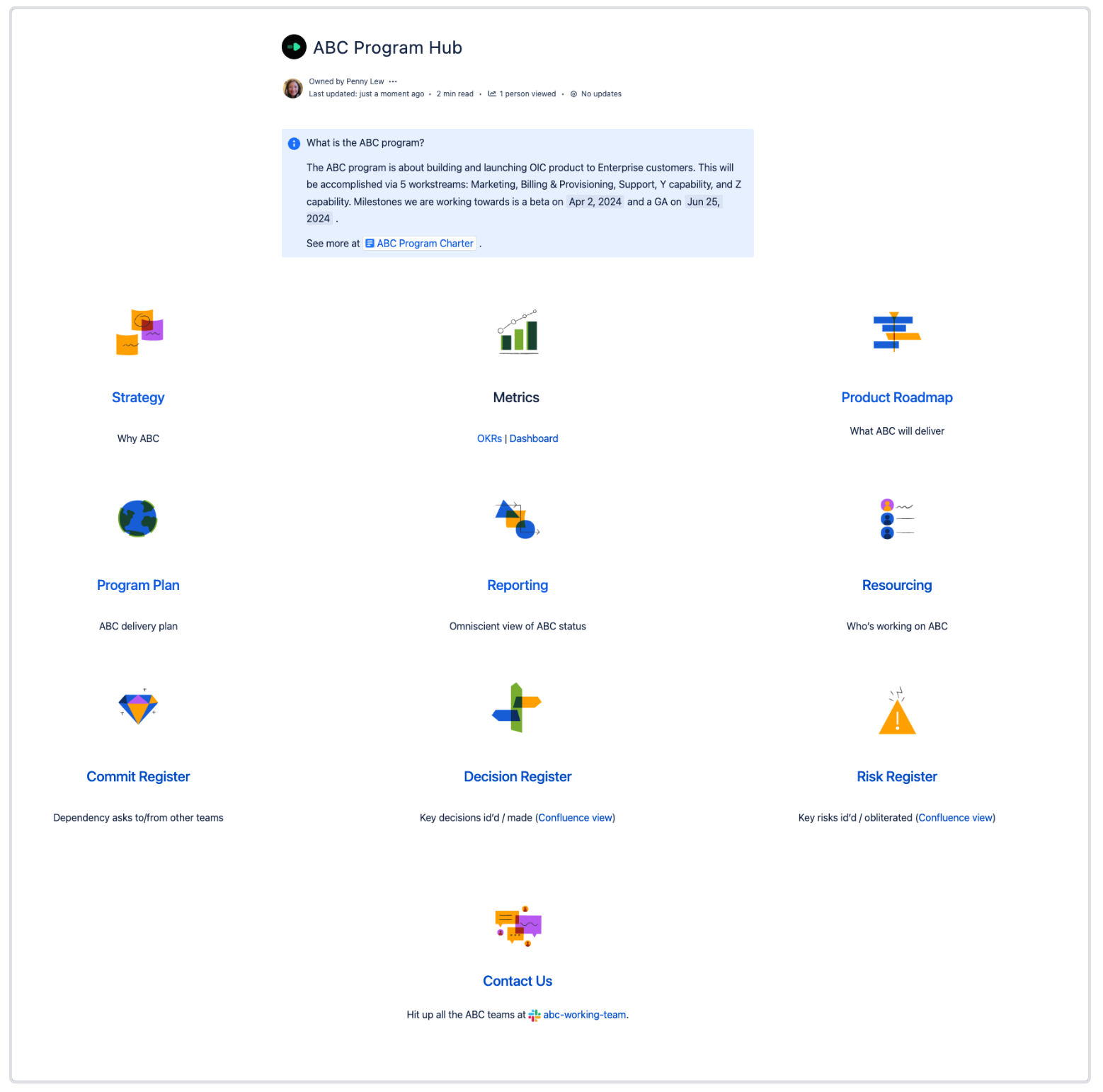
Let’s dive into an example program hub!
ABC Program Hub
| What |
Details |
Recommended Atlassian product and template |
|
Blue info box
|
Quick blurb on the program, inclusive of workstreams and milestones. Link to your program charter which could be a succinct Confluence page on the program intent, metrics, scope, key dates, risks, and more. (The program charter id’s and defines the program, essentially serving as the golden ticket to start the program.)
|
Confluence
|
|
Strategy
|
High-level plan and goals that the program will help realize
|
Confluence
|
|
Metrics
|
The OKRs the program contributes to and any dashboards tracking metrics that help inform scoring of the OKRs and the success of the program
|
Confluence (basic use cases)
Atlas (advanced use cases)
|
|
Product roadmap
|
Evolution of the product broken out by monthly/quarterly/yearly increments of time
|
Confluence (basic uses cases)
JPD (advanced use cases)
|
|
Program plan
|
How the program will be executed to deliver the program in a set time against specific milestones
|
Confluence
|
|
Reporting
|
Status tracking of projects within a program
|
Atlas
Check out Communicate effectively with a little help from Atlas - the Atlas update composer for great pointers on using Atlas for project/program communication.
|
|
Resourcing
|
The open and filled positions needed for the program
|
Confluence
- Depending on your program's size, it may be optimal to capture resourcing in a tool like GSheet. But if your program is relatively small, you could potentially capture resourcing in a Confluence page such as in a Team homepage template
|
|
Registers
|
It’s a triple whammy here! Successful tracking and closing out of dependencies, risks, and decisions are instrumental to a program’s trajectory. I shared an earlier post on the different flavours of a register at Oh, my most favourite decision and risk register flavours!
|
Confluence (basic uses cases)
JSW (advanced uses cases)
|
|
Contact Us
|
It can take a village to ship a program! Make sure to have a contacts page listing teams working on the program and how they can be reached.
|
Confluence
|
Keep it tight to make it right
Your hub is essentially a map to help folks self-navigate to key program artefacts so they can quickly onboard, stay aligned on goals, make upward progress, and know who to reach out to. Avoid throwing the kitchen sink into your hub by keeping it light and tight! Some pointers:
- Start the hub ASAP. All the info in your hub may not be readily available or even more so, in a very drafty draft state. That’s ok! Call out sections in your hub that are a work in progress and share a target date when they’ll be ready for consumption.
-
Stick to key info. As mentioned, your hub is a map. Don’t distract stakeholders and yourself with detours by listing tangential info. Treat your hub like a product and stick to an MVP.
-
Pithy for the win! Short headings and brief descriptions makes for easy scanning. White space is your BFF in a hub.
-
Visuals and up to date links. Make your hub engaging with images and direct links to specific info that is up to date. This is table stakes but worth emphasizing as these two elements are what helps capture your stakeholders attention, helps them remember your hub, and gets them to keep coming back.
Wrap up
A program hub is a great way to flaunt your program management skills in connecting the dots and providing clarity on a program. From new team members joining your program needing onboarding to seasoned stakeholders wanting to dive deep into the latest metrics and status on your program, they’ll be able to self-serve through your program hub. (And at the very least, you’ll be able to quickly walk them through what they need as you’ll have all the info centralized in your hub). So, pat yourself on the back for getting your program organized! With your hub set up it’s time to head to the pub! 


