Hello, I need some help here. I've been running a pipeline for my project for over a month and started having random problem in the build step of my pipeline. I managed to temporarly solve it adding the size: 2x option, but now not even that helps.
What are my options here? I really need help.
Eric
This is the error I'm getting:
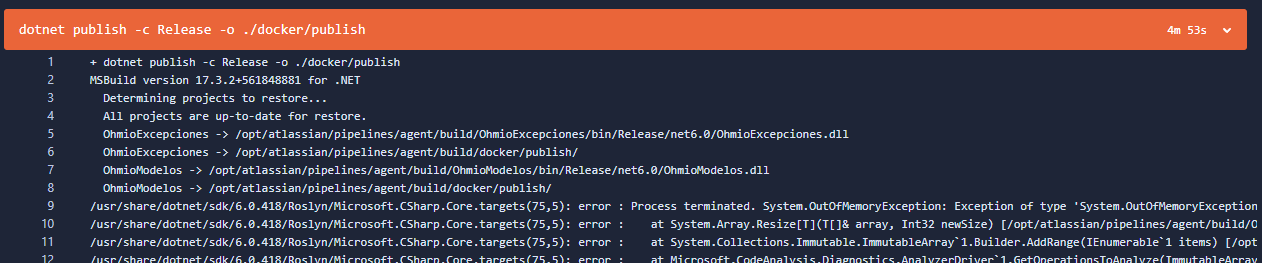
And this is my pipeline:
definitions:
steps:
- step: &build-branch
name: Build Feature Branch
image: mcr.microsoft.com/dotnet/sdk:6.0
caches:
- dotnetcore
script:
- dotnet restore
- dotnet build --no-restore

- step: &build-netcore
name: Build Docker Image
image: mcr.microsoft.com/dotnet/sdk:6.0
services:
- docker
caches:
- pip
script:
- apt-get update && apt-get install -y libgdiplus python3-pip nodejs npm wget
- wget https://packages.microsoft.com/config/ubuntu/20.04/packages-microsoft-prod.deb
- dpkg -i packages-microsoft-prod.deb
- apt-get update && apt-get install -y apt-transport-https
- apt-get update && apt-get install -y dotnet-sdk-6.0
- pip3 --version
- dotnet --info
- export CI=true
- pip3 install awscli
- IMAGE=$AWS_ECR_REPOSITORY_DOMAIN/$AWS_ECR_IMAGE_NAME
- PROJECT_VERSION=`node -p "require('./project.json').version"`
- TAG=$PROJECT_VERSION
- aws configure set aws_access_key_id "${AWS_ACCESS_KEY_ID}"
- aws configure set aws_secret_access_key "${AWS_SECRET_ACCESS_KEY}"
- eval $(aws ecr get-login --no-include-email --region ${AWS_ACCESS_KEY_REGION} | sed 's;https://;;g')
- dotnet restore
- dotnet publish -c Release -o ./docker/publish
- docker build -t $IMAGE:$TAG .
- docker tag $IMAGE:$TAG $AWS_ECR_REPOSITORY_DOMAIN/$AWS_ECR_IMAGE_NAME:$TAG
- docker tag $IMAGE:$TAG $AWS_ECR_REPOSITORY_DOMAIN/$AWS_ECR_IMAGE_NAME:latest
- docker push $IMAGE

- step: &deploy-netcore
name: Deploy Docker Container
image: mcr.microsoft.com/dotnet/aspnet:6.0
services:
- docker
caches:
- pip
script:
- apt-get update && apt-get install -y libgdiplus python3-pip wget
- export CI=true
- pip3 install awscli
- aws configure set aws_access_key_id "${AWS_ACCESS_KEY_ID}"
- aws configure set aws_secret_access_key "${AWS_SECRET_ACCESS_KEY}"
- export AWS_DEFAULT_REGION="${AWS_ACCESS_KEY_REGION}"
- eval $(aws ecr get-login --no-include-email --region "${AWS_ACCESS_KEY_REGION}" | sed 's;https://;;g')
- aws ecs update-service --service $SERVICE_NAME --cluster $CLUSTER_NAME --force-new-deployment

- step: &migrations-netcore
name: Run Migrations
image: mcr.microsoft.com/dotnet/sdk:6.0
services:
- docker
caches:
- pip
script:
- apt-get update && apt-get install -y libgdiplus python3-pip nodejs npm wget
- wget https://packages.microsoft.com/config/ubuntu/20.04/packages-microsoft-prod.deb
- dpkg -i packages-microsoft-prod.deb
- apt-get update && apt-get install -y apt-transport-https
- pip3 --version
- dotnet --info
- export CI=true
- pip3 install awscli
- aws configure set aws_access_key_id "${AWS_ACCESS_KEY_ID}"
- aws configure set aws_secret_access_key "${AWS_SECRET_ACCESS_KEY}"
- eval $(aws ecr get-login --no-include-email --region ${AWS_ACCESS_KEY_REGION} | sed 's;https://;;g')
- dotnet new tool-manifest
- dotnet tool install --local dotnet-ef --version 7.0.14
- dotnet ef migrations script --project OhmioData --startup-project OhmioWEBAPI --context EmpresaContext --idempotent --output migrations.sql
- aws s3 cp ./migrations.sql "${MIGRATIONS_BUCKET_DEST}"
- echo "Finalizado"

options:
size: 2x
pipelines:
default:
- step: *build-branch

branches:
develop:
- step:
<<: *build-netcore
name: Build Dev environment
deployment: DevelopBuild

- step:
<<: *deploy-netcore
name: Deploy Dev environment
deployment: DevelopDeploy

- step:
<<: *migrations-netcore
name: Migrations Dev environment
deployment: DevelopMigrations

master:
- step:
<<: *build-netcore
name: Build Prod environment
deployment: ProductionBuild

- step:
<<: *deploy-netcore
name: Deploy Prod environment
deployment: ProductionDeploy

- step:
<<: *migrations-netcore
name: Migrations Prod environment
deployment: ProductionMigrations

