Hi,
I'm wondering if there's a way to move fields to the top of a Jira ticket, or if there is a way to create an issue action with an accompanying keyboard shortcut?
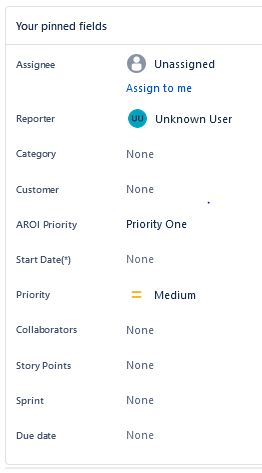
We recently migrated to Jira Cloud. Previously, the following fields appeared at the top of the ticket (in Board View): Assignee, Reporter, Category, Customer, Project Priority, Start Date, Ticket Priority, Collaborators, Story Points, Sprint, and Due Date. (See screenshot)
Now these fields are located at the bottom of the ticket. During our initial intake, those are the fields we update, and having to "page down" several times to access these fields is time consuming (and irritating). This intake is done in the overall Board view, not in Issue View.
Pinning the fields did not move them to the top of the ticket. Our scrum master doesn't see a way to move these fields back to the top of the ticket, and other than "I - Assign To Me," there's no issue action keyboard shortcuts for the fields listed above.
Is there a way to move the fields shown in the screenshot to the top of the ticket? Or is there a way to create individualized issue actions and keyboard shortcuts? Maybe not for every field I listed, but at the very least to the Category field, which is the first action we take with an incoming ticket?