

🚦Incident Management & 🏹 Customer Support
Jira Service Management & Jira Software
🧪SQA - Automation (API)
Postman & Github
-
Back up your Postman collections to GitHub, a cloud-based hosting service for Git repositories, with the Postman to GitHub integration.
-
Every change saved to your Postman Collection automatically commits changes to your GitHub repo in JSON format.
-
GitHub | Postman Learning Center
-
Postman
🧮 Tracking Progress
Jira and GitHub
-
Connect your GitHub code with your project management in Jira. A separate Jira subscription is required. With two of your most essential tools connected, you'll spend less time managing projects and more time working on them. This integration is an open-source project, built and maintained by Atlassian.
-
https://github.com/atlassian/github-for-jira
🚀 Build/Deployment Status
Jira Software - AWS - GitHub
Create a parameter in SSM containing the Jira Issues API endpoint for your Jira instance:
aws ssm put-parameter --cli-input-json
'{ "Name": "/webhooks/jira-issues-webhook-url",
"Value": "https://<my-jira-server>/rest/api/latest/issue/",
 "Type": "String", "Description": "Jira issues Rest API URL" }'
Create a parameter in SSM containing your basic auth headers as a JSON string:
aws ssm put-parameter --cli-input-json
'{ "Name": "/webhooks/jira-basic-auth-headers", "Value":
"{\"Authorization\": \"Basic <base64 encoded useremail:api_token>\"}",
 "Type": "SecureString", "Description":
"Jira basic auth headers for CodeBuild webhooks" }
Create an entry in the DDB webhooks table that uses the default template, substituting values as required:
aws dynamodb put-item --table-name CodeBuildWebhooks
--item file://examples/jira.json
🚨Alerts - 👀Observability - 🎯Architecture
📊Google Analytics
🗂️ Workflow - 1
- A branch is created on GitHub containing the Jira ticket ID i.e. “JIRA-00:”; automatically the ticket moves to "in progress" on the Jira Software board (In Progress is the ticket status). A comment is added on that Jira ticket with a time log as well, relevant users get tagged as well.
- The “start date” field is filled with the current date. (Jira issue/Story/Task/bug ticket)
- PR(Pull Request) is raised on GitHub, containing the Jira ticket ID i.e. “JIRA-00:”; Automatically the ticket moves to PR Review on the Jira board, Comment is added on that Jira ticket with a time log as well.
- Since the team lead is supposed to review the code, it automatically gets assigned to the lead, on the Jira board.
- PR(Pull Request) is Merged on GitHub Comment is added on that Jira ticket with a time log as well.
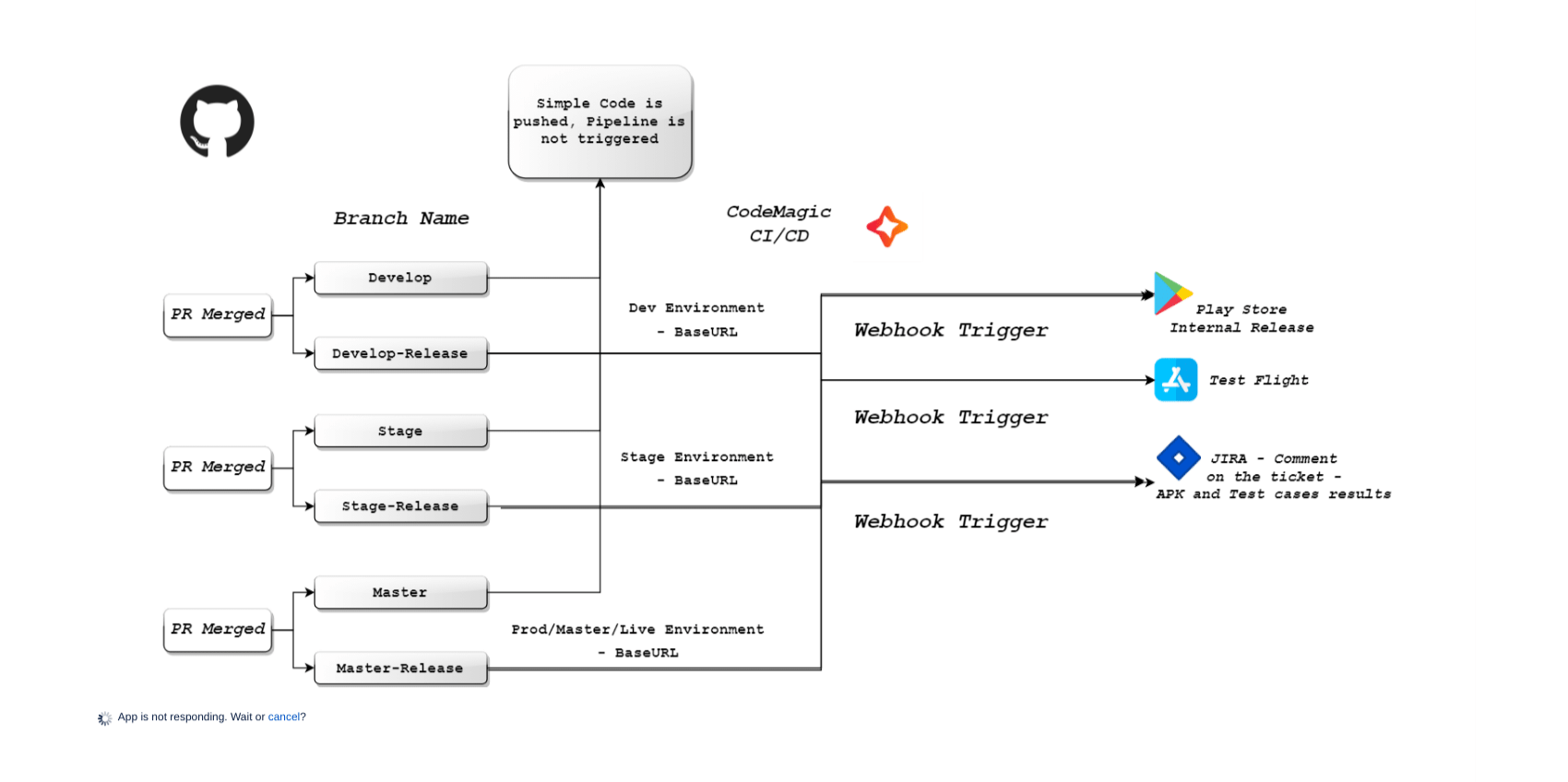
- Webhook Triggers (only on Three branches, develop, stage, master) AWS Codepipeline and the following process starts. E.g. Let's say if the branch is Develop to which PR is being Merged, and the ticket status changes to Deployed to develop on Jira
📌 AWS Code Pipeline Flow
- Source (GitHub - PR Merge)(Branch - Develop)
- Build
- Deploy
- Test
-- Postman - Newman (API testing)
-- Cypress
-
If the pipeline ran successfully on AWS, a comment is added on that ticket which is on Jira Board, and that ticket is moved to Post Develop Testing ticket is assigned to the SQA, and manual testing is done.
-
Now the flaw in this workflow is that it doesn't show or comment on the test results that ran in the pipeline on the Jira ticket, for I did find a solution, via APIs, and the test results are added on the Jira ticket in .xml format, but haven't been 100% successful yet. 💀
🗃️ Workflow - 2
AWS pipeline flow
-
Source (GitHub - PR Merge)(Branch - Develop)
-
Build
-
Deploy
-
If the deployment was successful on AWS, a comment is added to that ticket which is on the Jira Board, and that ticket is moved to Deployed to Develop
-
From Jira, a webhook is triggered, which will then create a monitor on the postman, run the test cases from the collection, and then send the summary of test cases in response to that webhook.
-
The summary should get posted on that same Jira ticket, If 80% successful rate(which will be mentioned on the ticket) then the ticket transitions to "Post Develop QA", it gets assigned to the SQA, for further testing. (Trying to do this for the backend Deployment but haven't been 100% successful yet, for mobile apps using code magic, it was successful)💀


🧭 Workflow (Explained)
-
The branch is created on GitHub containing the Jira ticket id i.e. “JIRA-00:”
-
PR(Pull Request) is raised on GitHub, containing the Jira ticket id i.e. “JIRA-00:”.
-
Automatically the ticket moves to PR Review on the Jira board
-
Since the team lead is supposed to review the code, it automatically gets assigned to the lead, on the Jira board.
-
PR(Pull Request) is Merged on GitHub
🧪 SQA - Automation
|
Branch on GitHub
|
Status on Jira Board
|
AWS Pipeline - Triggers
|
Test Cases
|
|---|
|
Develop
|
Deployed to Develop
|
|
-
Environment BaseURL - Develop
-
Test Cases will Run.
-
Before the PR is Merged, if any new API is created, that is added to the Postman collection.
-
Automatically it gets committed to the relevant branch.
|
|
Stage
|
Deployed to Stage
|
|
|
|
Master
|
Deployed to Master
|
|
|
📝 Release Notes - Organisation Updates
For more information check this Link -Processes & Standards
#AtlassianCreator #devops-story #MyAtlassianBag #AutomationSauce


