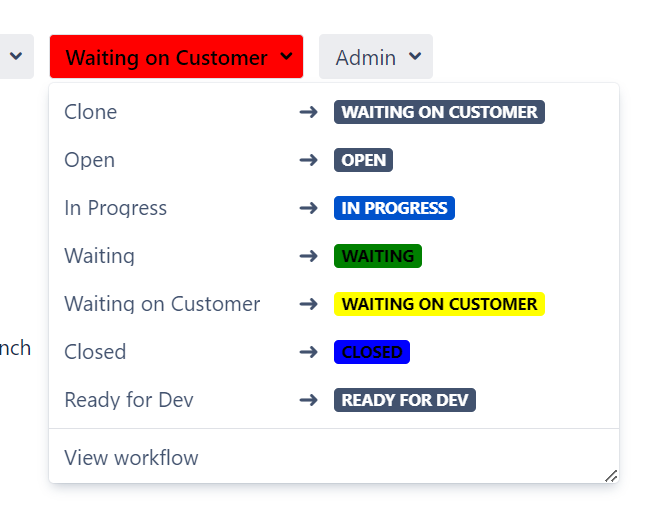
Hi All,
We wish to change the Jira issue status color other than the default colors (To Do - Grey, In Progress - Blue and Done - Green as per our color theme) for a particular project and /or issue type combination. We were able to partially achieve this by using the following Adaptavist Scriptrunner's Script Fragment script via 'Show a Web Panel' :
writer.write("""
<style>
    #opsbar-transitions_more {
        background-color: #FF0000;
        color: #000000;
    }
    #action_id_21 > a > div > div:nth-child(3) > span {
        background-color: #FF0000;
        color: #000000;
    }
</style>
""")But this is working partially. The colors are working in the transitions section/dropdown. But as we are setting opsbar-transitions_more directly to red (#FF0000), irrespective of the color that I have set in #action_id_xx, the color of the current status and the color of the status in the transition dropdown are not matching if set differently. For e.g., I want the 'Waiting on Customer' status to be yellow, the transition dropdown displays it as yellow but the main status which is colored using {{#opsbar-transitions_more is set to red. PFA for more details. So can we conditionally add color in #opsbar-transitions_more to match the color in the transition dropdown. So in our eg, Waiting on Customer should show yellow in the transition dropdown and in the actual Jira issue status.