Issue details can be edited directly on the backlog. Simply select an issue’s summary, assignee, status, parent, and priority field to edit. If you're working on a Scrum project, you can also edit the story points field.
⭐️ View settings
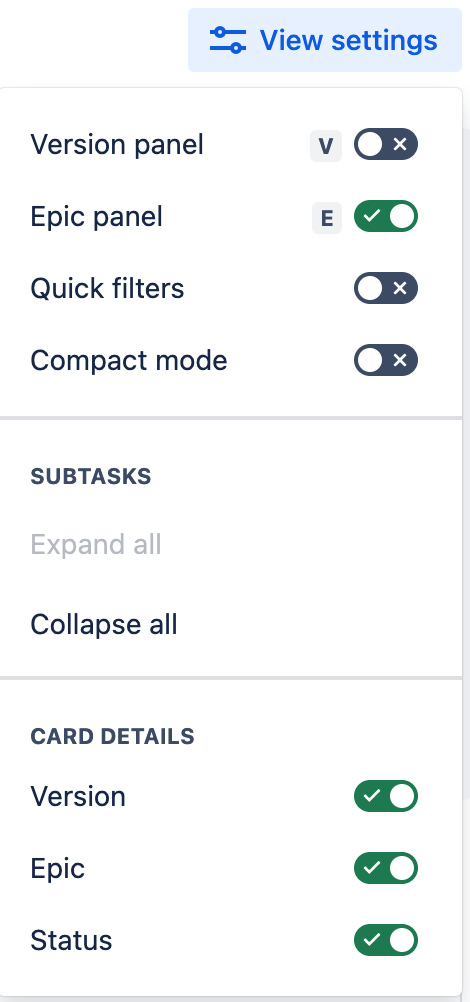
You can now take more control of the way you view your work.
You can control certain fields that have been added to the card - for backlog it is the status, epic (parent), and version field, for board it is the epic (parent) field. We will add to this list of fields over time.
In the backlog, you can select compact mode to reduce the height of the cards which will allow you to see more cards on your screen at one time.
There are toggles to show or hide the epic and the version panel.
There is a toggle to display Quick Filters as a horizontal row or to keep them in the Quick Filter dropdown to save on vertical space.
⭐️ Make simple bulk edits on the backlog
You can now perform bulk changes without having to leave the backlog or open individual issues. With a few clicks, you can change the priority, assignee, labels, and estimate fields for up to 50 issues at once.
Select issues one at a time using the checkbox, or by holding "command" (for Apple devices) or "control" (for Windows devices) while you select each issue. To select a group of issues, hold "shift" while selecting. Once selected, right-click on any of the issues, or use the more actions (...) menu, then choose the bulk action you'd like to perform.


