We are planning a series of articles on how to make your life easier by using a separate Release Center project and automations in Jira Cloud. These articles will help you use lifehacks on faster and more efficient release management, achieving fully controlled releases without them falling into your lap all at once. We will post twice a month on the following topics:
- Fast and efficient releases with the Release Center
- How releases get into the Release Center
- Release Center reports and dashboards and how to work with them
Without further ado, let's get into our first topic.
The stressed release manager
To deploy a release, there are several steps to be taken: create the version in Jira Software, build the release, deploy it to the required environment, and release the version.
But what happens when releases come from different sources? Let’s look at an example any organisation can relate to.
Release managers control and coordinate all releases within your organisation, spanning core development, bug fixes, and change requests from customers. Development projects are tracked in Jira. Requests for bug fixes and changes may be tracked in JSM. Or even not tracked.
Say, the development team is creating a new system documented in a separate project in Jira where releases are planned. But in parallel, an already finished (and only supported) project generates bugs via JSM. Such requests still have to be fixed and released even though they don’t have a dedicated Jira project where releases can be planned.
On top of that, there may be separate systems tracked outside of Jira and JSM for various reasons.
At this point, the prematurely ageing release managers run themselves into the ground having to gather all the data from all the sources where release requests come from, triggering the following cross-project release management challenges:
- Siloed points of view
- Each system component focused only on its own activities and interests
- Hidden dependencies
- Obscured dependencies on related systems
- Scheduling risks
- Resource conflicts emerging too late for meaningful prioritisation
There’s got to be another way, we are thinking!
What is it?
The Release Center, of course 😊
So why the Release Center?
On top of the standard Jira Releases page, you can create a separate Release Center project used by the release manager.
The Release Center in Jira is a single place of truth for the release manager, improving cross-project release management. It helps automate and centralise release management with every change request, new release, or deployment tracked and summarised. It is also amazing for planning large projects several months in advance with the help of team-level roadmaps.
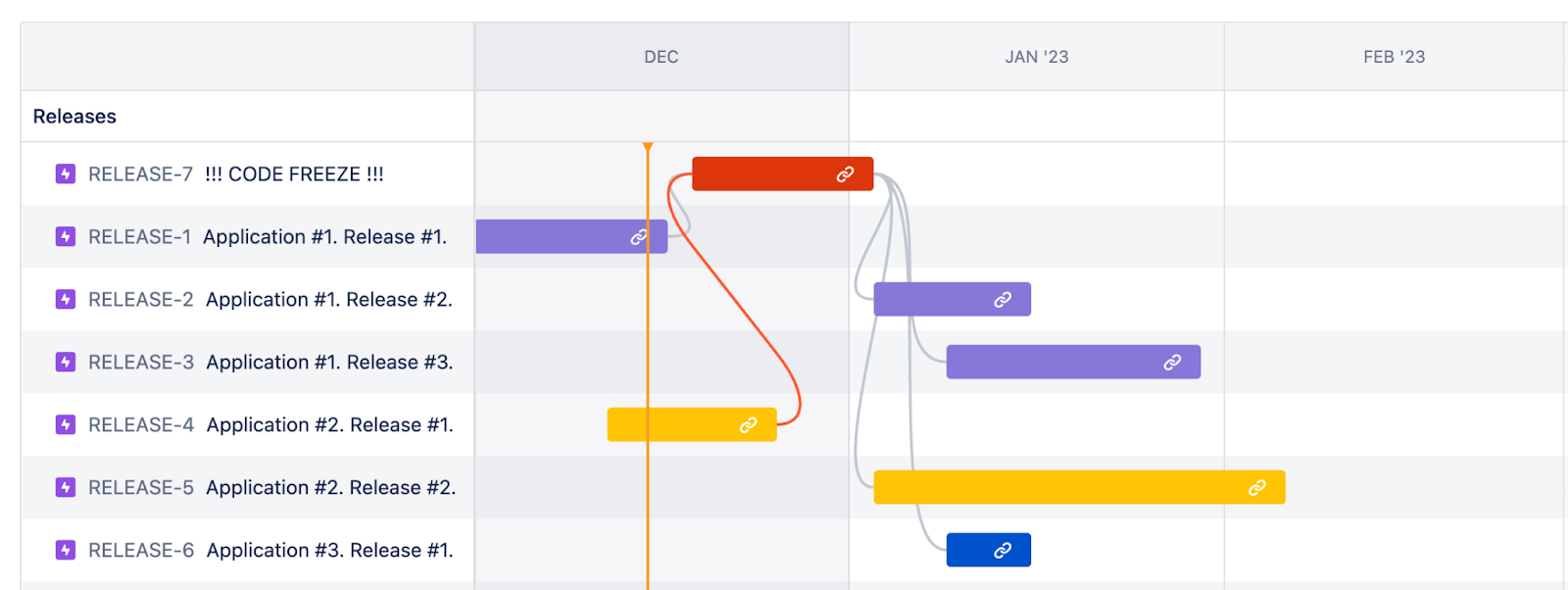
The Release Center helps release managers do the following:
- Shorten the development cycle and discover bugs and issues when they are still not affecting the project in a negative way
- Make the end-to-end release status visible to all interested stakeholders
- Manage software release dependencies
- Bring operations and development together early into the software release to remove friction
- Deploy ready code right away
- Simplify and control release management by keeping all release information in one place
- Take advantage of the bird’s eye view of all releases
- Keep track of which issues went into which release and when
- Automatically generate release notes rms can email, send into a chat, or add to confluence
- Enjoy supervision over Jira processes in place
- Track the status of each version and related pull requests and check release readiness when integrated with bitbucket
Using the Release Center has additional advantages:
- Ready-to-use out-of-the-box solution
- No additional development
- Simple release tracking
How the Release Center helps with release management
The project contains epics which are our releases, tasks, and sub-tasks as a breakdown of our releases. Each epic has a start and due date, which is connected to real releases. It also has a version and can be related to the Service, if you use the advantage of JSM services.
Any time we plan a new version, we create an epic, populate it with details from our version and show it on the roadmap. This works perfectly with the releases from the other Jira Software projects, JSM changes, and connected development tools. Additionally, there is an option to create releases manually, if the application is managed somewhere externally for some reason.
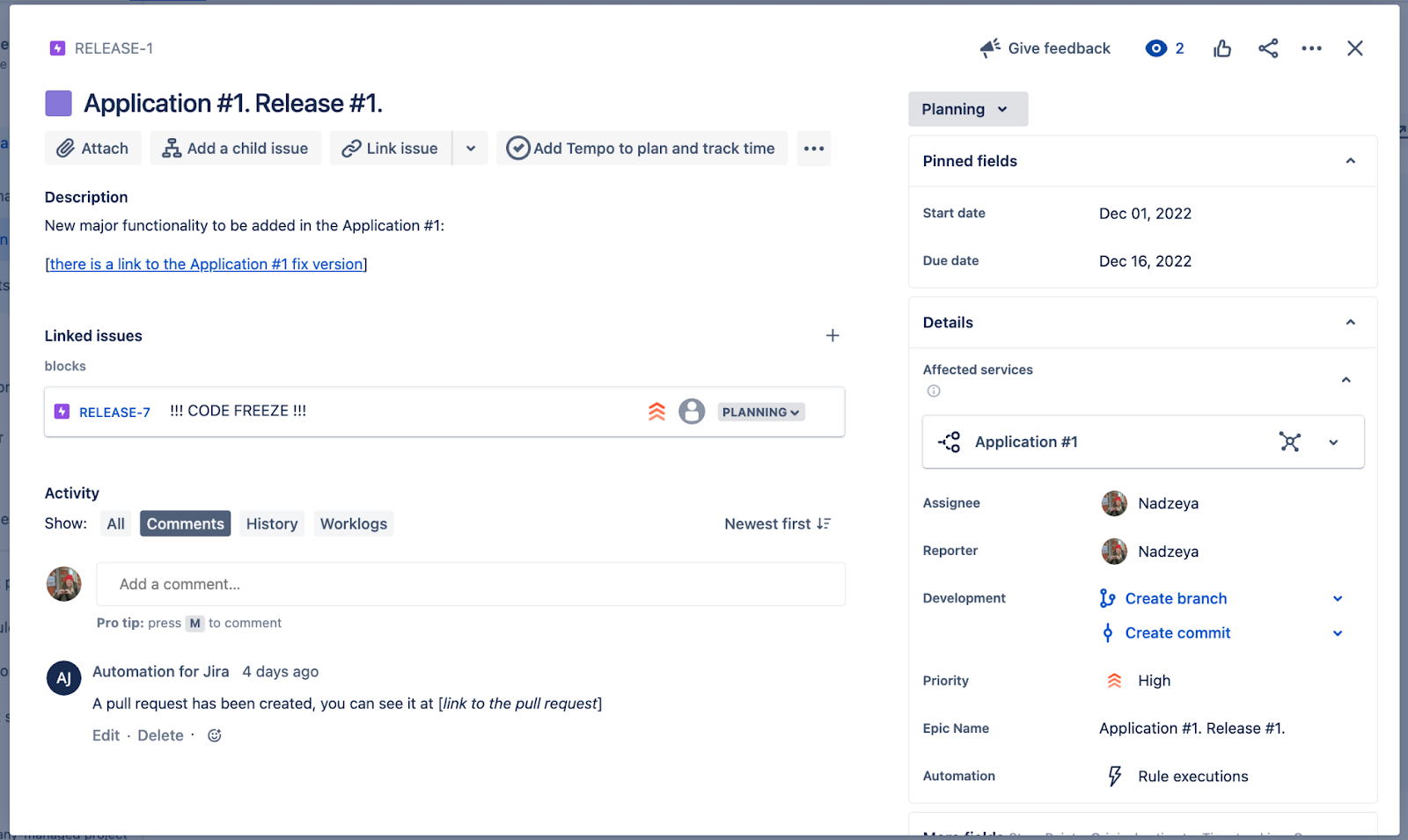
Each epic can also contain additional information with all important details relevant to the release manager. The information can be stored in custom fields or populated automatically from different sources.
Each epic can be broken down into tasks and sub-tasks if there is a need to perform additional activities for the releases. Tasks and sub-tasks can be assigned to respective assignees and be processed accordingly.
Finally, there is an opportunity to leverage Jira reporting functionality and build beautiful reports and dashboards in Jira. Alternatively, it’s possible to also export the details from Jira to Power BI or any other external reporting tools if needed and create release management reports at a glance.
Benefits of the Release Center
Adding the Release Center to the stack of Release manager tools, by our estimates and from our experience, offers benefits such as:
- 5x better-organized releases. Release managers can save time on manual syncs with numerous teams on release readiness since they have all the real-time data at hand
- 2x faster releases. Improved deployment efficiency and transparent cross-project processes enable release managers to release complex cross-project solutions faster and ensure less system downtime
- 2x improved quality. With functional, compatibility, performance, and integration tests incorporated into CI/CD, bugs can be fixed early
- Better planning and forecasting. It’s easier to collaborate around a shared goal and communicate further release scopes to project teams and stakeholders with a high-level plan
Leveraging integration with development tools, you can automate your epics to be completed as soon as the release goes live.
Now that you know the Release Center allows you to ship your projects faster (and sleep better), it is time to talk about how releases actually get into the Release Center, which is our next topic.
Please, subscribe to the series, like this post if you find it useful, and share stories about how you were up to your neck in releases 🙂


