Hi everyone! Today we want to share the way we integrate Jira with the HR management platform Bob.
According to the Gartner’s report, 60+% of surveyed 500+ HR leaders across all major industries focus on improving operational excellence and executing business transformations. Companies continuously improve processes and chosing different HR management software to ease the way people work globally, remotely, and collaboratively.
For example, our customer – a US-based multinational company – uses Bob for pre-boarding and onboarding flows management, conducting performance reviews, running compensation events, and other HR activities. The platform allows for creating templatized tasks to help the team stay organized. At the same time, Jira is used throughout the organization as a task-tracking tool, so the HR team wanted to integrate Bob with Jira to manage their tasks in one place – Jira Kanban board.
Having analyzed the customer’s workflows and gathered HR team requirements, we defined the processes that could be streamlined thanks to the integration of Jira with Bob:
1) Managing incoming events. When a user creates a new Task via triggering Task List in Bob, the same Task in Jira with the reference to a Task in Bob will be created automatically.
2) Managing resolution events. When a user resolves a Task in Jira, the related task in Bob will be automatically marked as Completed.
Managing incoming events
Step 1. Create a custom Field 'HiBob Task ID' in Jira.
Step 2. Create an Automation Rule in Jira with the trigger – incoming webhook.
- Set up a web request to find an email of the user who has triggered the event (has created the Task in Bob) with the help of ({{webhookData.changedBy.email}}). We used the email as a unique user’s account ID, as a user name may differ in Bob and Jira.
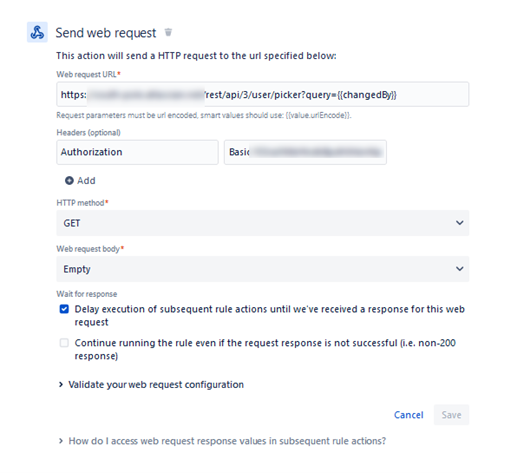
- Save the user’s account ID in Variable by adding {{changedById}}.
- Add {{webhookData.toDos}} as taskItem to trigger the Task from Bob’s Task List.
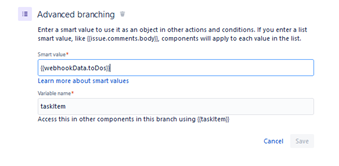
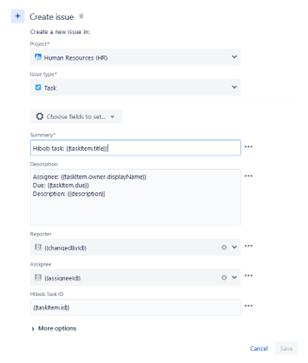
- Add {{taskItem.owner.email}} to get the email of the Task Assignee.
- Add {{assigneeId}} to find the user by email and get the Account ID.
- Create an Issue with the type – Task in the HR project by adding the following values in Fields:
Step 3. In Bob’s Settings click on Integration to register Webhook
To trigger Bob’s Task List and run the Rule, set the URL = webhook from Jira Automation Rule.

Managing resolution events
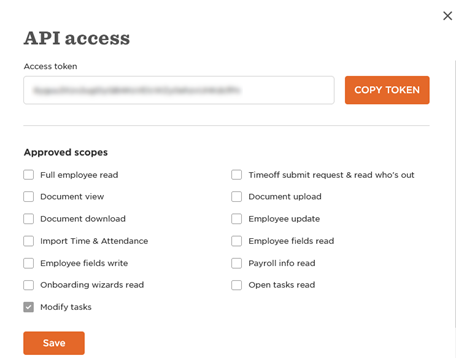
Step 1. For the Authorization header, we register as an administrator the API Access Token in Bob with Approved scopes – Modify tasks. It will help to protect the system from intruders.
Step 2. Create Automation Rule in Jira with the trigger – transition of Task to Done.
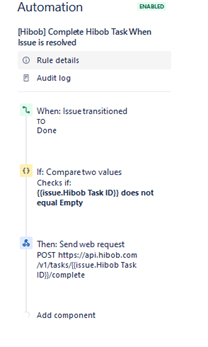
- Check if the Hibob Task ID Field is not empty.
- Send the web request https://api.hibob.com/v1/tasks/{{issue.Hibob Task ID}}/complete.
- Add the Authorization header to the web request, so that Bob will understand that the request is sent by the user with valid access rights and will mark the Task as Completed.
As a result, the integration of Jira with Bob helped the customer streamline HR management processes and save up to 30% of the time for the management of these processes.
Feel free to use this Jira and Bob integration algorithm and ask questions in the comments.


