Hello together,
I use Forms to create forms for our Jira Service Management and then provide the forms to our customers.
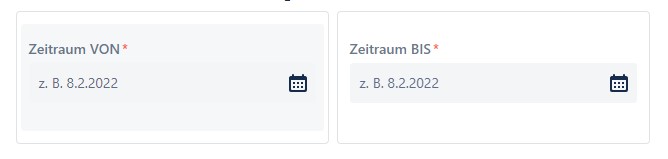
In one form I use two date pickers from the Forms Fields (checkScreenshot)
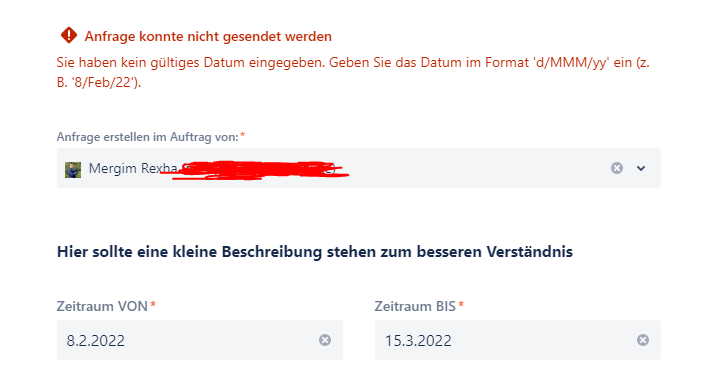
When a date is selected in the date picker which is in the month of March, the following message always appears:
Request could not be sent
You have not entered a valid date. Enter the date in the format 'd/MMM/yy' (e.g. '8/Feb/22').
Please Check Screenshot.
Now I have done some research and found out that there seems to be a problem with the German March, namely "März".
There are 2 or 3 tickets that I found:
[JRASERVER-62769] JIRA doesn't recognize "Mrz" abbreviation for March in German - Create and track feature requests for Atlassian products.
[JRASERVER-41268] JIRA doesn't recognize "Mrz" abbreviation for March in German - Create and track feature requests for Atlassian products.
In the comments it says the problem is solved, but I do not know if this also means for "forms", probably not or?
Then I also read that I need to adjust the settings in:
Settings -> “Advanced Settings”
jira.date.picker.javascript.format dd.MM.yyyy
jira.date.picker.javascript.format %d.%m.%Y
jira.date.time.picker.java.format dd.MM.yyyy HH:mm
jira.date.time.picker.javascript.format %d.%m.%Y %H:%M
System Settings -> “Look and feel”
Time Format HH:mm
Date Format EEEE HH:mm
Complete Date/Time Format dd.MM.yyyy HH:mm
Day/Month/Year Format dd.MM.yyyy
Use ISO8601 standard in Date Picker Yes
I have already done all this, but it still does not work. Can someone tell me something about this please?

