You may have noticed some recent changes to Queues inside of Jira Service Management (Star your favourite queues). Today I would like to introduce a powerful new feature designed to help teams manage their queues better; Team Priority.
We want to make sure queues are flexible enough for all teams. Team Priority allows team leaders to ensure that mission critical queues are always front of mind. This works in partnership with Starred, which allows Team members to promote the queues which are important to them.
How does it work?
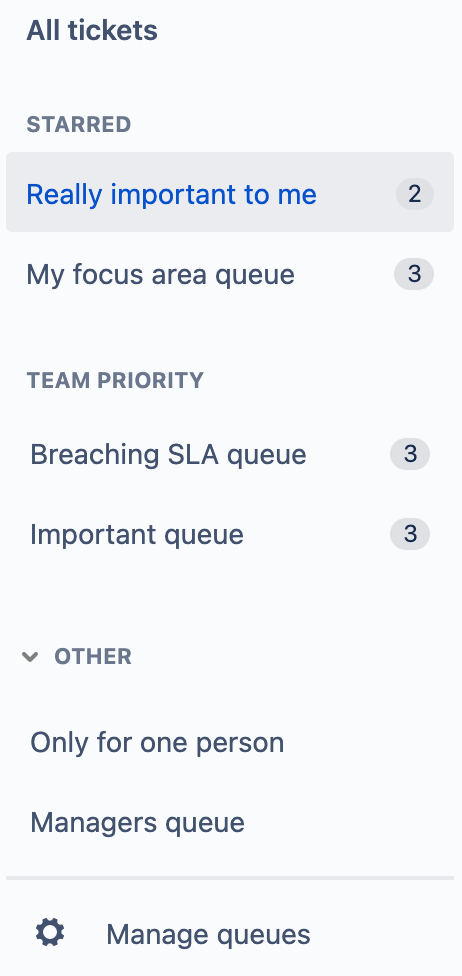 |
Starred queues always appear at the very top. They are independent of Team Priority, and are unique to each team member in the project.
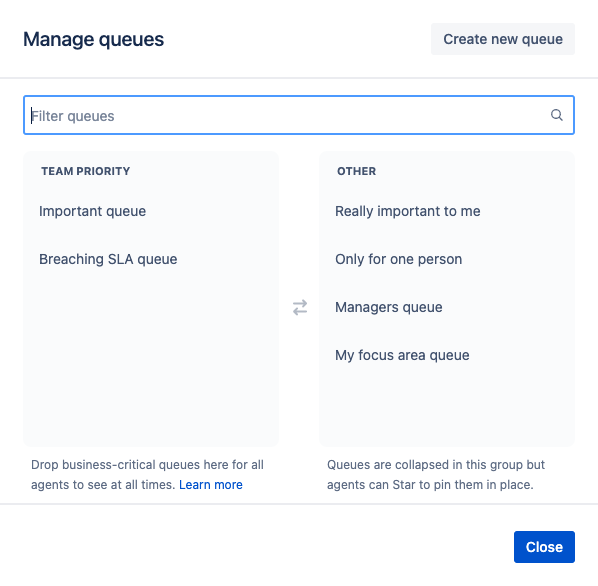
Team Priority queues are visible to all team members in a project. A Project Administrator has the ability to choose which queues appear in Team Priority via the Manage Queues button at the bottom of the list.
Queues that are not Starred or Team Priority will appear in the Other section, which is collapsed by default.
You can learn more about how Team Priority queues work here.
✅ Queues in the other section do not show ticket counts unless you click on them.
|
How can I use it?
There is no right or wrong way to use Team Priority, but a good rule of thumb is that less is more.
- Try to only prioritise queues which are important to all team members (e.g. breaching SLAs, Incidents, or High-priority issues).
- Queues with a limited audience are best left for individual team members to Star for themselves
- What are the queues that people may not think to Star for themselves, but has implications for the team if its contents are overlooked.
- Large projects often have multiple teams working inside them, it can be tricky to determine which teams queues should live in Team Priority. In this scenario most often the answer is none. Each team should Star the queues relevant to their team, and Team Priority should be used for common/utility queues, or those based on variables (e.g. assignee = currentUser()).
- It's possible that 0 is the right number of Team Priority queues for your team. This might be a good way to start 🤷♂️.
✅ The less queues you have in Team Priority the more productive your agents will be.
What do I do now?
To help your team transition into the new structure, we have moved all your existing queues into the Team Priority section. This will keep your project close to the way it was before.
This means you need to take action for your team to start benefitting from increased productivity.
- Have a conversation with your team about which queues are the most valuable, and for who they are valuable.
- Take this opportunity to audit the queues you have and do a general tidy up.
- Have your project admin (usually a team leader) click Manage Queues, and drag all the queues to Other that are not a Team Priority.
- Notify your team of the change. Let them know which queues are Team Priority, and how to find the Others.
- Encourage your team to Star the queues that are important to them.
We would love to hear your feedback. Please leave a comment below, or feel free to hit the Give Feedback button into the product.
Please note we are rolling this feature out progressively, if you cannot see it in your instance today, it won't be long until you do 😃.


