Sometimes it’s important to understand how far your Jira application has strayed from the default configuration. Was that setting there from the beginning or did an application administrator add it eons ago?
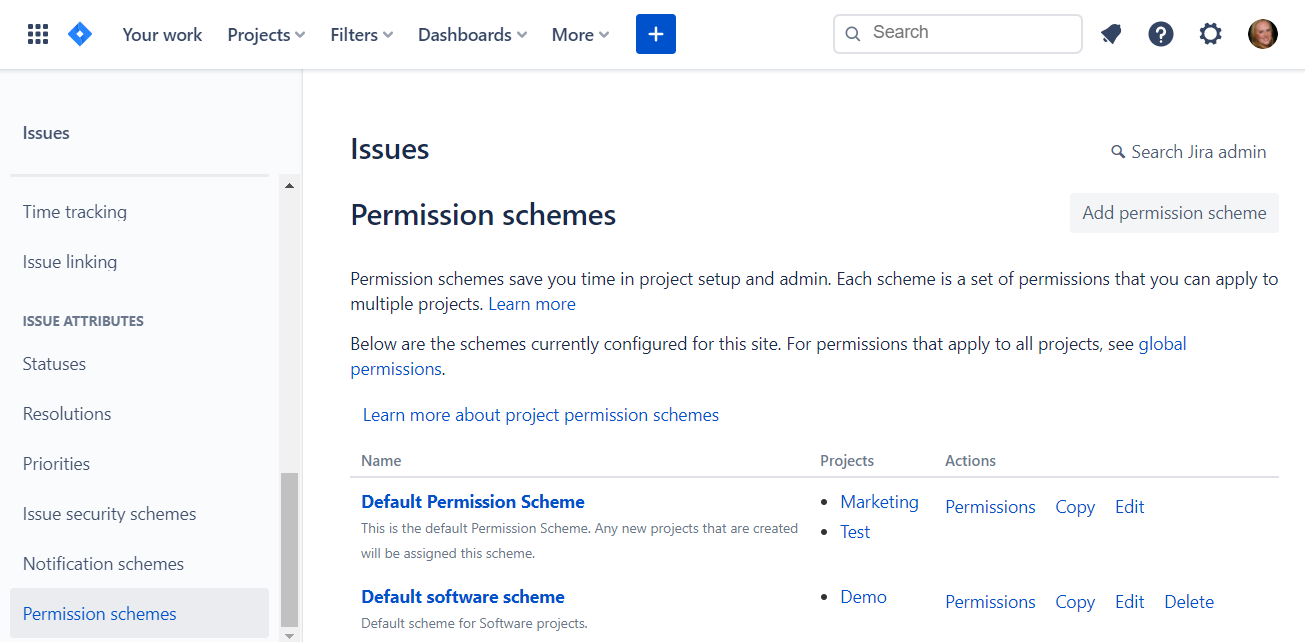
Default permission schemes (Jira Software Cloud)
To find out, visit Admin > Issues > Permission schemes in your application. Then use this baseline list to compare your Jira settings to the default.
Initial settings for Jira Cloud and Jira Server/Data Center v8.15 are included below. I keep fresh and untouched application instances around so you don’t have to!
Jira Software Cloud Free & Standard Project Permissions
Scheme name: Default Permission Scheme
Project permissions
ADMINISTER PROJECTS
Ability to administer a project in Jira.
Granted to:
- Project role
- Administrators
- atlassian-addons-project-access
BROWSE PROJECTS
Ability to browse projects and the issues within them.
Granted to:
- Project role
- atlassian-addons-project-access
- Application access
MANAGE SPRINTS
Ability to manage sprints.
Granted to:
- Project role
- atlassian-addons-project-access
VIEW DEVELOPMENT TOOLS
Allows users in a software project to view development-related information on the issue, such as commits, reviews and build information.
Granted to:
- Project role
- atlassian-addons-project-access
- Application access
VIEW READ-ONLY WORKFLOW
Users with this permission may view a read-only version of a workflow.
Granted to:
- Project role
- atlassian-addons-project-access
- Application access
Issue permissions
ASSIGNABLE USER
Users with this permission may be assigned to issues.
Granted to:
- Project role
- atlassian-addons-project-access
- Application access
ASSIGN ISSUES
Ability to assign issues to other people.
Granted to:
- Project role
- atlassian-addons-project-access
- Application access
CLOSE ISSUES
Ability to close issues. Often useful where your developers resolve issues, and a QA department closes them.
Granted to:
- Project role
- atlassian-addons-project-access
- Application access
CREATE ISSUES
Ability to create issues.
Granted to:
- Project role
- atlassian-addons-project-access
- Application access
DELETE ISSUES
Ability to delete issues.
Granted to:
- Project role
- Administrators
- atlassian-addons-project-access
EDIT ISSUES
Ability to edit issues.
Granted to:
- Project role
- atlassian-addons-project-access
- Application access
LINK ISSUES
Ability to link issues together and create linked issues. Only useful if issue linking is turned on.
Granted to:
- Project role
- atlassian-addons-project-access
- Application access
MODIFY REPORTER
Ability to modify the reporter when creating or editing an issue.
Granted to:
- Project role
- Administrators
- atlassian-addons-project-access
MOVE ISSUES
Ability to move issues between projects or between workflows of the same project (if applicable). Note the user can only move issues to a project they have the create permission for.
Granted to:
- Project role
- atlassian-addons-project-access
- Application access
RESOLVE ISSUES
Ability to resolve and reopen issues. This includes the ability to set a fix version.
Granted to:
- Project role
- atlassian-addons-project-access
- Application access
SCHEDULE ISSUES
Ability to view or edit an issue’s due date.
Granted to:
- Project role
- atlassian-addons-project-access
- Application access
SET ISSUE SECURITY
Ability to set the level of security on an issue so that only people in that security level can see the issue.
Granted to:
- Project role
- atlassian-addons-project-access
TRANSITION ISSUES
Ability to transition issues.
Granted to:
- Project role
- atlassian-addons-project-access
- Application access
Voters & watchers permissions
MANAGE WATCHERS
Ability to manage the watchers of an issue.
Granted to:
- Project role
- Administrators
- atlassian-addons-project-access
VIEW VOTERS AND WATCHERS
Ability to view the voters and watchers of an issue.
Granted to:
- Project role
- atlassian-addons-project-access
- Application access
Comments permissions
ADD COMMENTS
Ability to comment on issues.
Granted to:
- Project role
- atlassian-addons-project-access
- Application access
DELETE ALL COMMENTS
Ability to delete all comments made on issues.
Granted to:
- Project role
- Administrators
- atlassian-addons-project-access
DELETE OWN COMMENTS
Ability to delete own comments made on issues.
Granted to:
- Project role
- atlassian-addons-project-access
- Application access
EDIT ALL COMMENTS
Ability to edit all comments made on issues.
Granted to:
- Project role
- Administrators
- atlassian-addons-project-access
EDIT OWN COMMENTS
Ability to edit own comments made on issues.
Granted to:
- Project role
- atlassian-addons-project-access
- Application access
Attachments permissions
CREATE ATTACHMENTS
Users with this permission may create attachments.
Granted to:
- Project role
- atlassian-addons-project-access
- Application access
DELETE ALL ATTACHMENTS
Users with this permission may delete all attachments.
Granted to:
- Project role
- Administrators
- atlassian-addons-project-access
DELETE OWN ATTACHMENTS
Users with this permission may delete own attachments.
Granted to:
- Project role
- atlassian-addons-project-access
- Application access
Time tracking permissions
DELETE ALL WORKLOGS
Ability to delete all worklogs made on issues.
Granted to:
- Project role
- Administrators
- atlassian-addons-project-access
DELETE OWN WORKLOGS
Ability to delete own worklogs made on issues.
Granted to:
- Project role
- atlassian-addons-project-access
- Application access
EDIT ALL WORKLOGS
Ability to edit all worklogs made on issues.
Granted to:
- Project role
- Administrators
- atlassian-addons-project-access
EDIT OWN WORKLOGS
Ability to edit own worklogs made on issues.
Granted to:
- Project role
- atlassian-addons-project-access
- Application access
WORK ON ISSUES
Ability to log work done against an issue. Only useful if Time Tracking is turned on.
Granted to:
- Project role
- atlassian-addons-project-access
- Application access
Scheme name: Default software scheme
Same as the Jira Cloud “Default Permission Scheme” except:
MANAGE SPRINTS
Ability to manage sprints.
Granted to:
- Project role
- atlassian-addons-project-access
- Application access
Jira Software Server Project Permissions
Scheme name: Default software scheme
Project permissions
ADMINISTER PROJECTS
Ability to administer a project in Jira.
Granted to:
Also includes a checkbox to grant extended project administration permissions.
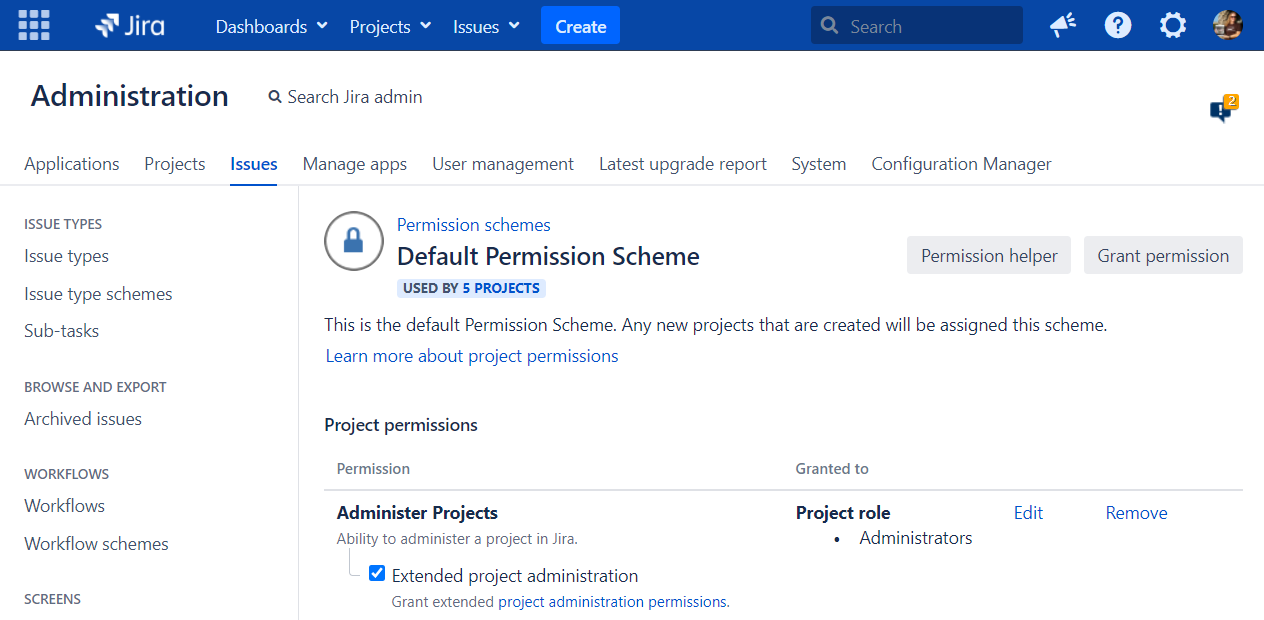
Extended project administration
BROWSE PROJECTS
Ability to browse projects and the issues within them.
Granted to:
EDIT SPRINTS
Ability to edit sprint name and goal.
Granted to: none
MANAGE SPRINTS
Ability to manage sprints.
Granted to:
START/COMPLETE SPRINTS
Ability to start and complete sprints.
Granted to: none
VIEW DEVELOPMENT TOOLS
Allows users in a software project to view development-related information on the issue, such as commits, reviews and build information.
Granted to:
VIEW READ-ONLY WORKFLOW
Users with this permission may view a read-only version of a workflow.
Granted to:
Issue permissions
ASSIGNABLE USER
Users with this permission may be assigned to issues.
Granted to:
ASSIGN ISSUES
Ability to assign issues to other people.
Granted to:
CLOSE ISSUES
Ability to close issues. Often useful where your developers resolve issues, and a QA department closes them.
Granted to:
CREATE ISSUES
Ability to create issues.
Granted to:
DELETE ISSUES
Ability to delete issues.
Granted to:
EDIT ISSUES
Ability to edit issues.
Granted to:
LINK ISSUES
Ability to link issues together and create linked issues. Only useful if issue linking is turned on.
Granted to:
MODIFY REPORTER
Ability to modify the reporter when creating or editing an issue.
Granted to:
MOVE ISSUES
Ability to move issues between projects or between workflows of the same project (if applicable). Note the user can only move issues to a project they have the create permission for.
Granted to:
RESOLVE ISSUES
Ability to resolve and reopen issues. This includes the ability to set a fix version.
Granted to:
SCHEDULE ISSUES
Ability to view or edit an issue’s due date.
Granted to:
SET ISSUE SECURITY
Ability to set the level of security on an issue so that only people in that security level can see the issue.
Granted to: none
TRANSITION ISSUES
Ability to transition issues.
Granted to:
Voters & watchers permissions
MANAGE WATCHERS
Ability to manage the watchers of an issue.
Granted to:
VIEW VOTERS AND WATCHERS
Ability to view the voters and watchers of an issue.
Granted to:
Comments permissions
ADD COMMENTS
Ability to comment on issues.
Granted to:
DELETE ALL COMMENTS
Ability to delete all comments made on issues.
Granted to:
DELETE OWN COMMENTS
Ability to delete own comments made on issues.
Granted to:
EDIT ALL COMMENTS
Ability to edit all comments made on issues.
Granted to:
EDIT OWN COMMENTS
Ability to edit own comments made on issues.
Granted to:
Attachments permissions
CREATE ATTACHMENTS
Users with this permission may create attachments.
Granted to:
DELETE ALL ATTACHMENTS
Users with this permission may delete all attachments.
Granted to:
DELETE OWN ATTACHMENTS
Users with this permission may delete own attachments.
Granted to:
Time tracking permissions
DELETE ALL WORKLOGS
Ability to delete all worklogs made on issues.
Granted to:
DELETE OWN WORKLOGS
Ability to delete own worklogs made on issues.
Granted to:
EDIT ALL WORKLOGS
Ability to edit all worklogs made on issues.
Granted to:
EDIT OWN WORKLOGS
Ability to edit own worklogs made on issues.
Granted to:
WORK ON ISSUES
Ability to log work done against an issue. Only useful if Time Tracking is turned on.
Granted to:
Scheme name: Default software scheme
Same as the Jira Server “Default Permission Scheme”.
Jira Software Data Center, Jira Cloud Premium, and Jira Cloud Enterprise Project Permissions
These types of Jira have archival features and additional permissions. Same as the Jira Server “Default Permission Scheme” plus:
BROWSE PROJECT ARCHIVE
Ability to browse archived issues from a specific project.
Granted to: none
ARCHIVE ISSUES
Ability to archive issues for a specific project.
Granted to: none
RESTORE ISSUES
Ability to restore issues for a specific project.
Granted to: none


