Hi,
I created a diagram with draw.io in Confluence Cloud and exported it to XML. Then I imported it into draw.io on our Confluence Server. The import worked fine, but now I have unwanted line spaces between the lines of different indentation in bullet point lists.
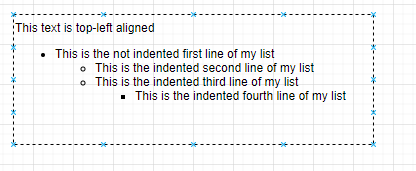
Here is an example in the draw.io cloud app:
And in the server app with the unwanted line space.
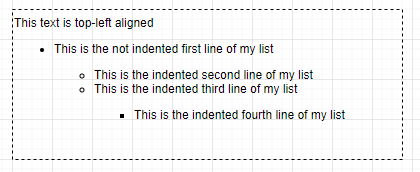
As you can see only the lines of different indentation have to much line space. Lines of the same indentation are shown as expected.
In both apps the text is written in Helvetica, 12pt, 120% line height, with 2pt global space, formatted as normal style.
How can I get rid of this additional space in the list? Is this something I can configure in my server app?
best regards
Jens

