It appears that the "Add approval" tick box for a Workflow Status appears only in the two out of the box Workflows that are created when you create a new Jira Service Desk Project.
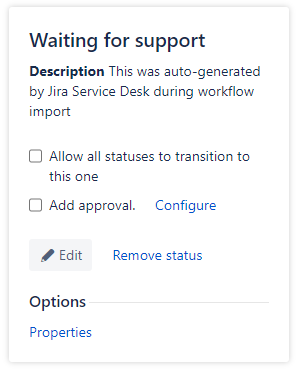
When I create a Jira Service Desk Project, lets calls this "My Test Project" (MTP), the system creates two Workflows:
MTP: Jira Service Desk default workflow
MTP: Service Request Fulfilment workflow for Jira Service Desk
Any steps in the Workflows above that are relevant, let me tick the "Add approval" option.
If I copy one of the about Workflows and add it to the Workflow Scheme for the same project (thereby linking it to a JSD Project) the "Add approval" option it not there.
I've been looking around the forums, and it appears that the common issue most people saw was that the new/copied Workflow was not linked to a JSD project, but I'm finding that even that doesn't help.
Any advice?

