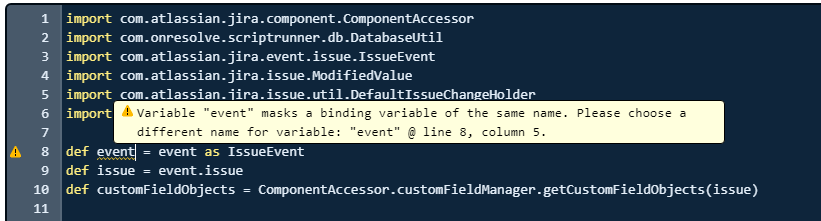
We recently created a Jira Service Desk, where customers create tickets. Created text field (Product Id) where customers enter the product id, in the backend I created two text fields (Product Name, Start Date). I just whenever customers enter the productId, it should show the product name and date from the backend to the service desk agent. I created a database an external database connection in scriptrunner and I can query the DB.
I copied a script from online and try to make it work, but it is not working, I'm not sure what I'm doing wrong. To be honest, I don't have any about the groovy, so I just copied everything online. I'm also getting a warning from line 8 (screenshot). Can somebody help me please, thank you!
Custom Fields name: Product Id, Product Name, Start Date
Database Fields name: productId, productName, startDate
DatabaseName: Product
Poolname from resources: Product_Pool
Script
import com.atlassian.jira.component.ComponentAccessor
import com.onresolve.scriptrunner.db.DatabaseUtil
import com.atlassian.jira.event.issue.IssueEvent
import com.atlassian.jira.issue.ModifiedValue
import com.atlassian.jira.issue.util.DefaultIssueChangeHolder
import java.sql.Timestamp
def event = event as IssueEvent
def issue = event.issue
def customFieldObjects = ComponentAccessor.customFieldManager.getCustomFieldObjects(issue)
def valueCF = customFieldObjects.findByName("Product Id")
def productName = customFieldObjects.findByName("Product Name")
def startDateCF = customFieldObjects.findByName("Start Date")
def value = issue.getCustomFieldValue(valueCF)
DatabaseUtil.withSql('Product_Pool') { sql ->
def row = sql.firstRow("SELECT * FROM Prdouct WHERE productId = ?", value)
if (row) {
def startDate = row.'CreateDate' as Timestamp
def startDateValue = """${startDate.time <= System.currentTimeMillis() ?
"{color:#d04437}${startDate.format('yyyy-MM-dd')}{color}" :
"{color:#00875A}${startDate.format("yyyy-MM-dd")}{color}"}""".toString()
productName.updateValue(null, issue, new ModifiedValue(issue.getCustomFieldValue(productName), row.'ProrductName'), new DefaultIssueChangeHolder())
startDateCF.updateValue(null, issue, new ModifiedValue(issue.getCustomFieldValue(startDateCF), startDateValue), new DefaultIssueChangeHolder())
}
}
Error log;
2020-06-16 12:01:40,115 ERROR [runner.AbstractScriptListener]: *************************************************************************************
2020-06-16 12:01:40,116 ERROR [runner.AbstractScriptListener]: Script function failed on event: com.atlassian.jira.event.issue.IssueEvent, file: null
org.codehaus.groovy.runtime.typehandling.GroovyCastException: Cannot cast object '2020-05-01' with class 'java.sql.Date' to class 'java.sql.Timestamp'
	at Script126$_run_closure1.doCall(Script126.groovy:20)
	at com.onresolve.scriptrunner.db.AbstractDbConnectionManager.withSql(AbstractDbConnectionManager.groovy:63)
	at com.onresolve.scriptrunner.db.AbstractDbConnectionManager$withSql$1.callCurrent(Unknown Source)
	at com.onresolve.scriptrunner.db.AbstractDbConnectionManager$withSql$1.callCurrent(Unknown Source)
	at com.onresolve.scriptrunner.db.AbstractDbConnectionManager.withSqlTracked(AbstractDbConnectionManager.groovy:92)
	at com.onresolve.scriptrunner.db.DbConnectionManager$withSqlTracked$1.call(Unknown Source)
	at com.onresolve.scriptrunner.db.DbConnectionManager$withSqlTracked$1.call(Unknown Source)
	at com.onresolve.scriptrunner.db.DatabaseUtil.withSql(DatabaseUtil.groovy:22)
	at com.onresolve.scriptrunner.db.DatabaseUtil$withSql.call(Unknown Source)
	at Script126.run(Script126.groovy:17)