I'm trying to make changes to the Start, Pause on and Stop conditions for a "time to resolution" SLA that has been set up.
However, each time I save the changes and either navigate to an issue or refresh the screen, the changes aren't applied.
I'm trying to move "Status: Assigned to Release" from Pause on to Stop
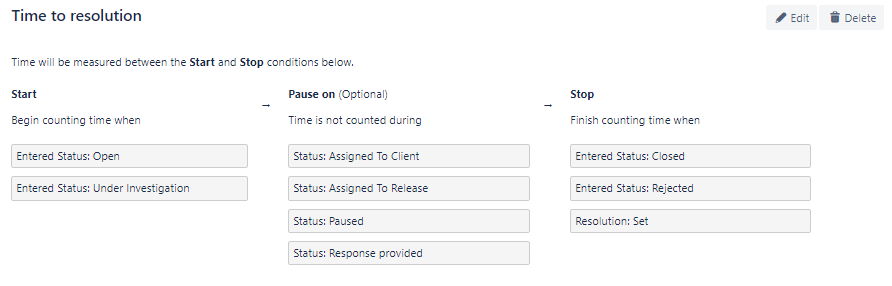
Steps:
- Select Project settings
- Select SLAs
- Click the 'Edit' button
- untick the 'Pause on' status and tick the relevant status in 'Stop'
- Select 'Save'
- Confirmation prompt "You changed your SLA configuration. Confirm your changes and we'll recalculate your project's SLAs."
- I select save
- Another prompt appears:
"Don't forget to save
You changed your SLA configuration. Confirm your changes and we'll recalculate your project's SLAs."
- I select 'Save' once again
- When I'm navigated back to the SLAs landing page, it looks like the changes have been made, however, when I refresh the page or navigate to an issue the changes are reverted and not applied as I can still see a paused icon on the issue.
I've tried on multiple browsers and get the same behaviour.
Any help would be greatly appreciated


