I am new to administrating on Jira Service Desk; I've been a Salesforce Admin for some time and have learned various other tools pretty quickly. That said I'm running into an issue with some of the more advanced tasks in Jira Service Desk.
I need to update the jira.table.cols.subtasks so that it shows different fields on the Issue that the subtask is attached to. I've followed the instructions and tried to use the IssueFieldConstants but no luck.
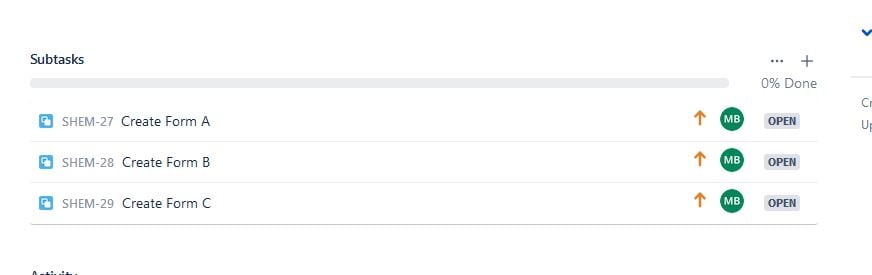
Figure 1. Shows a ticket with 3 subtasks. It shows Issue Type, Key, Summary, Priority, Assignee, and Status.
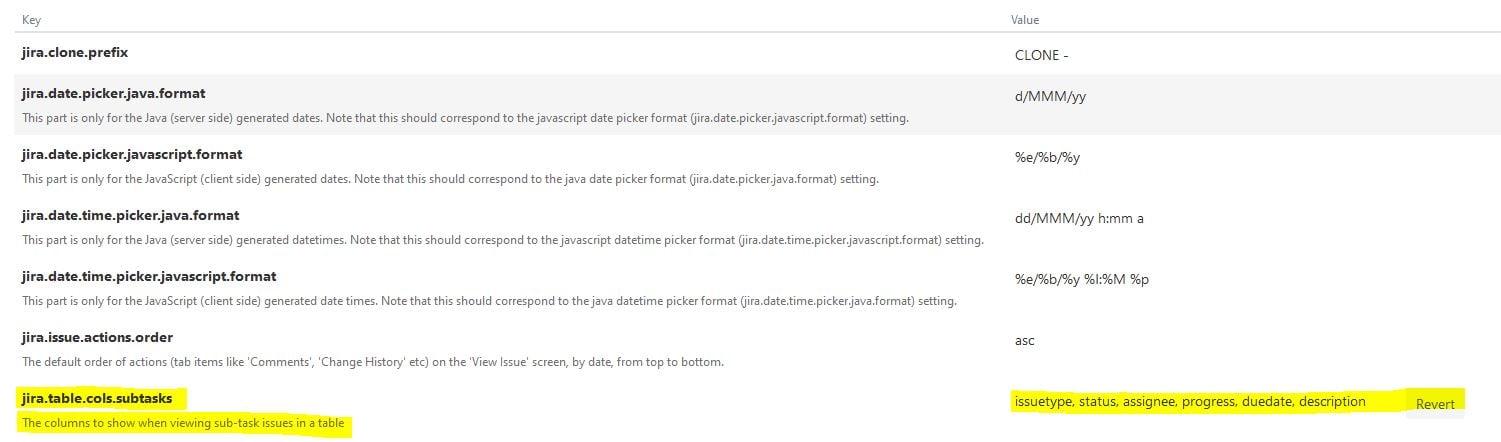
Figure 2. Shows the fields that should appear in this table.
Observations:
1) My understanding is that the fields should appear in the order that they are listed. But that doesn't seem to hold true here (Figure2)
2) I've added 2 new fields, if the field values are wrong it won't allow you to update so I'm assuming the fact that it updated means the values are accurate.
3) There are other fields I want to add but cannot for the life of me find a value for them. Trying to navigate the IssueFieldConstants is a nightmare.
Questions:
1) What am I missing? I attempted to create new subtasks to see if it only worked "going forward" but instead found even less information appeared when I did this.
2) Can anyone guide me a bit on the IssueFieldsConstant page and how to identify the fields that I need. I want to add Estimated Hours and Log Work so you can easily log work on each subtask rather than going into the Subtask. (I know it's possible at least in Jira Software I've used this feature before)