selecting /Files & Images and nothing happens
Is there something needed to unlock this as I notice it is the only one with a yellow border surrounding the icon?
Hello Cathy,
Welcome to Atlassian Community. It's nice to have you join us!
Could you please show me a screenshot of the yellow border you're referring to? I've never seen that before and so I'm not really sure what you're referring to.
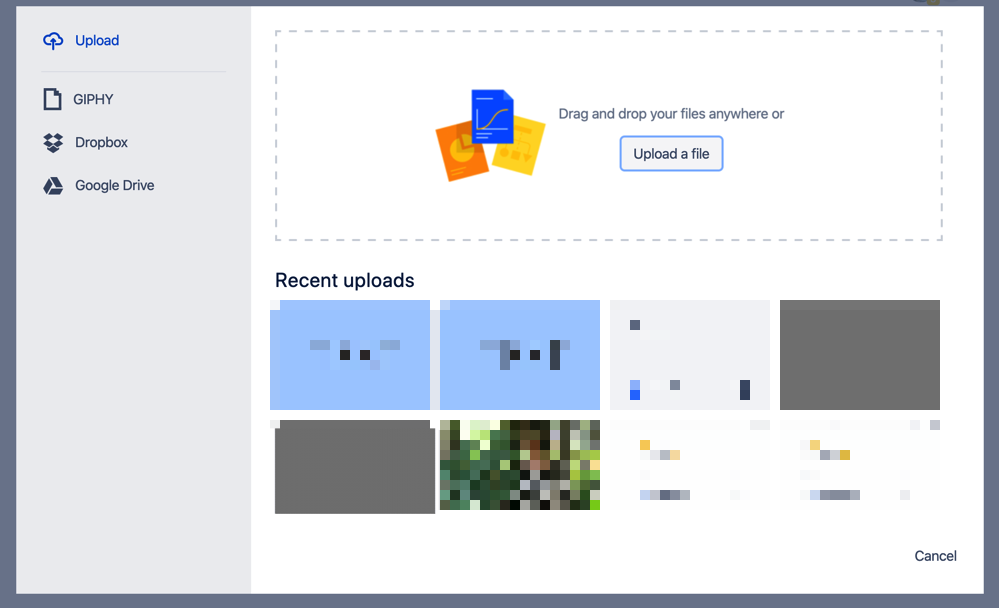
When you select Files & Images, this is the window that will pop-up if you are on the new Confluence editor:
If you're experiencing anything else, I would recommend that you try another browser, make sure you're using the latest available browser version, and try in Incognito Mode. You may need to disable all add-ons in your browser to prevent them from interacting with your Cloud site.
Let me know if you have any questions about that.
Shannon
Hello Shannon,
Thanks for taking a look.
I took a look at my colleagues screen and Yes, it worked just like yours.
But when I click on the attached image, Files & images, nothing happens.
Nothing at all, not warning message not advice, nothing. It just does nothing.
Hi Cathy,
Thank you for providing those details.
The menu you shared above is from when you type / to insert a macro in your browser, correct?
Can you let me know more about the yellow border you're seeing? I don't see one in the image you included, but I think you might be referring to the picture icon next to Files & Images. The yellow rectangle is a picture frame and it's part of the icon. Is this the one you're referring to?
When you click that, it does open a window very similar to the one I shared earlier. If you're not getting that window, then something's wrong with your browser or network. You might be using an add-on or setting that prevents new windows from opening in your browser, for example.
In this case, my previous recommendation should help you to narrow down the issue:I would recommend that you try another browser, make sure you're using the latest available browser version, and try in Incognito Mode. You may need to disable all add-ons in your browser to prevent them from interacting with your Cloud site.
If you still have trouble, you can ask your IT team or Network Admin and they can help you have a look at your browser locally and determine what might be blocking that window from opening.
As a workaround, can you let me know if dragging and dropping or copying and pasting images onto the page is working?
Regards,
Hi Shannon, I am also experiencing this issue. I've updated chrome, tried incognito mode, and disabled add-ons. Can you please advise? I type / and click Files & Images, and nothing happens.
sorry, not an answer! please see reply stream below.
I've gone through the same issue... After some time looking for a solution I found out that I had created the new document under the "Administration Home" folder.
I created a new document inside the correct folder, copied and pasted all the content. Then adding images started to work.
This seems to be a permissions issue, you need your Atlassian Cloud administrator to grant you attachment permissions, and after refresh you should have the image tab in your bar and be able to use them.
Hi there!
I was having this same exact issue. Nothing would happen when I clicked the Files/Images icon. After many attempts and reading through here I almost gave up. BUT!!!! I got it to work! I had some updates on my browser... after updating... the icon works again!
It looks like you're new here. Sign in or register to get started.