We updated Jira Software two weeks ago and are using now Jira v7.13.11.
Today, one user came up with a question about the following problem:
He wanted to change the text color of one table cell from red to green and this didn't work properly. After saving, the table was destroyed.
I tried to retrace the problem as follows:
Inserted a table in a new ticket as follows:
|Column 1||Column 2||Column 3||
|{color:#00875a}Test{color}|{color:#de350b}Test{color}|Test|
|Test|{color:#de350b}Test{color}|Test|
| | | |
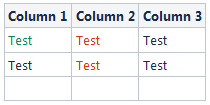
After editing the table by changing the value in cell "A2" the text renderer looked as follows:
||Column 1||Column 2||Column 3||
|{color:#de350b}{color:#00875a}Test{color}{color}|{color:#de350b}Test{color}|Test|
|Test|{color:#de350b}Test{color}|Test|
| | | |
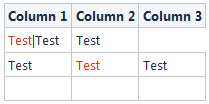
I also added two snapshots of the tables how they look in the visual text renderer.
Does anybody have a solution for this problem?
Thanks a lot in advance!


