Installing Jira 8.3.3 on Windows Server 2016. Database is MS SQL 2017 on a different server. After filling out the details on the Database setup page,
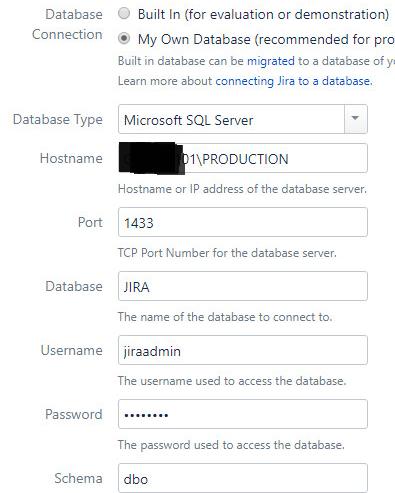
when clicking the "Test Connection" button I get the following error:
Error connecting to database
Login failed for user 'jiraadmin'. ClientConnectionId:4d9850de-3e03-4696-b08a-dce5775c8f7b
On the SQL server, the error is:
Login failed for user 'jiraadmin'. Reason: An attempt to login using SQL authentication failed. Server is configured for Integrated authentication only. [CLIENT: 10.98.64.43]
This is false. Here's a screenshot:
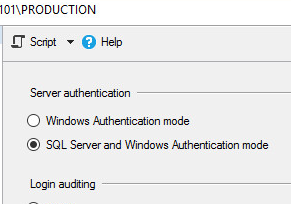
I CAN logon to the MS SQL Management Studio with that same username and password. I CAN connect successfully from the Jira server using an ODBC connection with the same username and password. This leads me to believe it is a Jira issue.
I tried initially making the jiraadmin user just a user with dbowner role and creating a new jira schema as suggested. In the process of trying things jiraadmin has been elevated up to the dbowner and the using the dbo schema, all with no change in results.

![Photo of Jack Nolddor [Sweet Bananas]](https://us.v-cdn.net/6038660/uploads/avatars/b3/a6/nb3a6df9986a0e0eba72ad4e75c0a61f5.png)

