We have recently upgraded from Jira Server 8.2.0 to 8.3.1.
We have since found that our Service Desk is inaccessible to any users who do not have access to the project through Jira Server. Their browsers show 500 errors, which the returned XML shows as:
IllegalAccessException: no access here at com.prontop.v4.managers.DesignManager.getDesignContext_MustBeCalledInServiceDeskContext
If I attempt to browse the permissions scheme that governs the Service Desk, I get a blank page. The XML shows a 500 error:
java.lang.NullPointerException at com.atlassian.jira.permission.management.ManagedPermissionSchemeHelperImpl.buildGrants
I have restored our pre-upgrade database on a separate server and installed 8.2.0 to view the working permissions scheme. I can see that the the Service desk customer – portal access option is missing from the 8.3.1 system. If I attempt to create a new permissions scheme on the upgraded system, this option is not available to me.
I have found this article which describes this problem:
https://confluence.atlassian.com/jirakb/when-granting-permissions-the-service-desk-customer-portal-access-permission-is-missing-966051663.html
In our instance, the error in atlassian-jira.log is:
[n.java.ao.sql] Exception executing SQL update <ALTER TABLE JIRASchema.AO_54307E_SERVICEDESK ALTER COLUMN PROJECT_KEY NVARCHAR(255)>
com.microsoft.sqlserver.jdbc.SQLServerException: The object 'df_AO_54307E_SERVICEDESK_PROJECT_KEY' is dependent on column 'PROJECT_KEY'.
The resolution in this article is :
Remove the variations from the table structure. It may be necessary to use a fresh installation on a test instance, to determine what the correct, default structure is for your specific database type and version.
I need some help with this solution as I'm unsure what to do with it.
We're running Jira on SQL Server 2017 in SQL Server 2012 compatibility mode.
Edit:
I ran the command outlined at the end of this article which suggests removing the 'sd.customer.portal.only' entry from the scheme permissions of the database.
https://confluence.atlassian.com/jirakb/nullpointerexception-on-editing-permission-scheme-826891686.html
When the server came back up after a reboot, I browsed the broken permissions scheme and got this message offering to fix them.
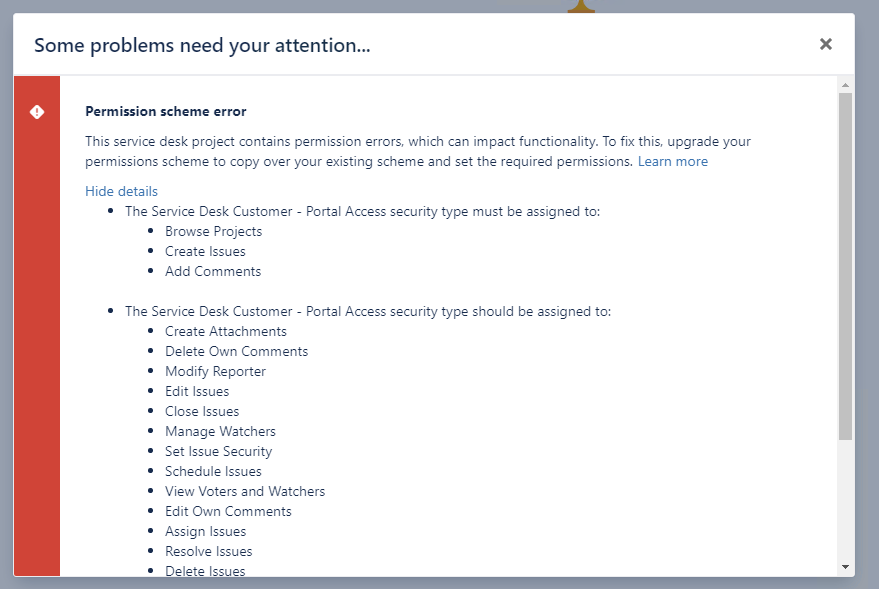
I chose this option which led to a new permissions scheme being created. However, if I try to open the newly-created scheme, I get the blank screen again. My browser console shows this 500 error, which is the same as before.
status><status-code>500</status-code><stack-trace>java.lang.NullPointerException at com.atlassian.jira.permission.management.ManagedPermissionSchemeHelperImpl.buildGrants(ManagedPermissionSchemeHelperImpl.java:367) at com.atlassian.jira.permission.management.ManagedPermissionSchemeHelperImpl.lambda$generatePermissionSchemeBean$4(ManagedPermissionSchemeHelperImpl.java:249)
So the problem persists. I can see from rolling back and re-running the upgrade that this fault is triggered by the 8.3.1 upgrade. Unfortunately, rolling back the upgrade is no longer an option for us.
Any suggestions would be welcome.


![Photo of Hua Soon SIM [Akeles]](https://us.v-cdn.net/6038660/uploads/avatars/70/48/n7048b7ba977b8dc55f8c14247ce9ba13.png)