Hello Community,
Avinoam here from Confluence Product Management.
When was the last time you created a Confluence page in the wrong place or spent ages trying to figure out how to create a child page from a parent page? If your answer is not long ago, the ability to create pages in context is here to help!
You can add a child page under whatever page you like directly from within the page tree. Simply tap on the new + icon that appears next to page name in the page tree, and your page will be created as a child page.
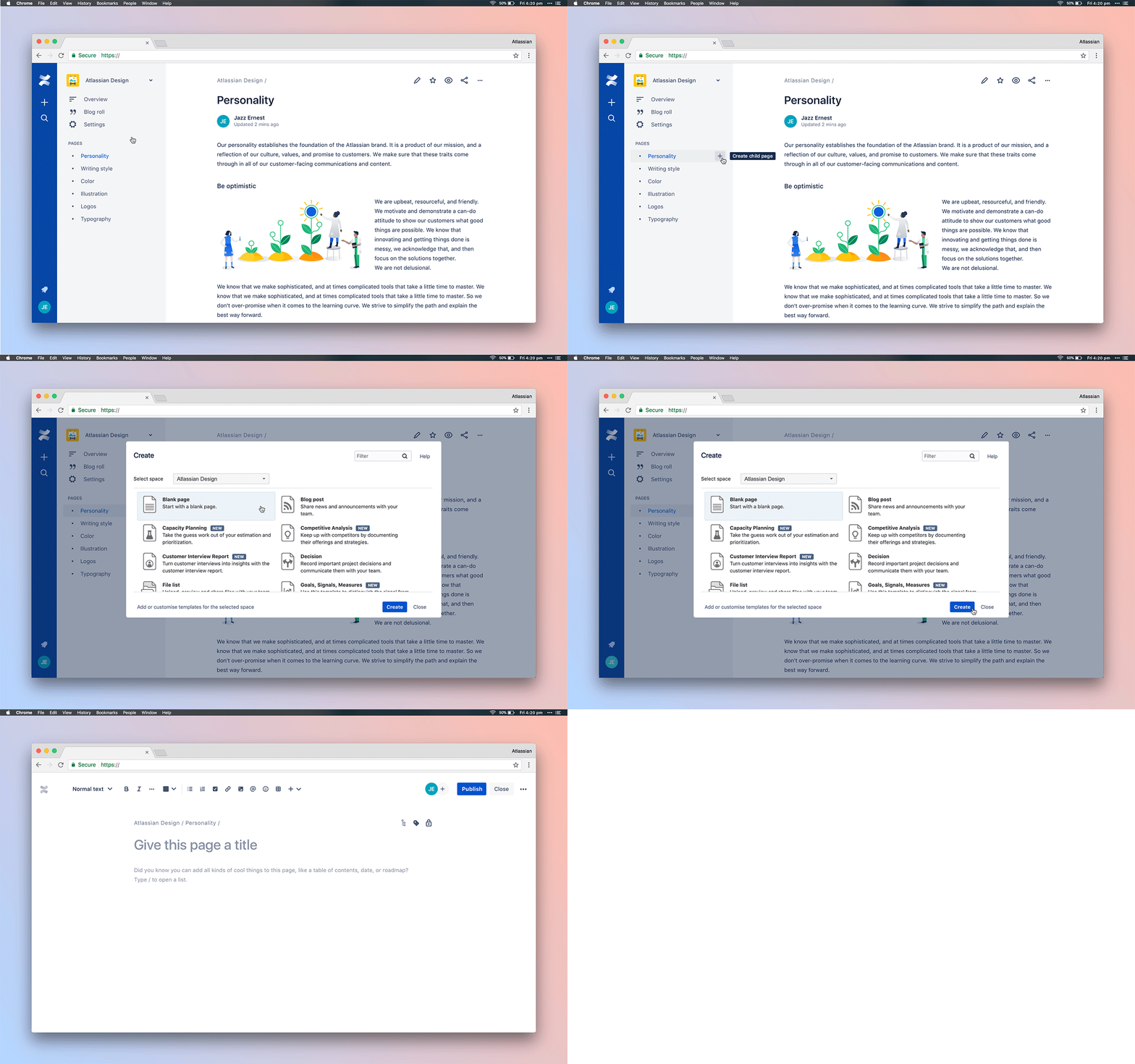
This action is in addition to the global Create button, so if you want to make a child page of the one you are viewing, that process hasn’t changed.
Keep spaces organized
Adding pages contextually lets us add them where you want them to live from the start. Made a mistake or changed your mind? Use our new drag and drop feature in the page tree to drag the page where you want it or reorder the pages as you like.
Want other tips for organizing your Confluence content? Check out these 4 tips.
Have feedback?
This will be rolling out to all customers over the coming weeks, and we’d love for you to try it out and share your thoughts! Please feel free to share your feedback in the comments below or directly in the product by clicking your avatar on the bottom left > Send feedback.


