I use Visual Studio 2017 with the BitBucket extension installed (v1.40.3).
In the past, I could push and pull with no problems, but somewhere along the line, it quit working. The last successful push was on 4/12. I do not recall making any change around that time or since.
I do not program all the time, so my project will get worked on for a month, and then I won't touch it for a while. I also must admit that I am not well-versed in git; it was originally setup for me.
I tried following the steps here: https://www.dotnetcurry.com/visualstudio/1374/using-git-bitbucket-with-visual-studio-2017, but when I get to the step where I am supposed to clone the repository, I get:
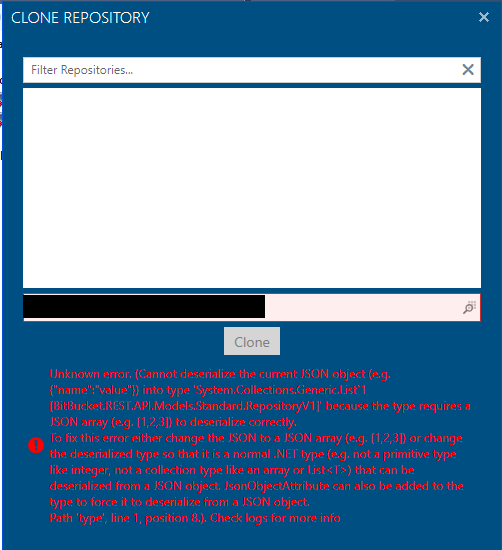
I'm not sure what to do with that... The default local directory had nothing in it, so I got the directory for my local repo and pasted it in; the error went away, but the screen still shows no repositories in the list.
Other [maybe] relevant information:
- My BitBucket account does have several repositories.
- When I go to Team Explorer > Settings > Repository Settings > Remotes; it displays the repository I am wanting to push to.
- When I go to Team Explorer > Manage Connections > Bitbucket Extension; I see "Welcome [my username]
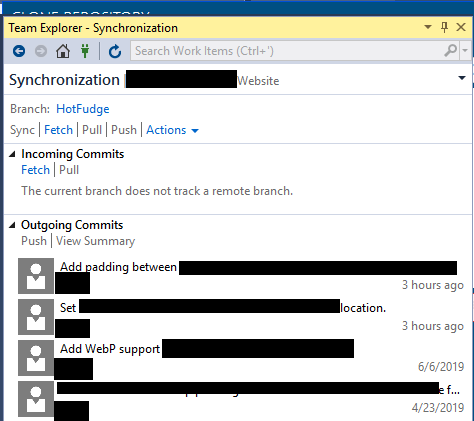
You are connected to https://bitbucket.org" - From the synchronization screen, this is what I see: