I have a saved filter on Project, Type and Sprint, but when I view the filter, I cannot see the Sprint filter (most of the time) in the basic view. If I switch to advanced view, you can see that Sprint is part of the selected filters.
(E.g. - this is the advanced view "project = BOUN AND issuetype in (Enhancement, Story, Task) AND Sprint = 324 ORDER BY key ASC, created DESC")
The Sprint filter option usually displays in the area circled in red below, it has definitely been selected as:
- the Sprint field no longer appears in the More list.
- The advanced syntax as given above shows that it is there.
- The result set is consistent with the value set.
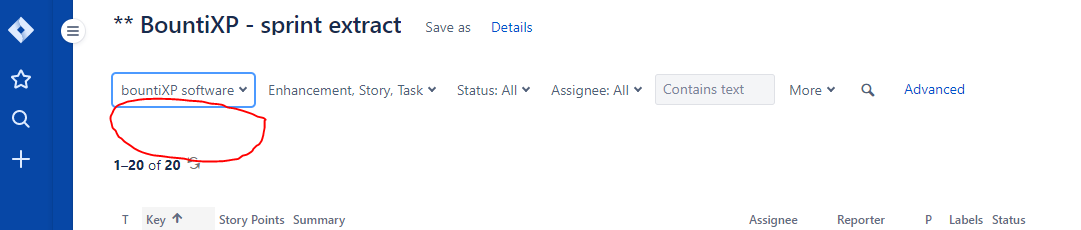
After experimenting I found that
- If I deselect then reselect the Project filter, it automatically resets the Type filter to enhancement only - is this correct? (Personally it does not seem correct to me)
- When it changed the Type to Enhancement, by chance, there were no enhancements in the Sprint, so I get the placeholder message "No issues were found to match your search" - and voila, the Sprint filter now displays!! - it therefore appears that the results set overlays the second filter line (or some similar action) - as the instant I correct the Type filter and results are returned, I can no longer see the Sprint filter option again!
- is anyone else having this problem?
- should this be reported as a bug?
Thanks
Mark

