Hello Brothers and Sisters,
GOAL: Make custom_field value (single text type) clickable on WIDGET DASHBOARD
Issue:
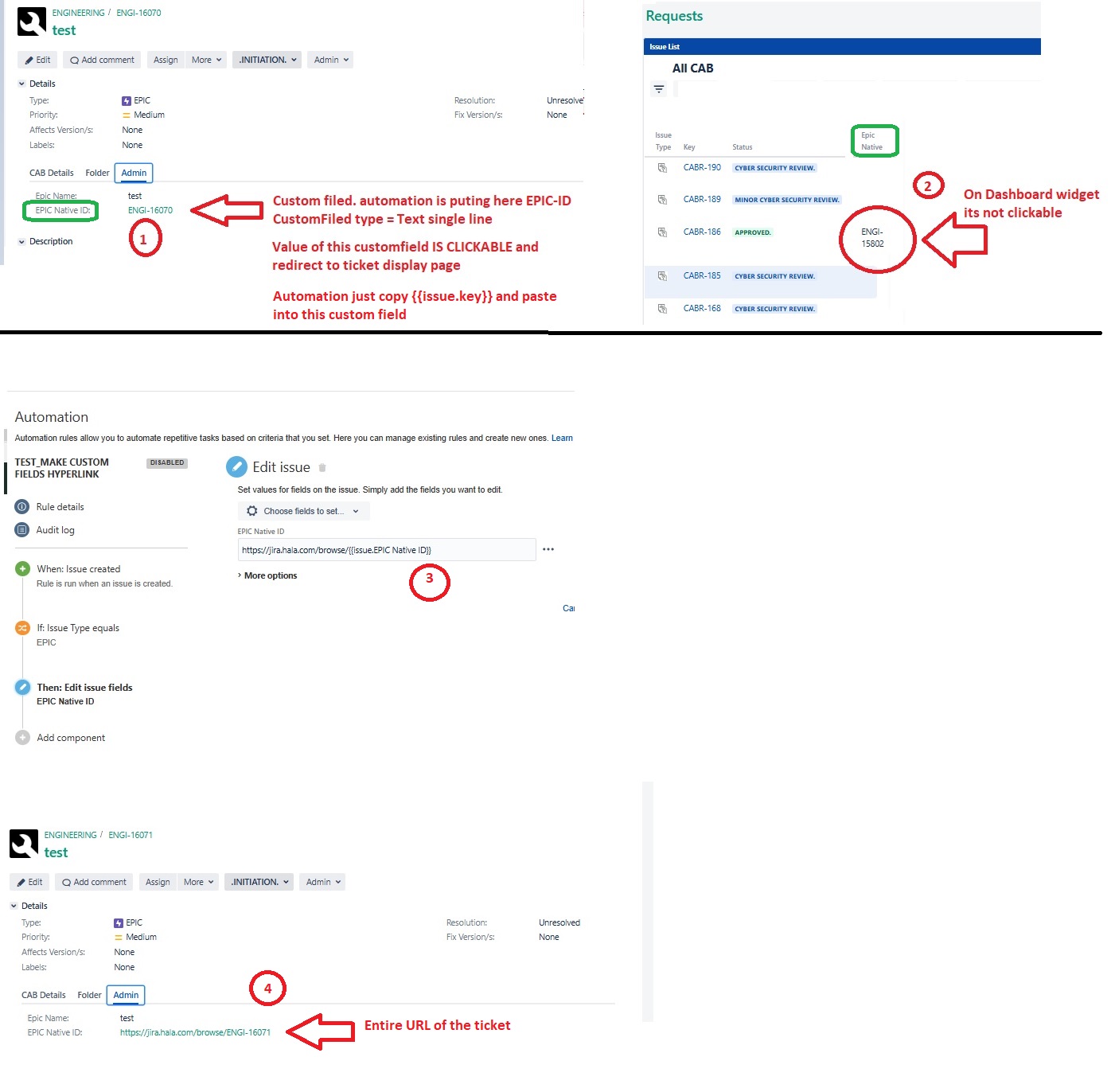
1. My custom field (1) is a single line text format field where is store ISSUE.KEY from automation rule. This Custom field value is clickable (by default) if ticket key exists.
2. When it comes to DASHBOARD this custom field value issue key is not clickable which is obvious, For DASHBOARD its just a static value, not a hyperlink
3. I made automation which add base URL after ticket is created and it works
4. But on view display screen it shows entire URL instead of JUST KEY. (same on DASHBOARD)
Is is possible to create SHORT URL to limit display only to issue KEY?
I do suspect this is might regarding rights, as users can view information, but not edit.
What if you use an URL field instead of a text field?
What renderer is used for the field in the field configuraiton?
hi again @Marc -Devoteam-
Regarding EDIT permission I am owner of the dashboard as well so I can edit it.
In termas of Field Type URL, if if have such field there is always expectation to insert URL and display of such field is also entire URL.
You must be a registered user to add a comment. If you've already registered, sign in. Otherwise, register and sign in.
I see the field is type Text Field, as you can't change the renderer on a URL field.
What is different on issue 16070 and 16071, you are viewing the issue both times.
You must be a registered user to add a comment. If you've already registered, sign in. Otherwise, register and sign in.
16070 is example before automation was ON - just to show that {{issue.key}} is clickable
Because automation trigger is on CREATE event for this demo purpose I had to create another EPIC (after automation is ON)
sooo what might be other field type which allows me inserting string value (ENGI-XXX) and changing rendered to URL? Cause I believe you are suggesting to change renderer to URL?
You must be a registered user to add a comment. If you've already registered, sign in. Otherwise, register and sign in.
i think even renderer = URL will not resolve my problem here. Cause to use rendered(URL) as a solution I will need entire URL in my custom field. I want to avoid that, i want to display ONLY issue.key and make it clickable on DASHBOARD/ Thats the issue. My Dashboard widget comes from 3rd party. I will try to reach them.
You must be a registered user to add a comment. If you've already registered, sign in. Otherwise, register and sign in.
You could try a custom field of type URL.
The reason what you see happening is because of the automation rule.
The automation places the information in the field as text, this action in automation is only possible in Cloud.
In DC you would need an app for that, like scriptrunner
You must be a registered user to add a comment. If you've already registered, sign in. Otherwise, register and sign in.
I did a test with field type URL.
In such scenario this field accept ONLY URL values so from the begining i have to insert entire URL of KEY instead of KEY only.
And for URL field type there is any other rendere options to display
You must be a registered user to add a comment. If you've already registered, sign in. Otherwise, register and sign in.
For field URL there are no rendering options, this is only on text fields.
But as I mentioned, on using automation to fill a text field with a value, the set information is seen a text.
It can't be seen any other way.
In Cloud this can be done, but not in DC.
This would require an app, scriptrunner, to create a custom scripted field.
You must be a registered user to add a comment. If you've already registered, sign in. Otherwise, register and sign in.