Hello Atlassian Community 👋
We’re excited to announce a more convenient and efficient experience to preview your work in Jira.
A new preview panel experience is coming to Jira’s global search and List views that will replace the detail view.
⏱️ A more efficient way to preview work quickly
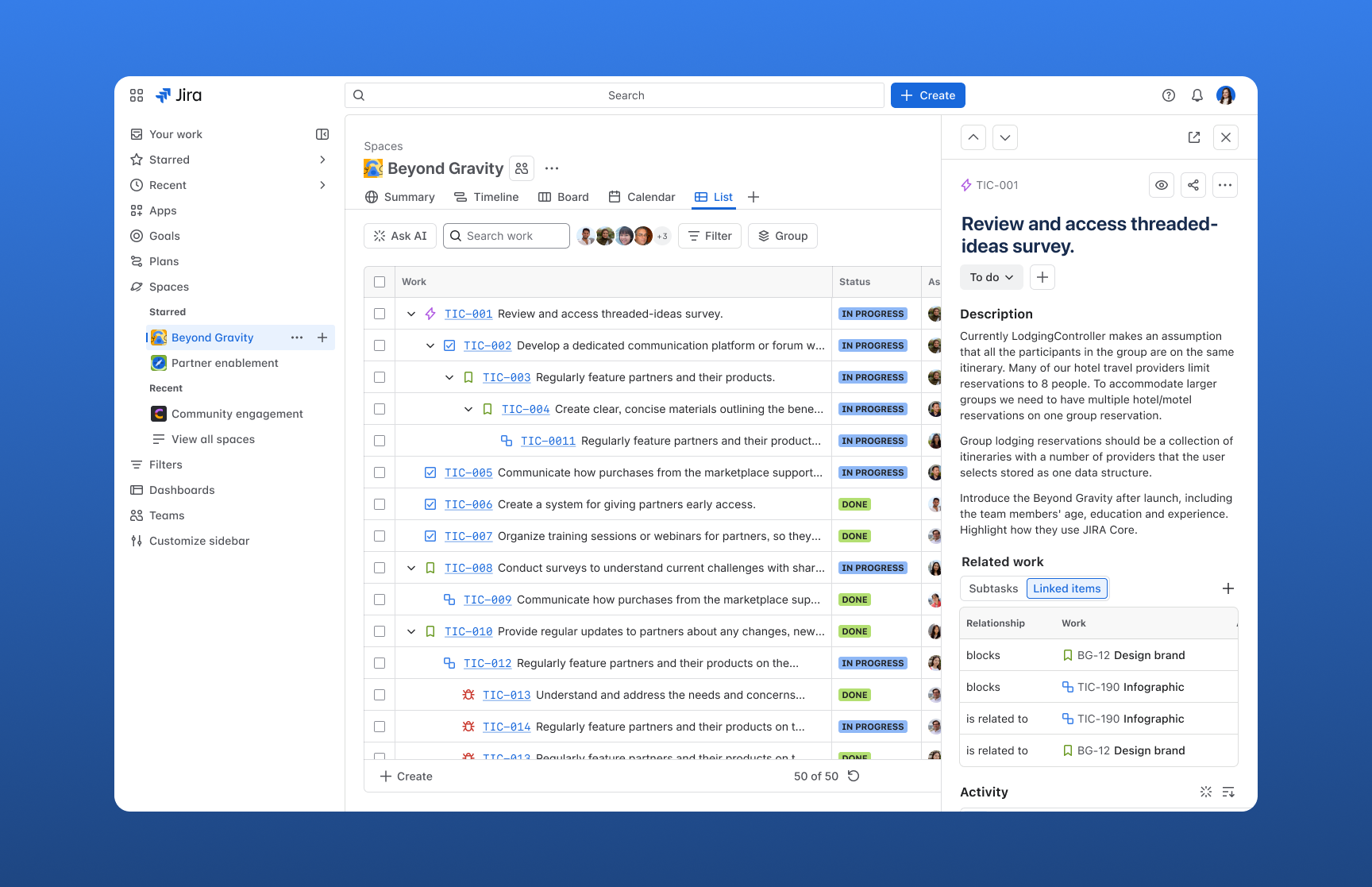
Previewing work and related context is slow and disruptive today, forcing you to bounce between full-screen views or open multiple new tabs just to gather the information you need.
Preview panels in the List will cut that friction by letting you open work items and related content inline to quickly scan details, read linked Confluence pages, and take action without ever losing your place in the List view.
By keeping you in context while you review and act on work, we’ll make it easier to understand dependencies, reduce tab overload, and speed up everyday workflows.
✨ What’s changing
Detail view is going away
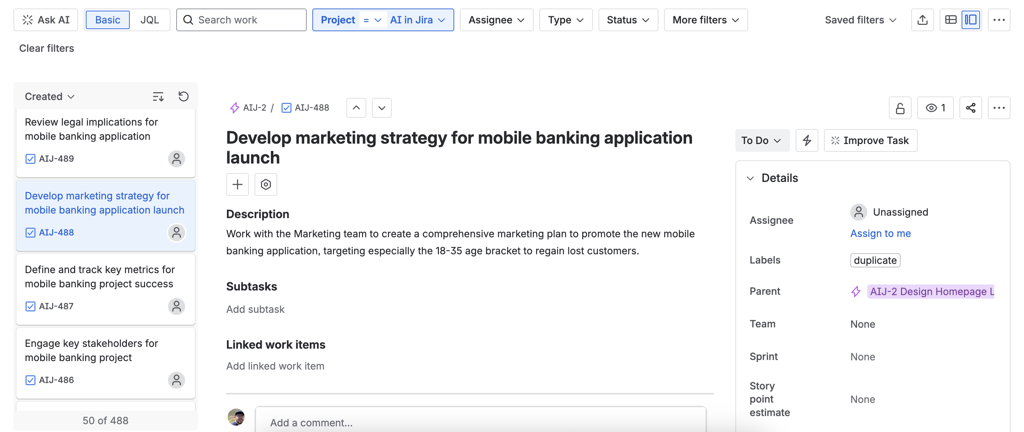
When using Jira’s global search or List view, you could toggle between the List and detail view.
The detail view let you quickly preview work by opening the selected item on the right-hand side. You could jump into the detail view to see more information about a work item, then switch back to the List to continue browsing other results.
The new default will be the preview panel experience
The new preview panel will make it easier to preview work directly from the List and Global Search views, without relying on the old detail view.
You’ll be able to quickly scan all the work items that match your filter or apply sorting, and then select an item to open a side panel. The panel will be resizable, or viewable in a full-screen view when deeper focus is needed.
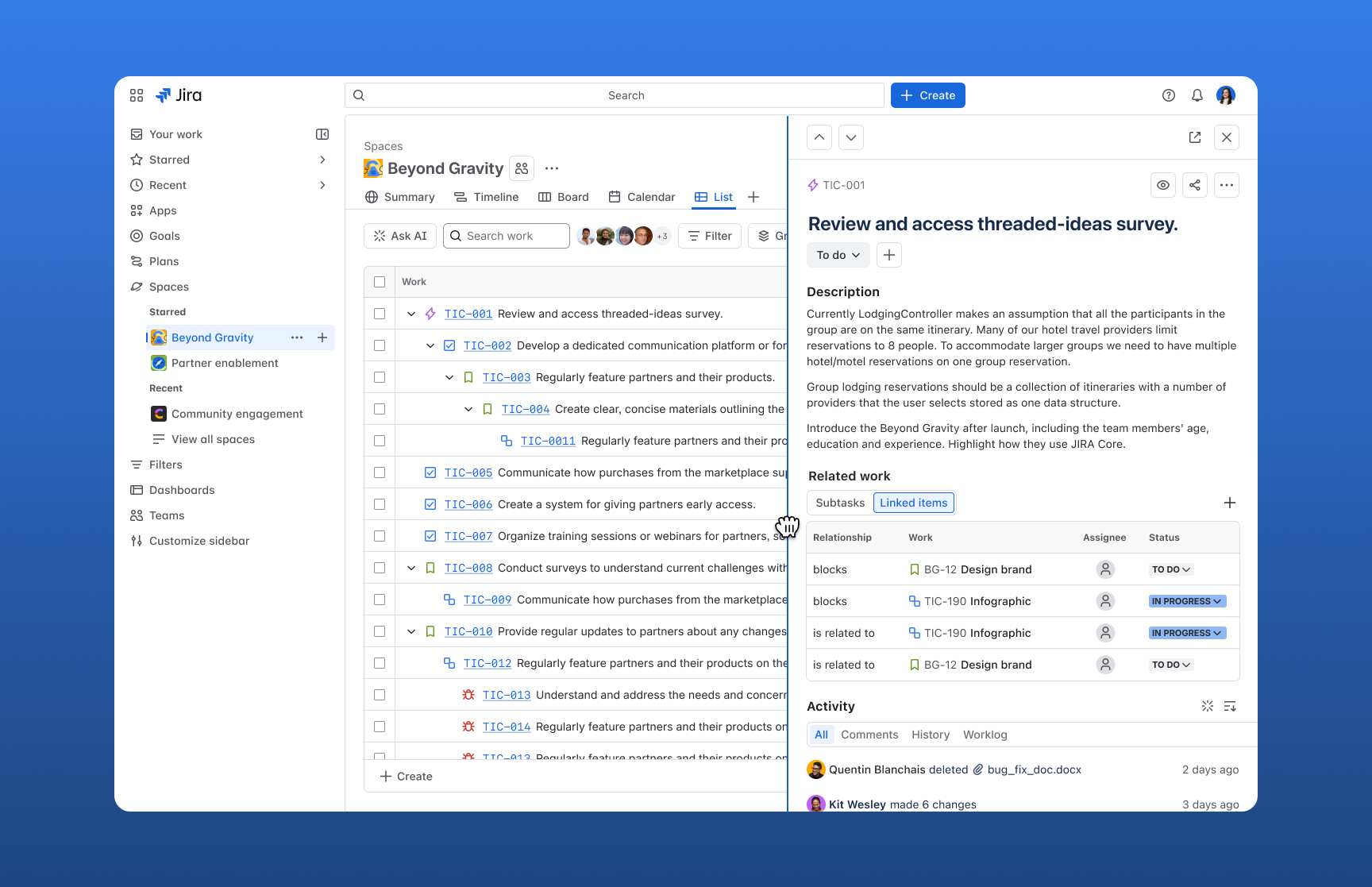
The preview panel will also support previewing Confluence pages, Projects, and Goals, reducing the need to constantly open and manage new browser tabs.
💬 We’d love to hear from you
We’re excited to hear what you think of the new preview panel experience, or how you’d like it to shape the future of the List view and Jira.
Drop your feedback below or book a time to chat with the team 🗓️.
————————————————————————————————————————
2 October - An update from Atlassian
Hi everyone,
Since the Preview Panel and modal reached General Availability and Detail view was removed, many of you have shared how the change is affecting your workflows.
Our intent was that the wider Preview Panel, together with the modal and navigation arrows, would replace Detail view and opening work items full screen in the same tab.
What we learned
The changes we made didn’t support the main workflows that you’ve said you need:
- Finding and comparing work items, without having to open each one, and
- Prioritising screen space when working on a single work item.
What’s changing
For the short term, we're introducing a setting that will allow Jira admins to choose how teams view work items in Jira's List & Global Search views.

For the “New work item layouts for List and Global Search” setting:
When the setting is ON - work items will open in the Preview Panel or modal.
When the setting is OFF - that Jira site will retain Detail view, and work items will open full-screen when the issue key is clicked in the List’s table view. The Preview Panel and modal won’t be available.
The setting will be accessible in Jira admin settings (/jira/settings/system/labs), and the change will apply to all spaces in the Jira site. If you're not a Jira admin, you'll need to ask your admin to change this setting.
Who will get what?
The setting’s default state | Applies to |
|---|
ON | Sites already using the Preview Panel and modal. We've kept them as the default to avoid another change so soon after the last one. Nothing changes unless your admin turns the setting off. |
OFF | Sites on a release track that have not yet received the Preview Panel and modal. |
OFF | Sites that have previously opted out of the Preview Panel change. |
When it’s coming, and the option until then
We're in the final stages of testing the setting. Until it rolls out, you can still use the opt-out form.
Where we're headed next
We’re currently defining a new experience for the many different needs and workflows that the List & Global Search serve. If you'd like to help shape it, please share your suggestions via the in-product feedback mechanisms. You can also reach out directly.
Stay tuned
We know how much these views matter to your day-to-day, and we're committed to making changes thoughtfully, with the context and advance notice you need. I’ll provide another update once the setting is available, and once we have a firmer view of the longer-term solution.
Thanks again,
Amanda.
————————————————————————————————————————
5 August - Another improvement is on the way
Hi everyone,
Thank you for continuing to share your feedback. We're continuing to work through implementing improvements to address it.
We've now increased the max width of the preview panel
- For screen sizes 1280px to 1536px, it will enable viewing both columns on the work item side-by-side, plus
- For screen sizes 1537px and above, it provides more space to view the relevant work item details, and help to prevent tab sprawl by reducing the need to open the work item in a new tab.
This change is rolling out at the moment (and if you don't have it yet, you will very shortly). We know that expanding the width of the panel compresses content on the List view, but if there's other challenges this change creates, please let us know.
Recapping on the previous message about options to view work items
Rather than a toggle to manage, we've enabled choice in the experience through persistence. How you view work items on the List and across other Jira views (e.g. the Board) will persist. If you last viewed a modal on the Board and came to the List, you'll see the work item in a modal. If it was in a preview panel, you'll see it in a preview panel. If you want to view the work item full screen, you can continue to use Cmd or Ctrl + click, or right-click to open it in a new tab.
For some of you, the widened panel, modal, and arrows may not fully replace what the Detail view offered. We're continuing to consider that alongside the broader feedback, and hearing what's working well, where it's not quite hitting the mark, and how you're moving through your work directly informs what we do next. You can share your thoughts on this ticket, or reach out directly.
Thanks again,
Amanda.
————————————————————————————————————————
30 June 2026: Addressing Your Feedback
Hi everyone,
We've started releasing the modal and the navigation arrows via phased rollouts (if you don't have them yet, you will very shortly).
You now get to choose how you view your work in the List, in a modal or the Preview Panel.
A few notes on the work item modal:
- It looks and works the same way as the modals on other Jira views (for example, the Board)
- It shows both work item columns side-by-side, rather than stacking them, which happened in the Preview Panel on small screens (e.g. 14") and at narrow widths, and created a cumbersome experience
- To open the modal for the first time, use the button in the top right of the Preview Panel. Your choice to view your work in the modal or the Preview Panel will persist across Jira views within the same session, so if you view a work item in a modal on the Board, opening one on the List will automatically open it in a modal too.
We're still working on making that choice persist across separate Jira sessions. Some of you have said an extra button is still extra clicks. Once cross-session persistence lands, your choice becomes your default and you won't be doubling up on clicks each time. We wanted to first roll out the modal to give you the choice of how you view your work items, and the persistence piece is coming soon.
Notes on the arrows:
- You'll find these in the top right of the work item, whether you open it in the Preview Panel or the modal. You can still use the J and K keyboard shortcuts.
We'd love to hear how you're getting on with the new features, so please do share.
Last but not least, on deprecating the Detail view: across our feedback sources, we've heard concern that the modal and arrows may not support every workflow the Detail view did. We're looking into that separately to understand where any gaps are, and we'll come back to you with the direction we're taking. Hold tight for a little longer (and thank you for your patience so far!).
Thanks again,
Amanda.
————————————————————————————————————————
17 June 2026: Mid-rollout Update
Hi all,
First off, we're sorry. We removed something that mattered to your daily workflows- the ability to open a work item with enough space to see the necessary context, and quickly step through your list of work items, before we'd shipped a proper replacement. That's on us, and the timing took some of you by surprise.
Here's what we're doing about it
We've paused the rollout for new users while we build two changes that will address the needs you've shared with us.
- A work item modal. From the preview panel, you'll be able to open a work item in a modal that gives you more room to see the context you need, without navigating away from the List or Global Search views.
- Navigation arrows. In both the preview panel and the modal, you'll be able to move through work items one by one, without losing your place in the List or Global Search views. These work alongside the existing J and K keyboard shortcuts.
How we'll handle changes like this going forward
Changes that affect how you work day-to-day belong in our seasonal releases, a cadence that gives you plenty of notice ahead of time so you and your teams can prepare. This change should have gone through that process. We chose to move quickly to close a feature gap between the old and new Lists rather than have you wait, but a change this fundamental to your workflows warranted the notice that seasonal releases provide. Going forward, changes like this will be part of our seasonal releases.
Please keep the feedback coming, here and via the in-product feedback options. We're reading everything, taking it seriously, and incorporating it into the product decisions we make every day.
If you’d like to temporarily opt your Jira site out of these changes, just fill out this form. I'll share more on the opt-out period once we've shipped the changes, and know they're working well for you, and I'll provide updates on this thread as the changes progress.
Thanks again,
Amanda.


