Forums

Articles
Create
cancel
Showing results forย 
Search instead forย 
Did you mean:ย 

๐Ÿš€ Now Live: Native Formula Fields in Jira!

Hi everyone,

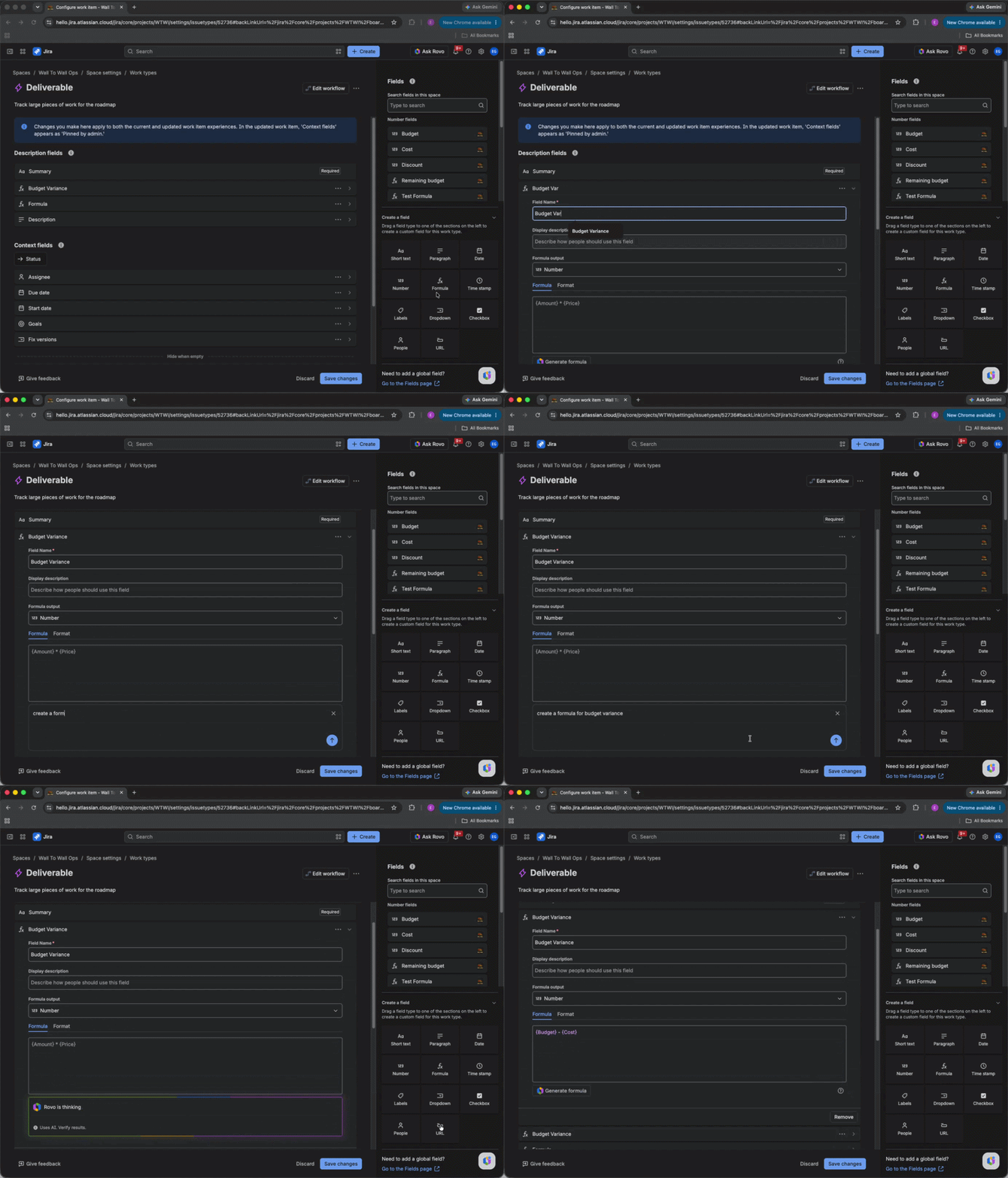
Iโ€™m excited to announce that Formula Fields are now Generally Available in Jira Cloud! Formula Fields allow you to run real-time calculations directly on Jira work items. By automating these calculations within Jira, you can ensure data remains accurate and actionable without needing to export to external spreadsheets.

โœจ Key Capabilities

  • Real-Time Calculations: Results update automatically whenever a referenced source field is modified.

  • Searchable & Filterable: Formula results are fully supported in JQL, allowing you to use them in dashboards, automations, and saved filters.

  • Multiple Output Types: Support for Number, Text, Date, and Duration outputs to cover use cases like risk scoring, status labeling, and due date management.

  • AI-Powered Building: Use Rovo to generate formulas from natural language prompts or suggest corrections for syntax errors.

Screenshot 2026-07-27 at 2.54.00โ€ฏPM.png

The image above shows a "Budget Variance" formula field with the formula {Budget} - {Actual Spend}. 

Screenshot 2026-07-27 at 2.55.00โ€ฏPM.png

The image above shows conditional formatting applied to highlight rows where the budget variance is negative, making it easy to spot where you've gone over budget. 

๐Ÿ› ๏ธ Admin Details

  • Availability: Enabled by default across all Jira Cloud editions (Free, Standard, Premium, Enterprise).

  • Configuration: Admins can create "Formula" fields in company-managed spaces or team-managed spaces.

  • Stability: To ensure JQL and reporting stability, the output type (e.g., Number vs. Text) is locked at the time the field is created.

๐Ÿ”œ Whatโ€™s Next?

As we move into GA, here are a few areas that are not yet supported in this release:

  • Cross Work Item Rollups: Formulas currently run within a single work item โ€” calculations that span across work items (e.g., rolling up values from child work items to a parent Epic) are not yet supported. We'd love to hear from you: How would you use cross-issue rollups in your workflows? Share your use cases in the comments!

  • Select Fields: Referencing single and multi-select fields within formula logic is not yet supported. We're curious โ€” how are you looking to use select fields in your formulas? Let us know in the comments!

๐Ÿ”— Helpful Links:

Weโ€™re excited to see how your teams use these new capabilities. Please share your feedback and use cases in the comments!

7 comments

Saki Okubo
Contributor
July 27, 2026

Can I also perform time calculations in this field?

Tomislav Tobijas
Community Champion
July 27, 2026

@Saki Okubo yep! It's documented here: Supported functions for formulas / Date and time functions 
Pretty cool actually :)

2026-07-28_07-45-57.png

Like โ€ข Dave Mathijs likes this
Yatish Madhav
Rising Star
Rising Star
Rising Stars are recognized for providing high-quality answers to other users. Rising Stars receive a certificate of achievement and are on the path to becoming Community Champions.
July 27, 2026

This seems great! Thanks @Esha Gajula and Atlassian! Will try it out real soon.

Tiina Savolainen
Contributor
July 28, 2026

Is it user issue (me) or is the usable field amount very tiny? For example couldn't find Resolution date available for use.

This has been waited field type :)

Like โ€ข Martin Runge likes this
Martin Runge
Community Champion
July 28, 2026

Yeah! This will same so much work in automations and reduce friction and hopefully potential errors with not updated/recalculated fields.

Julia Foden
Contributor
July 28, 2026

@Esha Gajula this looks great and as @Martin Runge said it will save on a lot of automation.

You asked for how we would use formula logic with select list fields if it was supported. Let me give an example of some automation I created in a previous job. There were several single select fields for different types of risk. Each had values 0, 1, 2, 3 ... 10. Users would select an option for each field, Risk Type A, Risk Type B etc. These fields were select lists rather than number fields so that I could ensure that only valid values were entered (no decimal places, not greater than 10 ... ). My automation then converted the values to numbers, summed them, recalculated to a number out of 100, and filled a number field called something like Overall Risk. It would be great if that could be done with a formula instead of automation!


Like โ€ข Martin Runge likes this
Roberta Antonini
Contributor
July 28, 2026

Really useful tips for anyone using this type of fields!

Like โ€ข Martin Runge likes this

Comment

Log in or Sign up to comment
TAGS
AUG Leaders

Atlassian Community Events