Out-of-the-box insights into productivity, bottlenecks, blockers, and areas for improvement for software teams
 Hey Atlassian Community!
We’re thrilled to announce that the Development feature in Jira is now generally available to all customers!
While AI is starting to automate busywork and unlock innovation, software teams today are still facing a familiar set of challenges: scattered development activity, missed risks, and too much time wasted switching between tools instead of proactively delivering value.
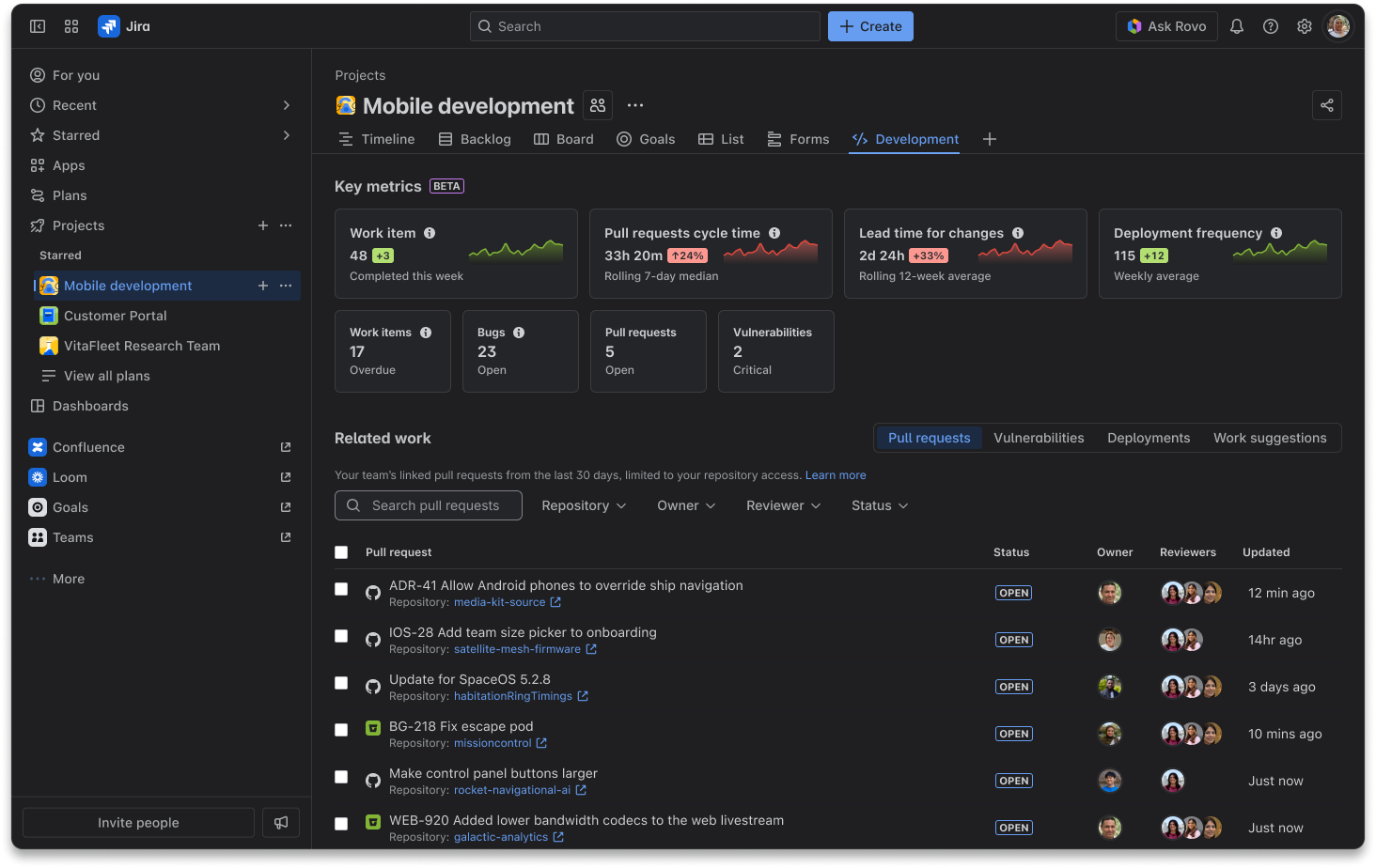
With its GA release, the Development feature in Jira brings all your team’s software delivery activity into a single, unified view. Offering valuable insights into your team's development work and performance metrics, the Development feature connects key development insights directly to your team's work.
 We sincerely appreciate the Communityfor participating in our closed beta and providing invaluable feedback. Your input has helped us shape the Development feature into a solution that empowers your teamsto deliver great quality software to your customers fast.
What problems does Development in Jira solve?
“The addition of and improvements to the Development have been a huge win for our agency. With multiple active projects, having a central spot to monitor engineering throughput helps us quickly surface friction, spot opportunities for improvements, and maintain momentum. It's becoming a go-to pulse check for our team and sparks valuable conversations. We’re excited to see how it continues to evolve.” - Shane Giroux, Technology Director at zu.com communications.
The Development feature brings all your team’s work, development, and security data into a single, actionable view - right inside your Jira space. No more jumping between tabs or tools. Now, you can:
 See key software delivery metrics at a glance.
 Get proactive work suggestions to keep your team moving.
 Stay close to work by drilling into related work, like pull requests and security vulnerabilities.
“I can’t see the full picture of my team’s development work.”
Engineering managers and team leads often struggle to get a unified view of their team’s software development and delivery data. Information is siloed across tools and Jira views, making it hard to spot risks or track progress.
Development feature in Jira brings all your team’s development and security data together in a single, actionable view - right inside your Jira project. No more jumping between dashboards or missing critical updates.
Explore the details:What is development in Jira Cloud? | Jira Cloud | Atlassian Support
“I don’t know where my team is blocked or at risk.”
It’s easy for delivery risks to go unnoticed - overdue work, stale PRs, reopened issues, or a spike in bugs can derail your plans if not caught early.
Key metrics on the Development page give you a real-time snapshot of your team’s delivery health. Instantly see:
-
Work items completed each week
-
Overdue or reopened work items
-
Open bugs
-
Pull request cycle time
-
Deployment frequency and lead time for changes, if you connect your CI/CD tool to Jira
These metrics surface trends and risks early, so you can take action before small issues become big blockers.
Find out more information:Key metrics on the Development page | Jira Cloud | Atlassian Support
“I waste time figuring out what needs my attention next.”
With so much happening, it’s hard to know what to prioritize - stalled issues, urgent deadlines, or inactive pull requests can slip through the cracks.
Work suggestions are context-aware, actionable recommendations that highlight the most impactful work for your team. Work suggestions surface:
-
Blocking work items that need investigation
-
Work items due soon requiring review
-
Work items missing key details
-
Inactive pull requests pending your team’s review
-
Compass component health that needs attention
By surfacing what matters most, work suggestions help you focus team’s energy where it will have the biggest impact - reducing context-switching and accelerating delivery.
Explore the details: Work suggestions on the Development page | Jira Cloud | Atlassian Support
“I need to stay close to team’s code and security posture.”
Tracking team’s pull requests, deployments, and security vulnerabilities is critical, but it’s often buried in other tools.
Related work section brings together pull requests, security vulnerabilities, and deployments from connected apps. Drill down into development, deployment and security specifics connected to team’s work, see who’s working on what, and jump straight to code or vulnerability details - all from Jira.
Find out more information: Related work on the Development page | Jira Cloud | Atlassian Support
How does this help software teams?
-
Faster, more informed decisions: Unified metrics and suggestions mean you always know where to focus.
-
Proactive risk management: Spot and resolve blockers before they impact delivery.
-
Less context-switching: Everything you need is in one place - no more tool-hopping.
-
Stronger security and compliance: Track vulnerabilities and component health alongside your delivery work.
-
Accelerated delivery: By reducing friction and surfacing what matters, your team can deliver value faster and with more confidence.
How to get started?
Getting started with the Development in Jira is simple:
-
The Development feature is enabled by default in your software spaces in Jira.
-
Space admins can turn it on from space settings or navigation.
-
Once enabled, everyone with project access can use the Development tab.
-
For advanced metrics (like deployment frequency or lead time for changes), connect your development tools as needed.
Learn more: Enable the development feature | Jira Cloud | Atlassian Support
Share your feedback!
Hi! I’m Nat, Product Manager for Development in Jira.

We can’t wait to hear what you think - please share your feedback with us by selecting Give us feedback at the bottom of the Development page, or schedule a chat with Nat! Your feedback helps us to improve and shape our future roadmap.


