Forums

Articles
Create
cancel
Showing results for 
Search instead for 
Did you mean: 

Automate your workflows with Atlassian Teams in automations!

Hey Community 👋

Happy to announce that you can now use Atlassian Teams natively in automation rules to keep your workflows scalable and accurate.

What's new?

Easily route issues and assign work to the right team with:

New automation actions

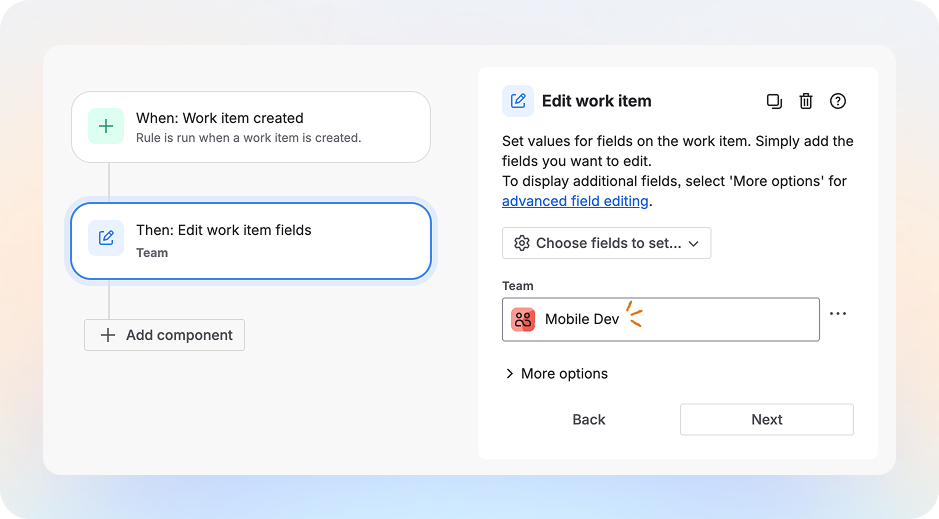
  • Edit work item: When a work item is created in Team Mobile's board, set Team Mobile so work is tracked accurately.
edit-work-item.png

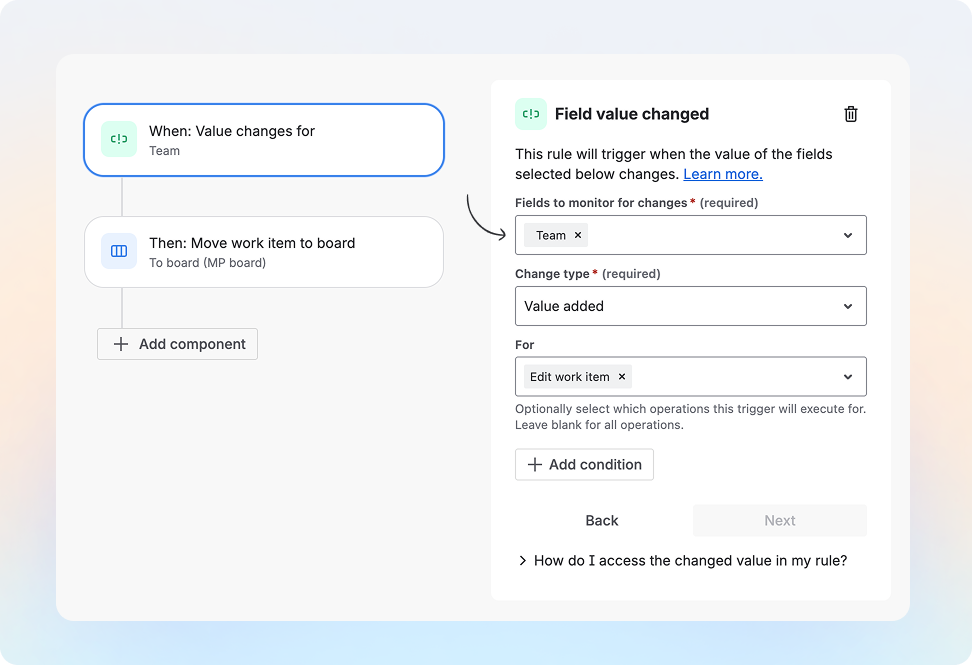
  • Field value changed: When a Team is set for a work item, move work item to that team’s board and notify them.
field-value-changed.png

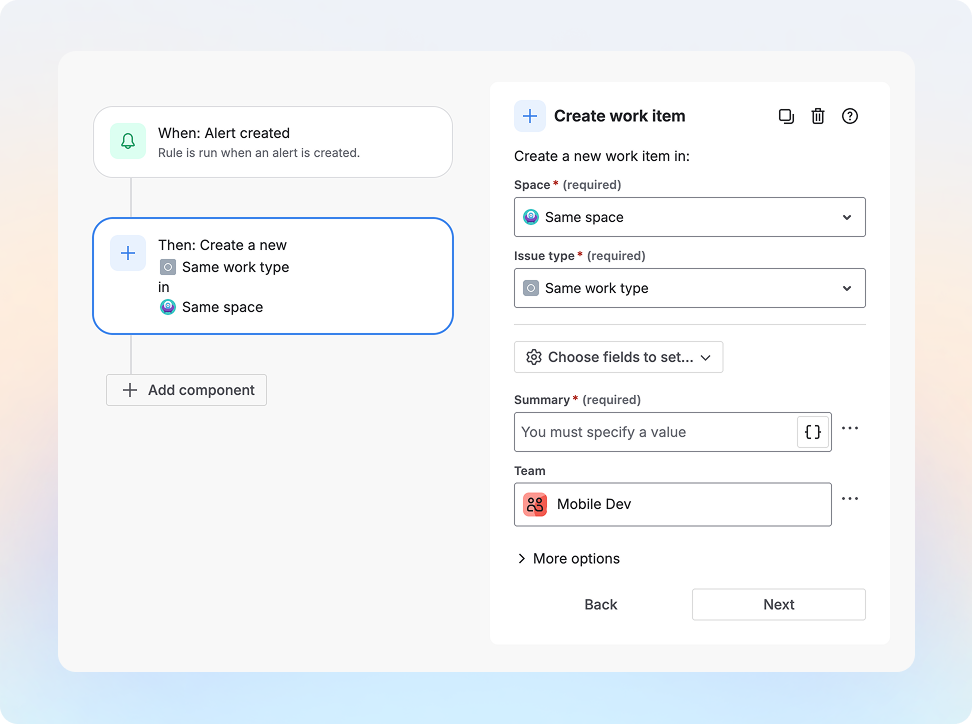
  • Create work item: When an alert is created, create a work item and assign to Team Mobile.

create-work-item.png

  • Clone work item: When 'cross-team' label is added, clone the work item into Mobile Team’s board and set team field to Team Mobile on cloned work item.

New automation conditions

  • Work item fields condition: If team field is Team Mobile, then add a comment mentioning the Team Mobile engineering lead.

New automation triggers

  • Field value changed: When Team field value is changed, move it to the newly assigned Team’s board.

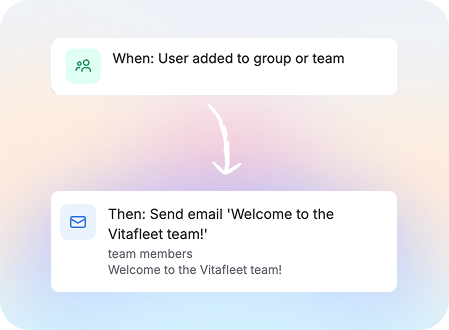
  • Member added or removed: When a member is added to the team, send them a welcome email with all onboarding materials. **currently only available in Confluence Cloud, Jira Cloud coming in March
Group 6273561.png


How do I use it?

  1. Go to Project settings → Automation (or Global automation).

  2. Create a rule - select one of the trigger or actions shared above to use Teams in automations!


What's next?

  • Assign work item to user in a team: If work item is assigned to Team Mobile, then assign this ticket to David who is in Team Mobile.

  • User condition: For work item assigned to Team Mobile, ensure the assignee is in Team Mobile.


Tell us what you think

We’d love to see how you use this:

  • What rules are you building with the Teams and in what product?

  • What other Team-based automation would help your workflows?

Share your examples and feedback in the comments so we can keep improving this experience!

7 comments

Yatish Madhav
Rising Star
Rising Star
Rising Stars are recognized for providing high-quality answers to other users. Rising Stars receive a certificate of achievement and are on the path to becoming Community Champions.
February 5, 2026

Thanks @April Chi - I love these introductions to Teams field in Automation

One thing I do wish for Teams is to @ mention a Team in a comment / description / etc and not have it expand the members, but still notify as if it is an @mention 

Thanks

Yatish

Like • # people like this
Josh
Rising Star
Rising Star
Rising Stars are recognized for providing high-quality answers to other users. Rising Stars receive a certificate of achievement and are on the path to becoming Community Champions.
February 5, 2026

@April Chi this is awesome!!! Thank you for prioritizing these incredible enhancements!

I cannot wait to see this roll out:

  • User condition: For work item assigned to Team Mobile, ensure the assignee is in Team Mobile.

If you need any feedback there, please don't hesitate to reach out. This would unblock a bunch of use cases for us and really help Atlassian Teams be used more broadly in our organization.

James Rickards _SN_
Rising Star
Rising Star
Rising Stars are recognized for providing high-quality answers to other users. Rising Stars receive a certificate of achievement and are on the path to becoming Community Champions.
February 5, 2026

You bloody ripper! This has so much potential!

Milad S_
Rising Star
Rising Star
Rising Stars are recognized for providing high-quality answers to other users. Rising Stars receive a certificate of achievement and are on the path to becoming Community Champions.
February 5, 2026
Good on you, these are great improvements. I love the trigger of a user added to a group/team.
Do you have any plans to allow us to add a smart value to populate the Team field dynamically? I just tested the Team field in Automation, and it seems we can only select a team from the Team field (i.e., Set) or copy from other issues (i.e., Copy), but we cannot insert text (e.g., smart value taken from the Asset object).
We have an Asset schema for our teams that also captures extra information such as manager, tech lead, default assignee, capability, various user groups, and a text field containing the Id of the team (manually hard-coded). We use these in a few global automation rules (e.g., set the team based on the assignee or vice versa) or to filter issues based on the user's team membership. In all these automation rules, we use the Additional fields with the team ID stored as text in the team object.
I think the ability to insert smart values is necessary to populate team fields dynamically. We also need JQL or another way (similar to current user conditions within automation) to check team membership dynamically.

Kind regards,
Milad
Like • Susan Hauth _Jira Queen_ likes this
Daniel Bagiński
Contributor
February 9, 2026

Hey, this is great! 

"I think the ability to insert smart values is necessary to populate team fields dynamically. We also need JQL or another way (similar to current user conditions within automation) to check team membership dynamically."

+1

assignee/reporter/custom user picker in membersof("Team") would be awesome.

Adam Gołaszewski
Contributor
February 9, 2026

Finally, can we also have a way to notify a team when a work item is assigned to it? It would come in handy. 

Susan Hauth _Jira Queen_
Community Champion
February 9, 2026

Hi,

This is very good.  BUT we really,really need a way to Notify a team in automation rules.

Susan


Comment

Log in or Sign up to comment
TAGS
AUG Leaders

Atlassian Community Events