The Atlassian Community Forums are currently in read-only mode. We will be relaunching on a new platform on September 22 (read more here). We apologize for the extended downtime. For concerns or questions, please email communitymanagers@atlassian.com. See you on the other side, on the new Atlassian Community Forums! :)

×

Forums

Articles
Create
cancel
Showing results for 
Search instead for 
Did you mean: 

Jira List

Michal Sharaby
July 15, 2024


222.png1111.pngHi once i click on collapse\expand in Jira list is does not work as expected.

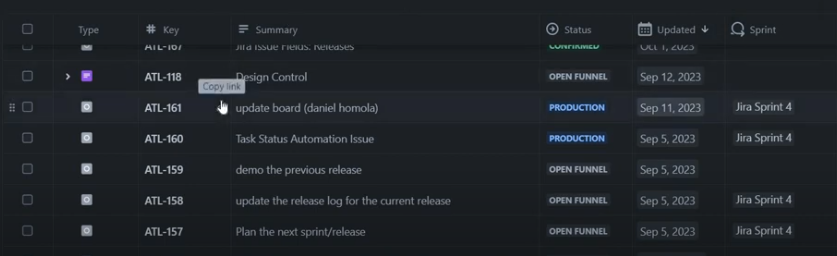
I do not have this arrow. how can I make it show as it shows in the black background pic I want to have a view of epic and under it its stories. same for task and sub task.
for example:


I want that under epic 5480 his child (story 5481) will appear. 
as the second pic attached(black background) 

1 answer

Comments for this post are closed

Community moderators have prevented the ability to post new answers.

0 votes
Cristian0791
Rising Star
Rising Star
Rising Stars are recognized for providing high-quality answers to other users. Rising Stars receive a certificate of achievement and are on the path to becoming Community Champions.
July 15, 2024

Hi Michal,


Please ensure that you Story is in Child relationship with the Epic.

You can do this by open the Epic and see if the Story is append to Child issues.
Child.png

TAGS
AUG Leaders

Atlassian Community Events