Hey Atlassian Community 👋
We're thrilled to introduce AI Backlog for Jira, a brand-new app that brings AI directly into your Jira backlog to help you groom, organize, prioritize and plan sprints in minutes.
We're also proud to share that AI Backlog for Jira won two awards at Codegeist 2025: 3rd Place (Software Teams) and Best Rovo Apps.
The problem we're solving
If you're a Product Manager, Scrum Master, or Engineering Lead, you know the pain:
- Backlog grooming sessions that drag on for hours
Scrolling through hundreds of unstructured issues, trying to make sense of what's there
- Sprint planning from a blank page
Every sprint, you're manually piecing together work items, guessing at capacity, and hoping the balance feels right
- No visibility into planning risks
Duplicates slip through, blocked items get pulled in, and stale tickets waste everyone's time
- Strategy lives in your head, not in your tools
You know what matters, but translating that into a concrete sprint composition is tedious
We built AI Backlog to solve exactly this. It's the AI co-pilot that handles the heavy lifting so you can focus on decisions, not data wrangling.
What AI Backlog for Jira does
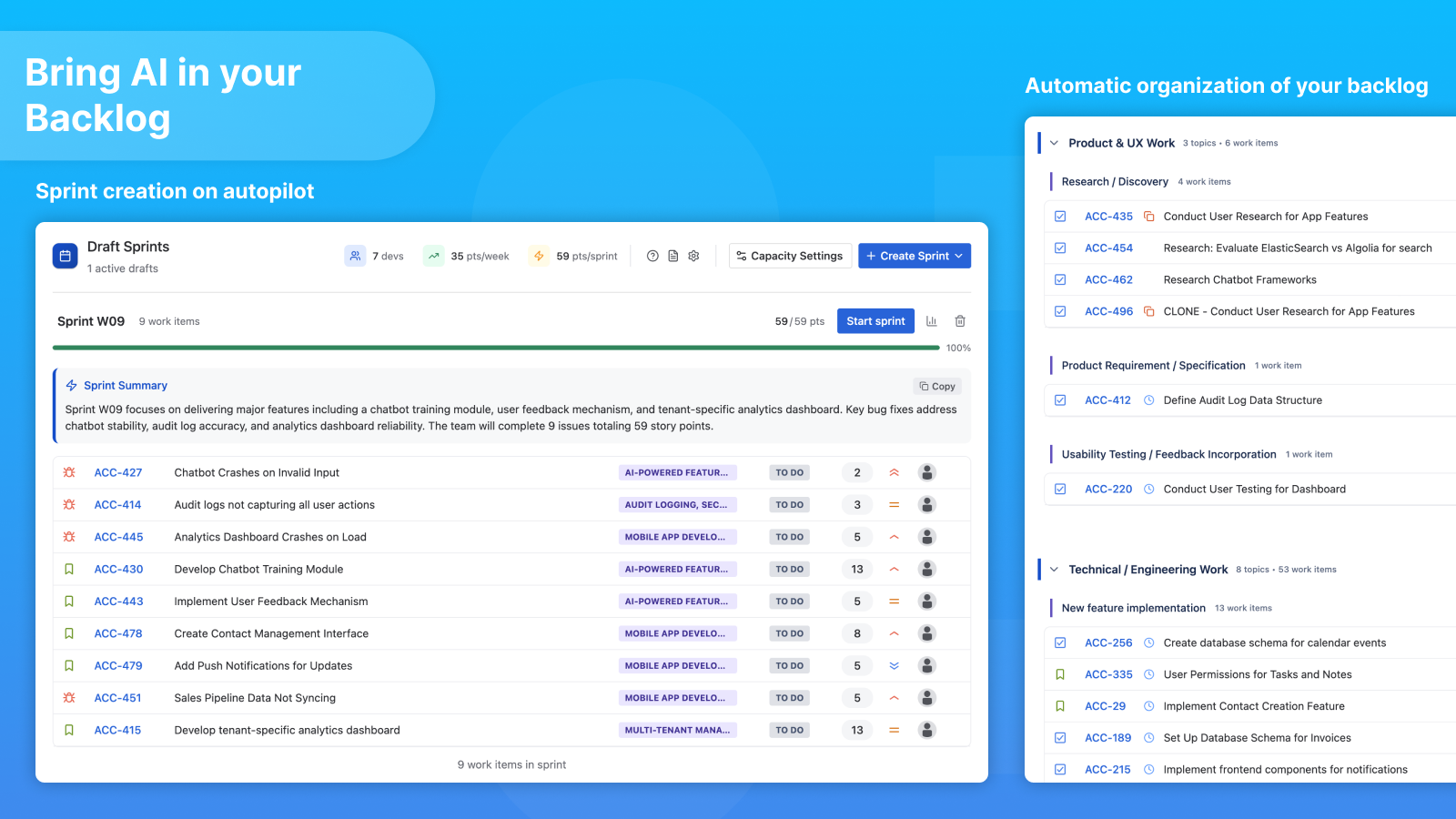
1. Organize your Backlog into clear work topics
Stop scrolling through flat, endless lists. AI Backlog lets you define Work Topics (groups + topics) that match how your team actually thinks about work - like "Product & UX Work", "Technical / Engineering Work", "Customer Support", etc.
Then, the AI automatically categorizes your issues into these topics. Your backlog goes from chaos to clarity in seconds.
2. Generate Sprints with AI in minutes
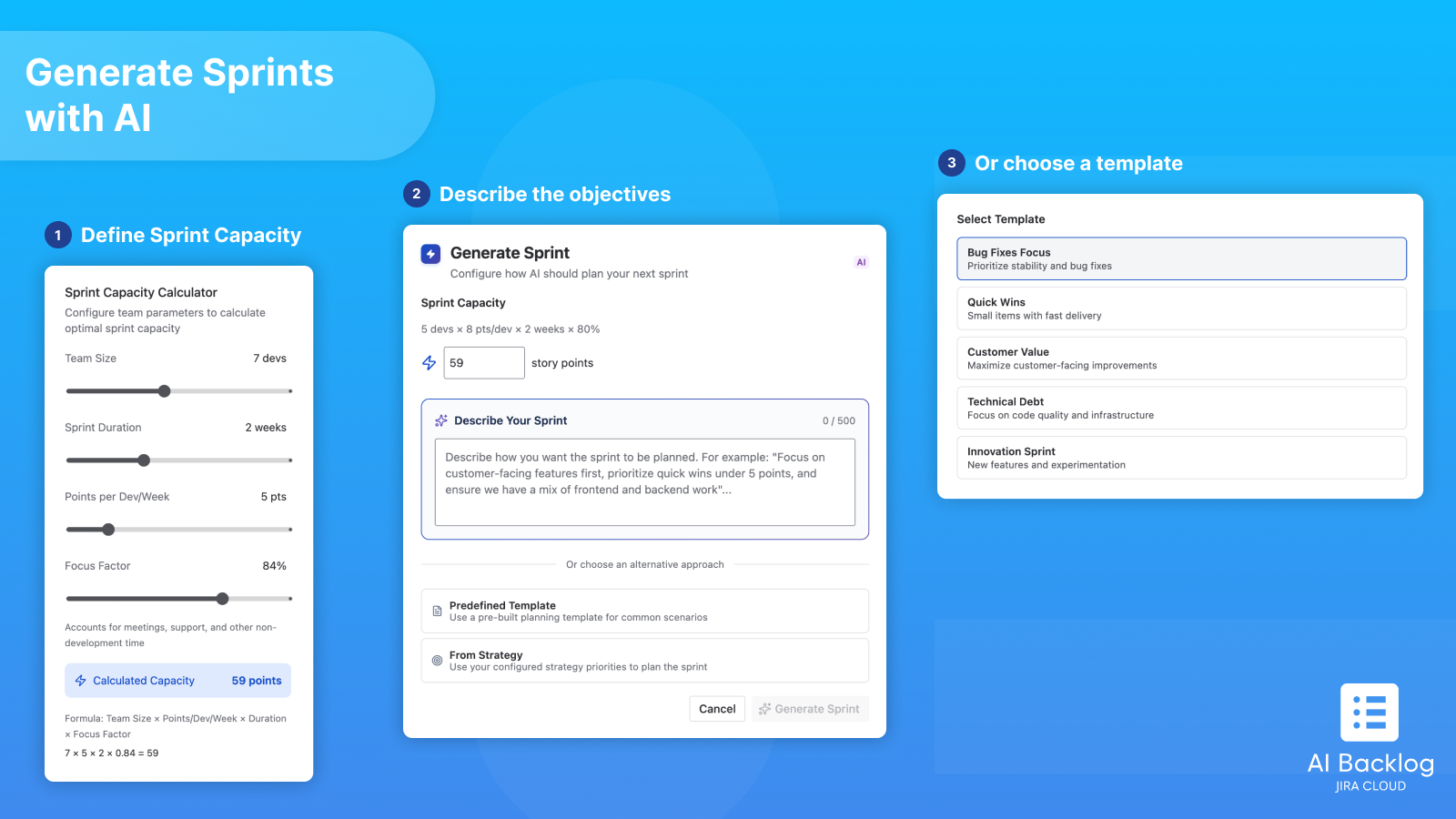
This is where the magic happens. Instead of building a sprint from scratch, you:
- Define your sprint capacity: team size, velocity, sprint length, focus factor
- Describe your objectives: a few sentences like "Prioritize stability and production incidents" or "Focus on onboarding and billing this sprint"
- Choose a template or use your strategy: reusable presets or strategy-based balancing
- Hit Generate: and get a ready-to-review sprint draft with a summary, issue list, and capacity utilization
The AI respects your capacity constraints, topic allocation, and planning signals. You start from a strong draft, not a blank page.
3. Validate before you commit with Sprint Insights & Indicators
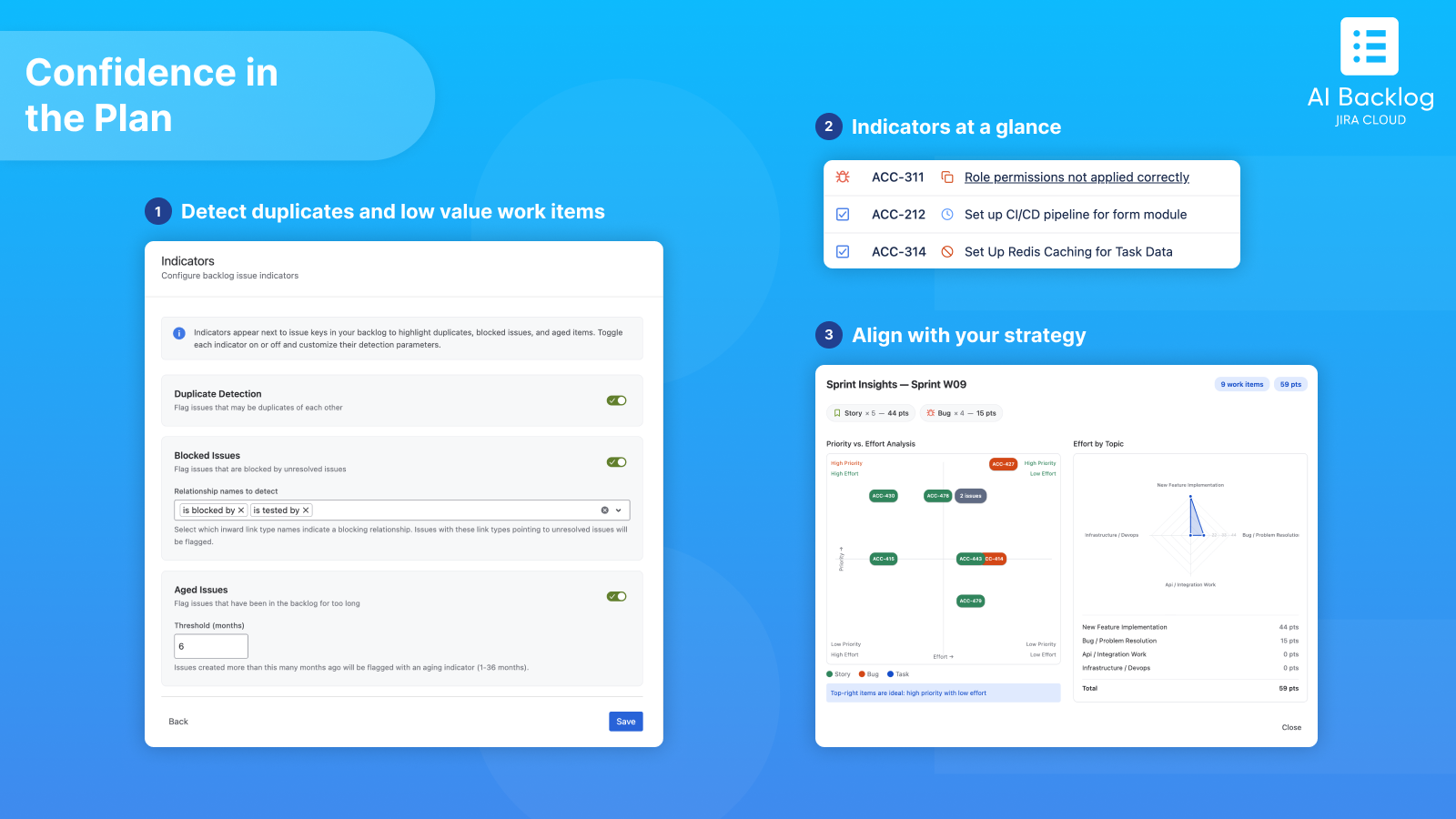
Before you hit "Start Sprint", AI Backlog gives you confidence in the plan:
- Sprint Insights
See priority vs. effort distribution and effort by topic at a glance. Is the sprint skewed toward low-value work? Too concentrated in one area? You'll know instantly.
- Indicators
Detect duplicates, blocked items, and aged work items right in your backlog. These signals also feed into the AI sprint generation, so risky items are flagged or avoided automatically.
4. Teach the AI how your team works
AI Backlog doesn't guess. It learns from your team's patterns:
- Fields Selection: choose which Jira fields the AI should analyze (priority, type, story points, labels, components, custom fields). The AI builds recommendations from the same signals your team uses during planning.
- Strategy Discovery: the app analyzes your historical sprints and generates an editable planning baseline. What gets prioritized first? How is effort typically distributed? It captures the strategy your team already follows, even if it's never been written down.
- Sprint Templates: save your most common sprint approaches as reusable presets. No more rewriting instructions every time.
Who is it for?
Product Managers: see the backlog by themes and outcomes, not endless lists. Align sprint composition with product priorities.
Scrum Masters / Delivery Leads: spend less time prepping planning sessions. Start with a realistic draft aligned with capacity and intent.
Engineering Leads: reduce surprises with risk signals (blocked work, duplicates, stale items) and keep work balanced across tech debt, features, and stability.
We need your feedback.
Here's 3 months free to make it worth your time
Let's be real: we know this app won't be perfect on day one. Backlog grooming and sprint planning are deeply personal to every team. Your workflows, your priorities, your definition of "a good sprint" are unique. We can't nail all of that without hearing from real teams using the app in real conditions.
That's exactly why we're offering 3 months completely free to early adopters. This isn't just a launch promo, it's an invitation. We want you to use AI Backlog, push it, break it, tell us what's missing and what's working. Your feedback during these early months will directly shape where the app goes next.
We're a small team, we're iterating fast, and we genuinely read and respond to every piece of feedback we get.
Use promo code: EYWLUI when subscribing to get your 3 free months.
Try AI Backlog for Jira on Atlassian Marketplace
Whether you have a question, a feature idea, or just want to say hi, our support is waiting for you.
Happy planning!
Olivier
