Meetings are crucial for team collaboration, but preparing and managing meeting details often involves tedious manual effort. How can you ensure that all key information—agenda, participants, and expected outcomes—is captured and readily available for everyone?
With Smart Forms for Jira, meeting request details submitted via a form are automatically turned into a structured Confluence meeting notes page. This automation eliminates manual work and guarantees consistency. All meeting information is centralized, ensuring your team is prepared and ready to collaborate.
Scenario: Streamline Meeting Preparation
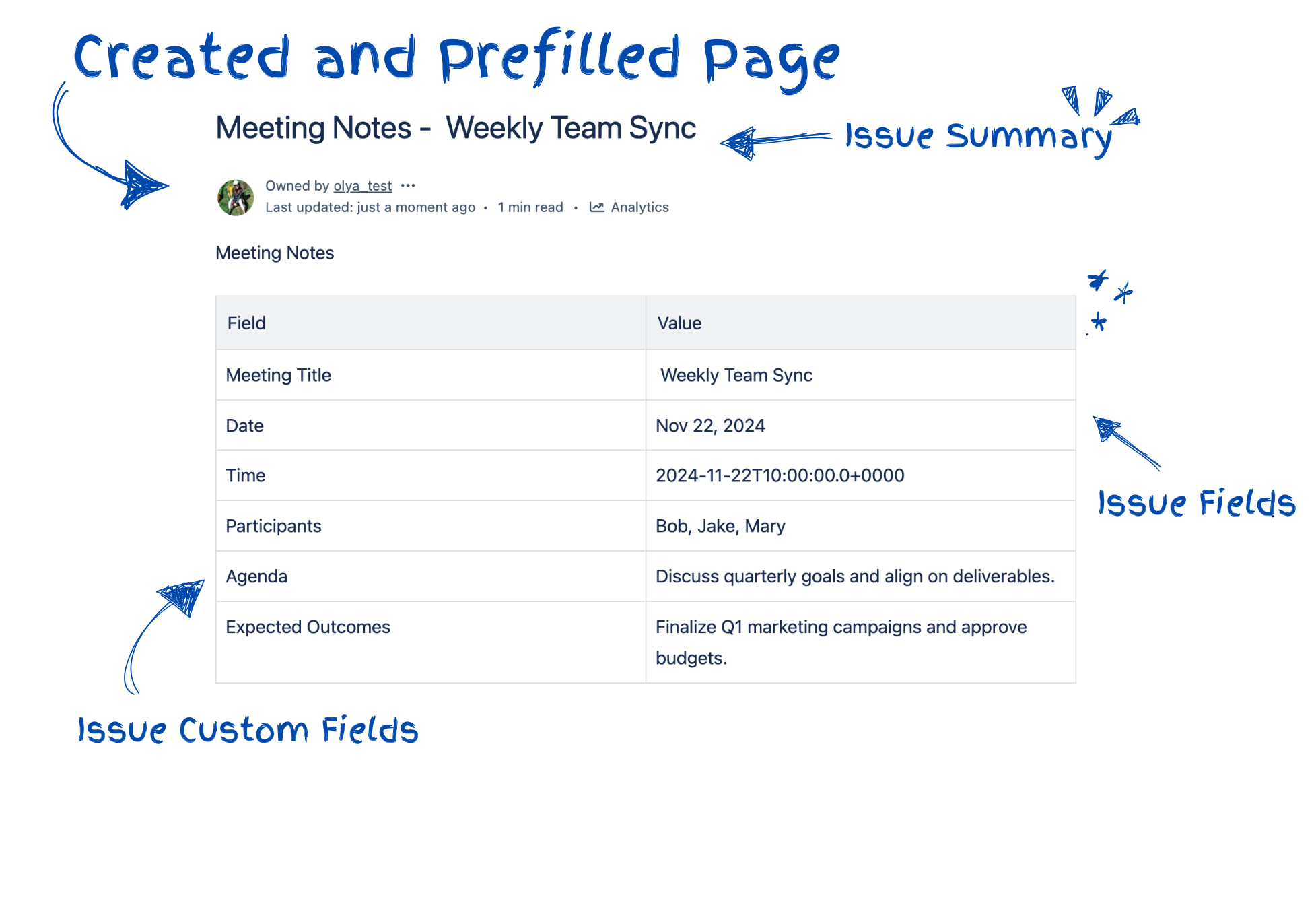
- Form Submission: A meeting request form is submitted with details such as the meeting title, date, time, participants, and agenda.
- Automation: Smart Forms for Jira maps the details to Jira issue fields, and Jira Automation populates a Confluence meeting notes template with this information.
- Collaboration: The created Confluence page becomes a live document, where additional notes and decisions can be added during the meeting.
Step-by-Step Guide
1. Set Up the Meeting Request Form in Smart Forms for Jira
Form Configuration
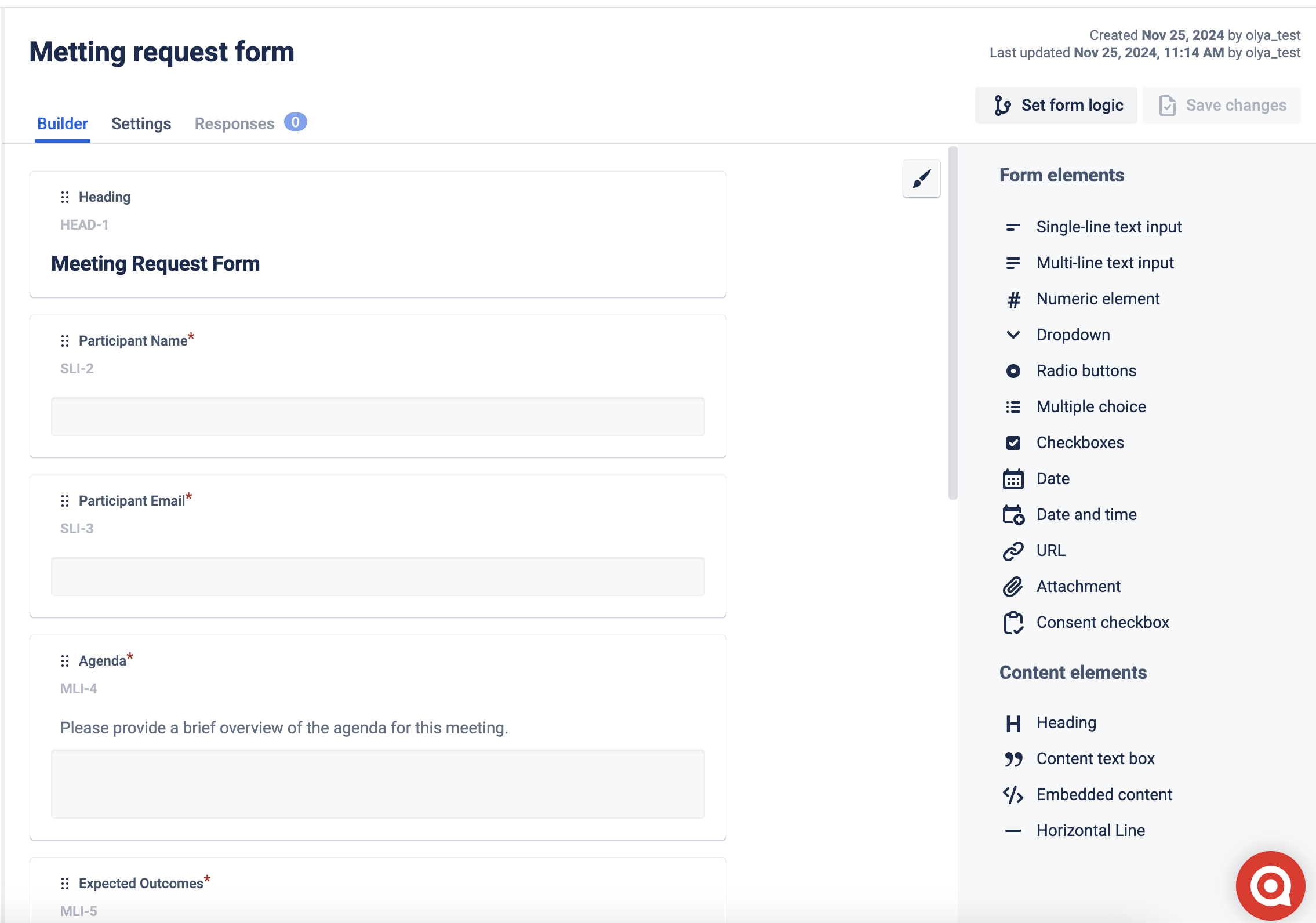
- Form Name: Meeting Request Form
- Fields:
- Meeting Title: Text Field
- Meeting Date: Date Picker
- Time: Text Field
- Participants: Multi-Select or Free Text
- Agenda: Paragraph Field
- Expected Outcomes: Paragraph Field
Enable Field Mapping
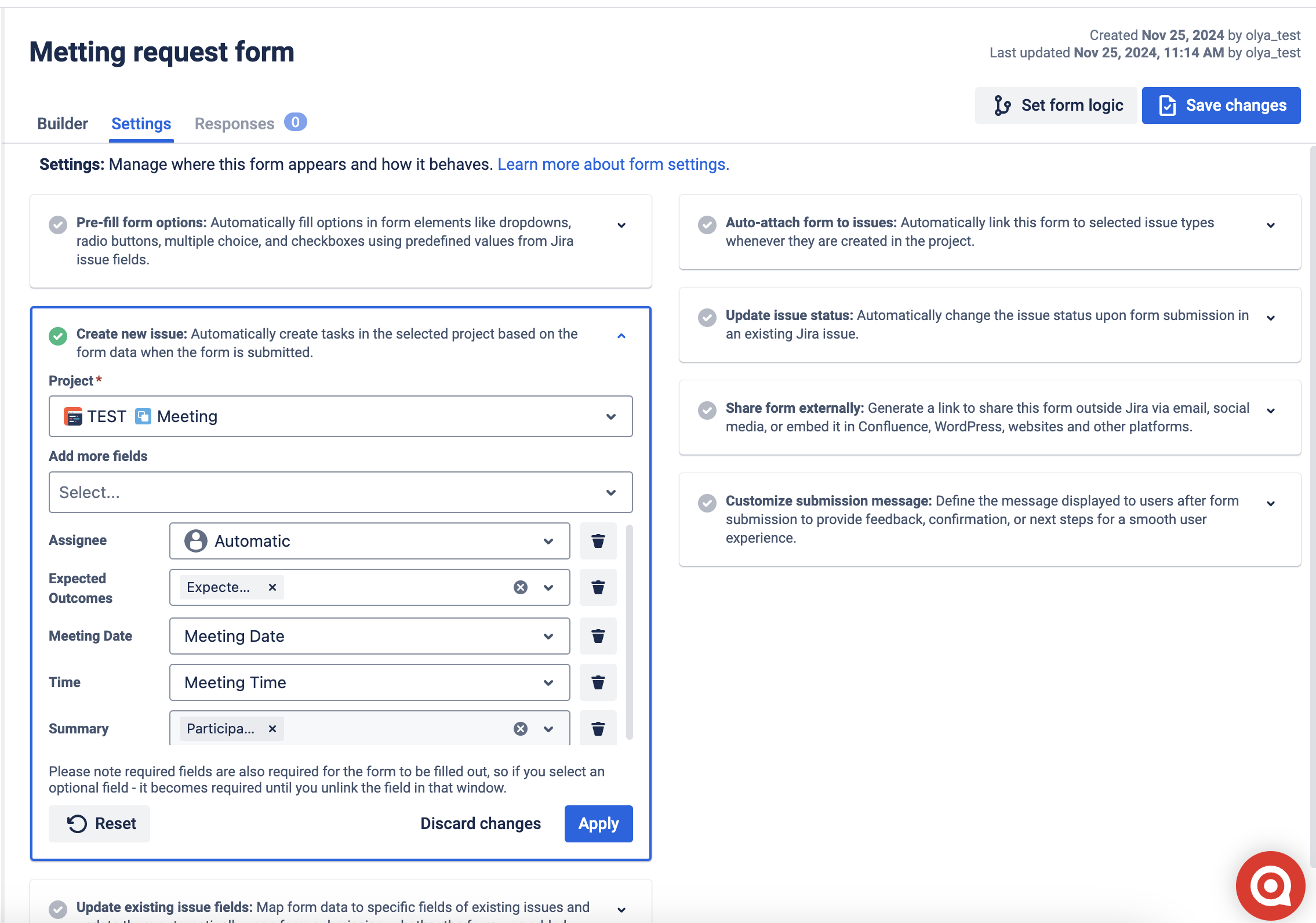
- Use the Create New Issue feature to automatically map form fields to Jira issue fields.
- Once set up, mapped fields will populate Jira issues without manual intervention, ensuring data consistency.
Form Sharing
- Share the form externally via a link or embed somewhere, also you can add it within Jira issues for seamless submissions.
2. Configure Jira and Confluence Integration
Set Up Project Fields
- Create custom fields in your Jira project to match the form inputs:
- Meeting Date: Date Picker
- Time: Text Field
- Participants: Multi-Select or Text
- Expected Outcomes: Paragraph Field
- and so on
Connect Jira to Confluence
- Link the Jira project to the appropriate Confluence space where meeting notes will be created.
Set Permissions
- Ensure the user or automation account has permission to create Confluence pages.
3. Automate Confluence Page Creation
Steps to Configure Jira Automation
Trigger: Issue Created
- Use the Issue Created trigger.
- Add a condition to filter issues by Request Type, such as "Meeting Request."
Action: Create Confluence Page
- Use the Send Web Request action in Jira Automation to create a Confluence page.
- API Endpoint:
<a href="https://your-domain.atlassian.net/wiki/rest/api/content" rel="noopener nofollow noreferrer" target="_blank">https://your-domain.atlassian.net/wiki/rest/api/content</a>
- Method: POST
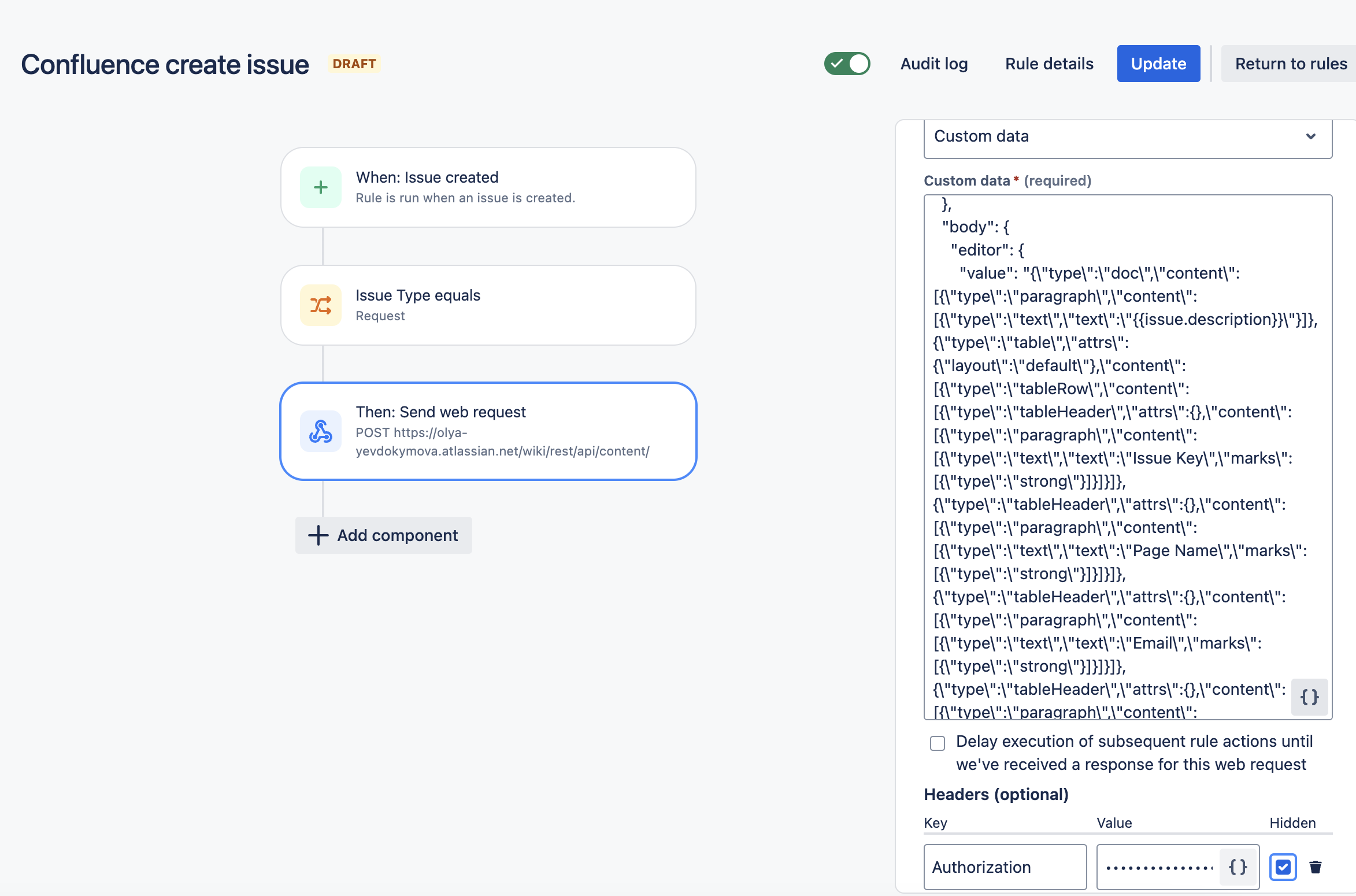
- Headers:
Content-Type: application/jsonAuthorization: Basic XXXXX
Request Body Example
{
  "type": "page",
  "title": "Meeting Notes {{issue.summary}}",
  "space": {
    "key": "Your_Key"
  },
  "body": {
    "editor": {
      "value": "{\\"type\\":\\"doc\\",\\"content\\":[{\\"type\\":\\"paragraph\\",\\"content\\":[{\\"type\\":\\"text\\",\\"text\\":\\"{{issue.description}}\\"}]},{\\"type\\":\\"table\\",\\"attrs\\":{\\"layout\\":\\"default\\"},\\"content\\":[{\\"type\\":\\"tableRow\\",\\"content\\":[{\\"type\\":\\"tableHeader\\",\\"attrs\\":{},\\"content\\":[{\\"type\\":\\"paragraph\\",\\"content\\":[{\\"type\\":\\"text\\",\\"text\\":\\"Issue Key\\",\\"marks\\":[{\\"type\\":\\"strong\\"}]}]}]},{\\"type\\":\\"tableHeader\\",\\"attrs\\":{},\\"content\\":[{\\"type\\":\\"paragraph\\",\\"content\\":[{\\"type\\":\\"text\\",\\"text\\":\\"Page Name\\",\\"marks\\":[{\\"type\\":\\"strong\\"}]}]}]},{\\"type\\":\\"tableHeader\\",\\"attrs\\":{},\\"content\\":[{\\"type\\":\\"paragraph\\",\\"content\\":[{\\"type\\":\\"text\\",\\"text\\":\\"Email\\",\\"marks\\":[{\\"type\\":\\"strong\\"}]}]}]},{\\"type\\":\\"tableHeader\\",\\"attrs\\":{},\\"content\\":[{\\"type\\":\\"paragraph\\",\\"content\\":[{\\"type\\":\\"text\\",\\"text\\":\\"Target Audience\\",\\"marks\\":[{\\"type\\":\\"strong\\"}]}]}]},{\\"type\\":\\"tableHeader\\",\\"attrs\\":{},\\"content\\":[{\\"type\\":\\"paragraph\\",\\"content\\":[{\\"type\\":\\"text\\",\\"text\\":\\"Request Type\\",\\"marks\\":[{\\"type\\":\\"strong\\"}]}]}]},{\\"type\\":\\"tableHeader\\",\\"attrs\\":{},\\"content\\":[{\\"type\\":\\"paragraph\\",\\"content\\":[{\\"type\\":\\"text\\",\\"text\\":\\"Deadline\\",\\"marks\\":[{\\"type\\":\\"strong\\"}]}]}]}]},{\\"type\\":\\"tableRow\\",\\"content\\":[{\\"type\\":\\"tableCell\\",\\"attrs\\":{},\\"content\\":[{\\"type\\":\\"paragraph\\",\\"content\\":[{\\"type\\":\\"text\\",\\"text\\":\\"{{issue.key}}\\"}]}]},{\\"type\\":\\"tableCell\\",\\"attrs\\":{},\\"content\\":[{\\"type\\":\\"paragraph\\",\\"content\\":[{\\"type\\":\\"text\\",\\"text\\":\\"{{issue.summary}}\\"}]}]},{\\"type\\":\\"tableCell\\",\\"attrs\\":{},\\"content\\":[{\\"type\\":\\"paragraph\\",\\"content\\":[{\\"type\\":\\"text\\",\\"text\\":\\"{{issue.Email}}\\"}]}]},{\\"type\\":\\"tableCell\\",\\"attrs\\":{},\\"content\\":[{\\"type\\":\\"paragraph\\",\\"content\\":[{\\"type\\":\\"text\\",\\"text\\":\\"{{issue.Target Audience}}\\"}]}]},{\\"type\\":\\"tableCell\\",\\"attrs\\":{},\\"content\\":[{\\"type\\":\\"paragraph\\",\\"content\\":[{\\"type\\":\\"text\\",\\"text\\":\\"{{issue.Request Type}}\\"}]}]},{\\"type\\":\\"tableCell\\",\\"attrs\\":{},\\"content\\":[{\\"type\\":\\"paragraph\\",\\"content\\":[{\\"type\\":\\"text\\",\\"text\\":\\"{{issue.Deadline}}\\"}]}]}]}]},{\\"type\\":\\"paragraph\\",\\"content\\":[{\\"type\\":\\"text\\",\\"text\\":\\"\\"}]}]}",
      "representation": "atlas_doc_format"
    }
  }
}
4. Link the Confluence Page to the Jira Issue
Benefits
- Effortless Preparation: Meeting request details are automatically mapped, saving valuable time.
- Collaboration Ready: Confluence pages become a centralized document for updates during meetings.
- Standardized Format: Predefined templates ensure every meeting note is consistent.
- Effortless Setup: Forms and automation are easy to configure.
- Streamlined Workflows: Create Jira issues and Confluence pages seamlessly.
- Collaboration Boost: Keep all meeting details accessible for your team.
Conclusion
With Smart Forms for Jira and Jira Automation, meeting notes are created automatically and structured perfectly in Confluence. Transform your team's workflow today—leave manual tasks behind and focus on collaboration and productivity.

