Detect and respond to incidents using Rovo
10 min
By the end of this lesson, you'll be able to:
- Group alerts using Rovo
- Use Rovo to populate your post-incident reviews
Streamline incident management with AI
The AI feature to group alerts automatically identifies patterns among incoming alerts, correlating and grouping them based on similarities. This allows responders to focus on high-priority alerts and proactively detect incidents, reducing 'alert fatigue' for on-call agents. Instead of handling each alert individually, they can view a summary of similar alerts within an alert group.
By cutting through the noise, AI helps surface the most critical alerts, enabling faster incident detection. It helps on-call teams effectively distinguish between disruptive, noisy alerts and those with a higher impact.
👉 For example: Imagine a situation where a company's network monitoring tools are generating numerous alerts due to a recurring network latency problem. Each alert might have different wording, such as "Network latency detected in region A," "Slow response time in region A," or "High latency affecting services in region A." Although these alerts are worded differently, they all point to the same underlying problem.
The group alerts feature combines alerts into one alert group. This group shows a persistent latency problem in region A, helping the team quickly find the root cause without going through many alerts. By focusing on this single alert, teams can prioritize their responses, simplify troubleshooting, and reduce the time needed to fix the problem. This approach decreases alert fatigue and improves overall efficiency.
Alert groups powered by Rovo
Use alert groups powered by Rovo to get an overview of similar alerts that are intelligently grouped together. This helps reduce noise, highlight patterns, and makes it easier to act on related alerts as a set.
To view alerts grouped by Rovo:
- Go to the Alerts list from either Your work or your team’s Operations.
- When Rovo detects similar patterns in your alerts, it automatically groups related alerts and assigns each group a unique Group ID.
- Select a group in the list to open its details, including a Rovo‑generated title, alert count, and a summary of what’s going on.
👇 Click the icons to explore how Rovo groups alerts and summarizes them with key information.

Create intelligent post-incident reviews (PIRs)
Prevent future incidents with intelligent PIRs
Post-incident reviews (PIRs) or postmortems are key parts of incident handling; they help teams learn from what happened and share tips to prevent or deal with similar problems later. However, putting these together can take time and be labor-intensive, so they often get deprioritized. This means the Operations teams might miss out on important lessons.
Rovo offers AI-generated incident summaries, saving time for the ops team while preserving critical insights. This AI-powered approach reduces the time on-call teams spend on PIRs. It minimizes information loss, leading to more incidents associated with PIRs and quicker resolutions for similar future incidents.
Post-Incident Reviews (PIRs) are only available for Jira Service Management Premium and Enterprise plans.
Generate a post-incident summary using AI
- Go to your service space.
- From the navigation on the left, select Incidents.
- Select the incident that has been resolved and for which you want to create a PIR.
- Select Add PIR. This will open the Create post incident review window.
- Select Suggest description.
👇 Here's how you can use Rovo to generate a summary of the incident to include in your PIR description.
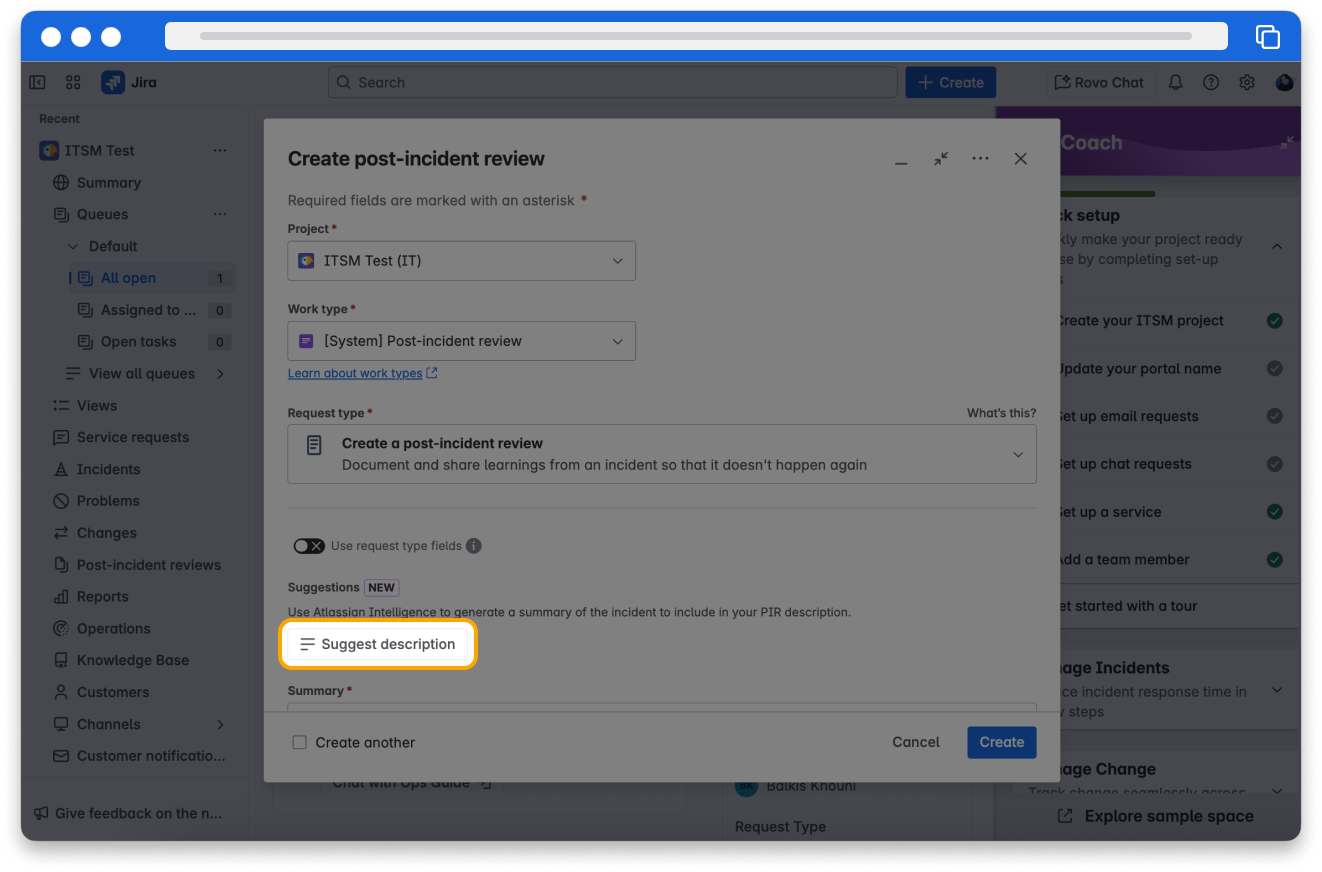
👇 Here's an example of the AI-generated description of the incident that you can add to the PIR description.
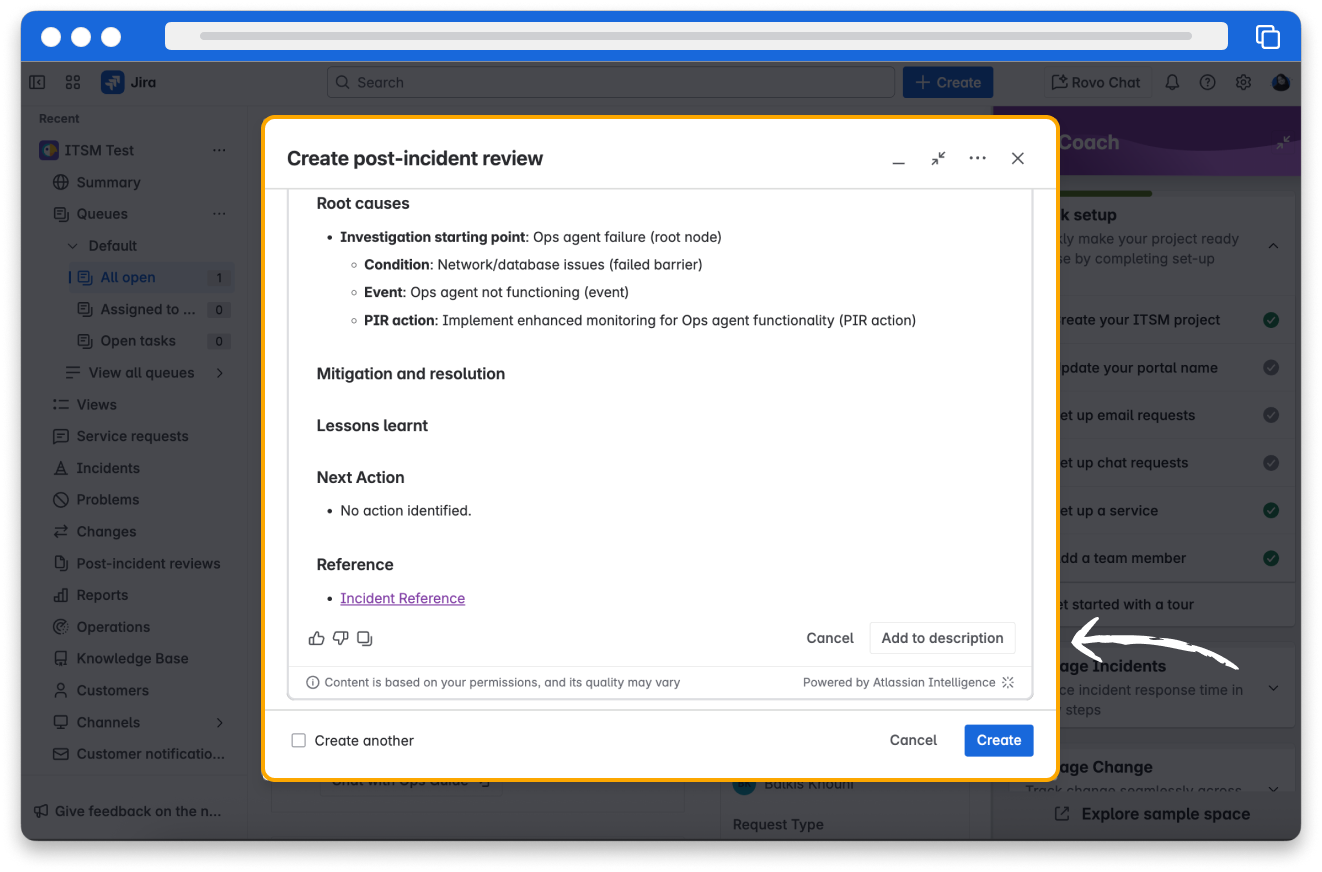
6. Review the AI-generated description and select Add to description. The content gets copied into the Description field. Make further edits as necessary.
7. Select Create.