Use the component catalog in Compass
10 min
Intermediate
By the end of this lesson, you will be able to:
- Identify the different types of dependencies of components within the Compass environment.
- Define the difference between a “depends on” and “depended on by” dependency.
- Access and interpret component activity.
- Describe the purpose and benefits of using Config-as-Code for managing Compass component data.
Utilize dependencies in Compass
You can have dependencies between your components.
👉 For example: the component you are creating relies on the functionality of a component previously created by another team. You can map those dependencies using component dependencies. Utilizing dependencies allows you to efficiently track both the components that depend on your own and those that your components rely on.
Benefits of tracking dependencies
Perhaps your team is preparing to implement a significant update to a service and its calculation process. Does that affect other services downstream? Do you even know of the other components that rely on your team's component?
What if it's the other way around? Another team is preparing to make a significant update to their component by modifying the data format it returns. Does that affect your component?
By tracking dependencies between your components, both upstream and downstream, you will always know what components rely on your component and what components your component relies on.
View dependencies
Dependencies are categorized based on their respective components.
To view dependencies in Compass:
- Select Components from the top navigation bar to view your list of components.
- Select a component.
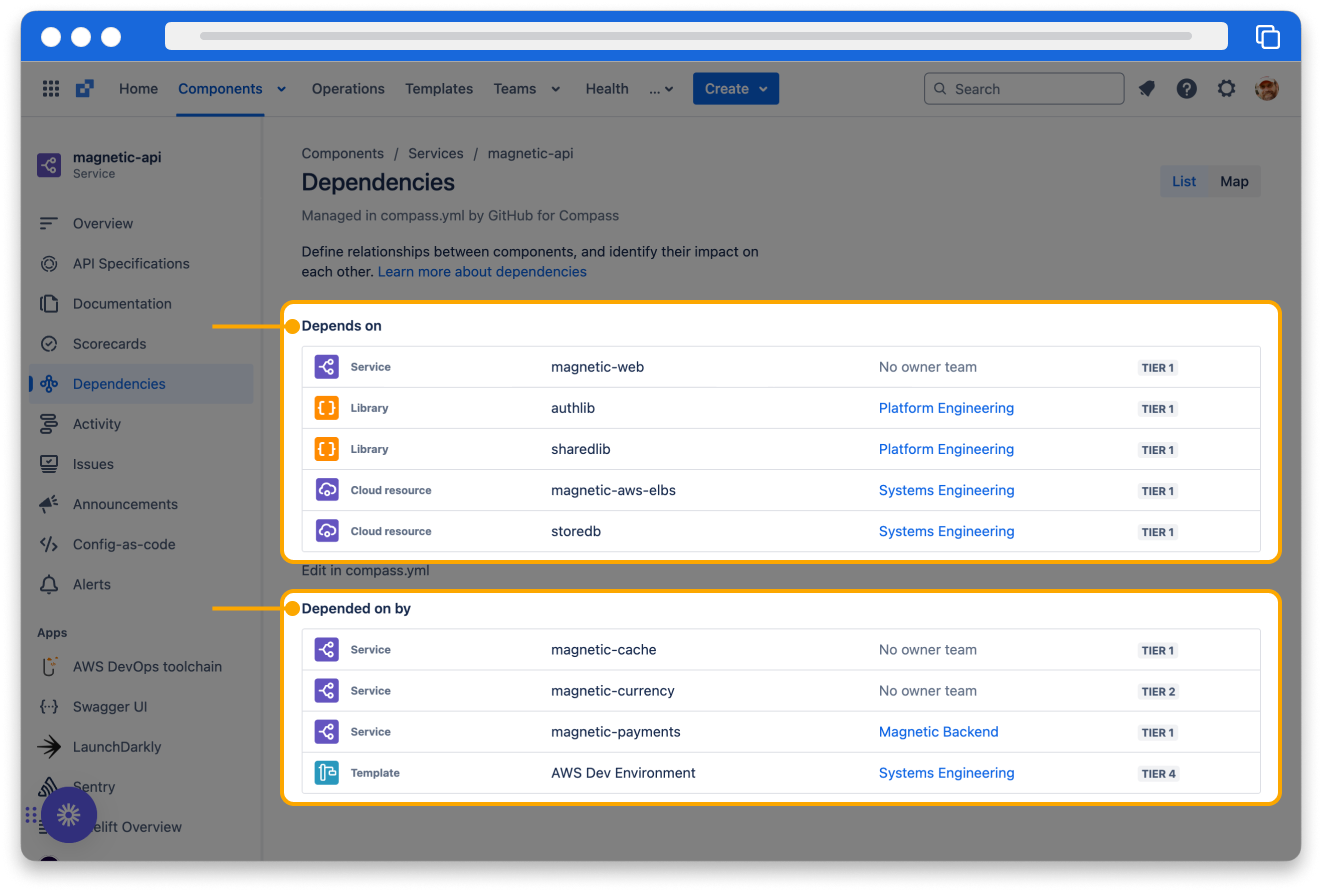
- From the sidebar, select Dependencies. This will reveal all the dependencies linked to the chosen component.
Dependency types
These are the two types of dependencies displayed for components.
- Depends on
- the selected component depends on the components in this list.
- Depended on by
- the components in this list depend on the selected component.
👇 Click the icons below to learn more about each dependency type.
Monitor component activity
To monitor the activity of a specific component:
- Ensure that your desired component is selected.
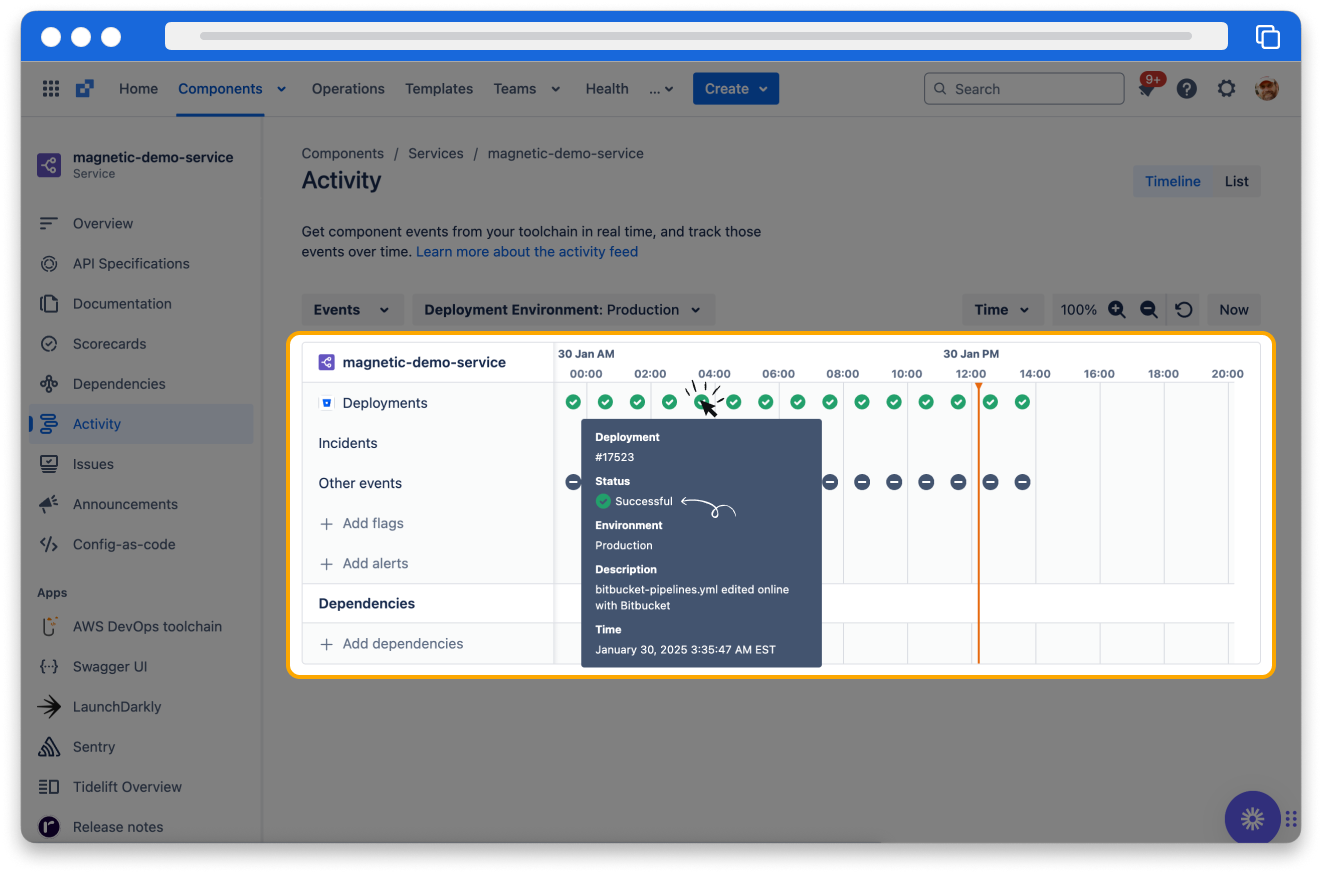
- Select Activity from the sidebar menu.
- In the activity table, hover over any event to reveal a description of the activity.
- You can customize the activity screen, which allows you to view the activity for a single selected component or all components that depend on it.
- Select either Timeline view or Map view. In the timeline view, you can also specify the desired time range.
You can filter the event types shown for the component(s). By default, all event types are displayed, which include:
- Alerts
- Deployments
- Feature flags
- Incidents
- Vulnerabilities
Each event is categorized by its status:
- In Progress
- The deployment has commenced and is currently ongoing. This status is dynamic and updates to reflect the latest progress.
- Successful
- The deployment was completed successfully.
- Canceled
- The deployment was halted by a user during its execution.
- Failed
- The deployment was completed but did not succeed.
- Unknown
- The state of the deployment event is not accessible for Compass to interpret.
You can view the activities for different deployment environments by selecting the desired environment from the Deployment Environment selection list.
👇 Component activity
Manage component using config-as-code
Config-as-code empowers you to efficiently manage Compass component data through a configuration file stored in a Git repository.
Benefits
- Single source of truth: With config as code, the source of truth for your Compass components is centralized in a configuration file within your code repository. Any updates to the compass.yaml file on your repository’s default branch automatically sync back to and are reflected in Compass.
- Create components using commit: You can also create new components by simply committing a compass.yaml to a git repository.
- Manage components without the Compass UI: Manage your component via YAML right next to your source code without needing to navigate to the Compass UI.
- Manage governance: Governance, via repository permissions and settings, over who can update component catalog information.
- Version control: Version control of your component metadata.
Setup config-as-code
To fully utilize config-as-code, your Compass admin must install one of the supported git repository apps (Bitbucket, GitHub, or GitLab) on your Compass site. Once you set up config as code for a component, the component becomes managed via the compass.yaml configuration file located in its related git repository. You can update a managed component by making changes to the compass.yaml file.
Please keep in mind that only one compass.yaml file is permitted per repository, which means you can manage only one component per repository.
How was this lesson?
next lesson
Create a component catalog in Compass
- Start creating a component catalog
- Add components to a Compass catalog
- View the component catalog view