Managing multiple projects in Jira can be daunting, especially when consistency and efficiency are critical. The Blueprint Creator for Jira Projects app solves this challenge by enabling seamless project creation, template replication, and workflow standardization. Let’s dive into how this app revolutionizes project management in Jira, explore its core features, and understand how to maximize its potential for your team’s success.
Why Blueprint Creator for Jira Is a Game-Changer ?
The Blueprint Creator for Jira Projects app provides a unique approach to project management by simplifying the replication of successful configurations. Here’s why it’s an indispensable tool for organizations:
Consistency Across Projects
The app ensures that every new project follows a pre-defined structure, maintaining uniformity in configurations like workflows, permissions, and issue types.
Time-Saving Efficiency
With its cloning capabilities, manual setup becomes a thing of the past. Teams can quickly replicate templates, allowing them to focus on delivering impactful work.
Error Reduction
Audit logs and detailed tracking empower teams to troubleshoot issues effortlessly, ensuring a smoother project setup experience.
How Blueprint Creator for Jira Enhances Project Management ?
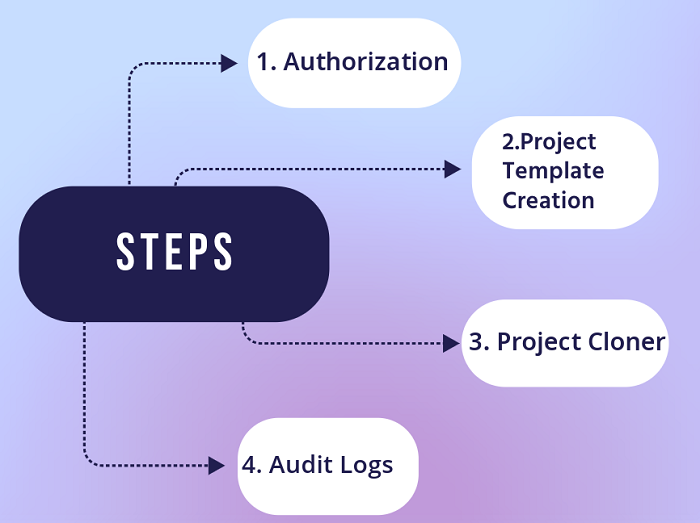
1. Template Creation for Reusability
Create detailed templates tailored to your organization’s workflows. Whether you’re managing software, business, or service desk projects, you can define configurations that ensure every project starts on the right foot.
2. Rapid Project Cloning
Quickly replicate existing templates to create new projects. With just a few clicks, you can transfer essential elements such as workflows, permissions, and issue details to the new project.
3. Comprehensive Replication
The app guarantees that every critical detail is carried over, including:
- Project Metadata: Project name, URL, category, and lead.
- Workflow Schemes: Seamless transition of workflow and screen schemes.
- Permission Configurations: Copy permissions, notification settings, and issue types.
- Attachments and Links: Ensure no detail is left behind, including subtasks, files, and URLs.
4. Transparent Audit Logs
Track the app's actions and troubleshoot any issues with detailed audit logs, which provide insights into the last 30 days of activity.
Best Practices for Using Blueprint Creator for Jira
To make the most of this app, follow these best practices:
1. Define Clear Templates
Ensure your templates are comprehensive and tailored to your workflow. Include essential configurations such as roles, permissions, and issue types.
2. Limit Manual Adjustments
Once a template is created, rely on it for consistency. Avoid manual changes that could disrupt standardization.
3. Use Audit Logs Proactively
Regularly check audit logs to monitor usage and identify any anomalies early on.
4. Group Similar Projects
For projects with minor differences, consider grouping them under one template. This approach reduces the need for numerous unique templates.
What You Can Achieve with Blueprint Creator for Jira
Streamlined Onboarding for New Projects
The app ensures new projects are set up efficiently with consistent configurations, reducing onboarding time for new team members.
Efficient Scaling
As your organization grows, the app makes it easy to scale project management by cloning successful templates.
Error-Free Configuration
Reduce the risk of misconfigured workflows, permissions, or settings with precise template replication.
Real-World Scenarios Where Blueprint Creator Shines
1. Maintaining Consistency Across Teams
Organizations with multiple teams often struggle to maintain uniformity. The app simplifies this by allowing standardized templates to be applied to all teams, ensuring consistency in workflows, permissions, and more.
2. Scaling Projects Across Departments
For organizations expanding their project scope, the app enables seamless replication of proven project structures to new departments, reducing the learning curve.
3. Simplifying Complex Configurations
Instead of manually configuring workflows or permissions for every project, use the app to replicate intricate setups, saving time and reducing errors.
Benefits of Blueprint Creator for Jira
1. Uniformity Across Projects
Eliminate inconsistencies by using predefined templates for all projects.
2. Faster Project Setup
Save hours of manual setup by replicating existing configurations.
3. Error Reduction
Audit logs ensure any issues are identified and resolved quickly.
4. Enhanced Collaboration
Standardized setups improve team alignment and reduce confusion.
Conclusion
The Blueprint Creator for Jira Projects app transforms the way teams manage projects in Jira. By leveraging its powerful features—such as template creation, project cloning, and detailed audit logs—you can enhance consistency, streamline workflows, and save valuable time. Whether you're onboarding new projects or scaling your operations, this app ensures that every project starts with a solid foundation.
The app is available on Atlassian marketplace:
https://marketplace.atlassian.com/apps/1233626/blueprint-creator-for-jira-projects?hosting=cloud&tab=overview


