Hello,
one month ago I had the terrible idea of cleaning up my GitHub access tokens, and haven't managed to get SourceTree back in a working state since then.
After logging in again, SourceTree keeps asking for my password every time I push something. Having 2FA enabled I can't use the account password, and need a token that is impossible to remember and shouldn't be stored anywhere.
I found tens of threads here with the same issue, none of the workarounds suggested worked. So I went ahead and cleaned some SourceTree config files, with the result that the issue wasn't solved and now SourceTree was unable to find my local SSH keys and was only giving me an option to generate new ones.
As last resort I *completely* cleaned up my setup and installed again, then successfully logged into GitHub via oAuth.
- removed app files
- removed config folder
- removed all entries in Keychain
- removed all oAuth/temp tokens related to SourceTree from GitHub
At this stage I don't get a password prompt anymore, but get a 403 error when I try to push via HTTP. SSH isn't an option since SourceTree is still unable to list my existing SSH keys.
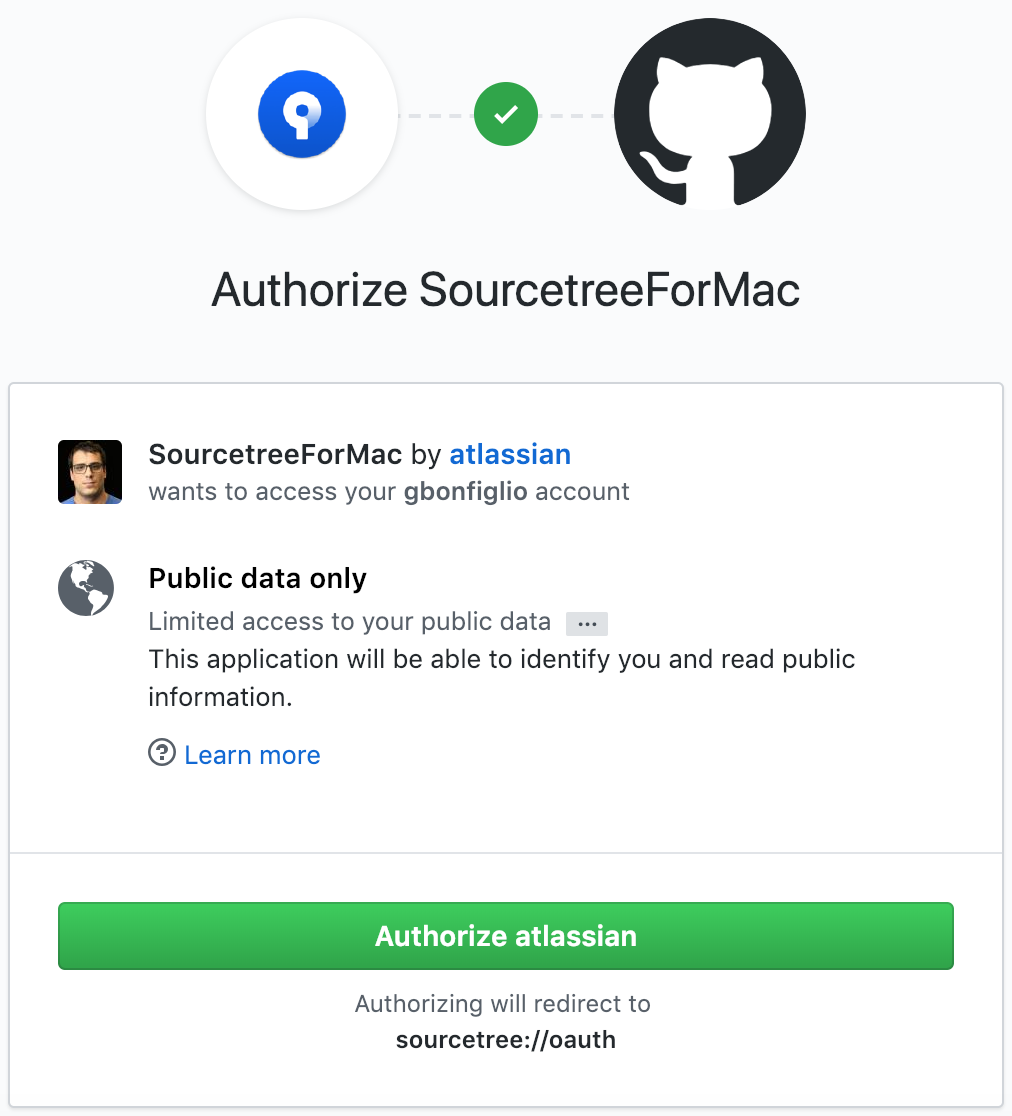
I spotted the below (see screenshot) during login (which is clearly some recent regression since my old token was probably ok) - why is SourceTree asking for readonly access to my GitHub account and then using it to push code?
In short, HTTP doesn't work for this reason, SSH doesn't work for another reason. Is someone looking into this? I'm surprised there are still so many topics on login issues, sounds like something hard to get right?
Giorgio

