Hello,
According to Bitbucket, my bitbucket-pipelines.yml file is invalid due to deployment environment 'test' being invalid. Screenshot below:
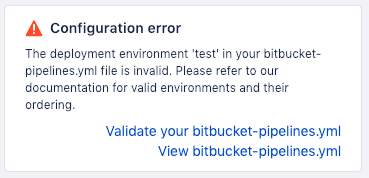
I checked the validator and it said that my code is valid, so I'm confused as to what I am doing wrong.
My .yml file is as follows:
definitions:
  steps:
    - step: &step-test
        name: "Test"
        image: golang:1.11-stretch
        deployment: test
        script:
          - export GOPATH="$HOME/go"
          - export PATH="$PATH:$GOPATH/bin"
          - go get -u golang.org/x/lint/golint
          - go mod vendor
          - golint -set_exit_status $(go list ./... | grep -v /vendor/)
          # Uncomment these test steps when there are test file available
          # - go test -short $(go list ./... | grep -v /vendor/)
          # - go test -race -short $(go list ./... | grep -v /vendor/)
        artifacts:
          - vendor/**
    - step: &step-build
        name: "Build"
        image: golang:1.11-stretch
        deployment: test
        script:
          - go build
    - step: &step-deploy
        # set GCLOUD_PROJECT environment variable to your project ID
        # set GCLOUD_API_KEYFILE environment variable to keyfile as described here (but we aren't base64-encoding the file): https://confluence.atlassian.com/x/dm2xNQ
        name: Deploy to GCloud
        deployment: production
        image: google/cloud-sdk:latest
        script:
          # Set up credentials
          - echo $GCLOUD_API_KEYFILE > ./gcloud-api-key.json
          - gcloud auth activate-service-account --key-file gcloud-api-key.json
          # Deploy app (and cron if it exists).
          - gcloud config set project $GCLOUD_PROJECT
          - gcloud --quiet --project $GCLOUD_PROJECT app deploy app.yaml
          - if [ -f cron.yaml ]; then gcloud --quiet --project $GCLOUD_PROJECT app deploy cron.yaml; fi

pipelines:
  default:
    - step: *step-test
    - step: *step-build
branches:
  master:
    - step: *step-test
    - step: *step-build
    - step: *step-deploy
Any help would be greatly appreciated, thank you!
EDIT: I found out that it is my "step-build" that is failing.
EDIT 2: I was able to have it run by combining both my step-test and step-build stages to one step. Are we not allowed to have multiple steps with the same deployment value?


